Have you ever clicked a button that did nothing, faced an app that suddenly crashed, or received the wrong result from a program? These issues are often caused by software bugs.
Even carefully built applications can contain bugs because software involves complex code, multiple systems, and constant updates.
According to the NIST Computer Security Resource Center, software flaws can create problems that affect how systems work and may also introduce security risks.
Today, you’ll learn why software bugs happen, what are the types of software bugs, how developers fix them, and the steps teams take to prevent them.
What is a Software Bug?
A software bug is a mistake or flaw in a program that makes it behave in a way you did not expect. Instead of doing the right thing, the software gives wrong results, acts strangely, or stops working altogether.
The ISTQB Glossary, a standard reference in software testing, describes a bug as a flaw that can stop a program from doing its required job.
Think of a calculator that shows 2 + 2 = 5. The buttons work, the screen lights up, but the answer is wrong.
That gap between what you expect and what actually happens is the bug. Bugs range from tiny visual glitches to serious faults that crash an app or expose data, which is why teams treat finding and fixing them as a core part of building reliable software.
Why Do Software Bugs Happen?
Bugs are a normal part of building software, and even careful, experienced teams create them. Most trace back to a handful of common sources that show up at different stages of the work.
- Coding: A small mistake in the code, such as a wrong symbol, a typo, or a missing rule, can quietly change how the whole program behaves.
- Design: A weak plan or unclear structure before coding starts often leads to flaws that are hard to fix later.
- Testing: Too few test cases, or testing on only a handful of devices, lets problems slip through to real users.
- Integration: Two systems that fail to talk to each other properly can break features that worked fine on their own.
- Changing requirements: Last-minute changes to what the software should do can introduce fresh gaps in already-finished code.
Most bugs trace back to one of these areas, so teams focus their attention, reviews, and testing effort there to catch problems early.
What are the Types of Software Bugs
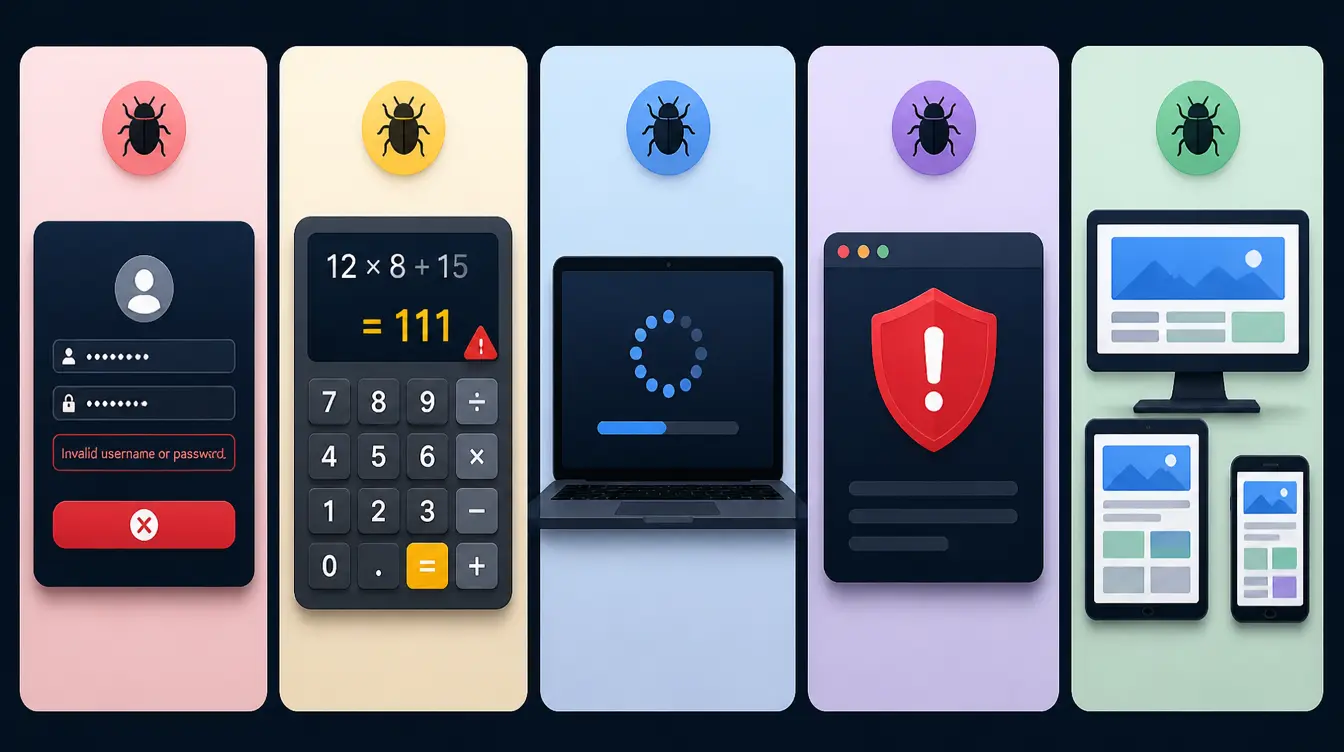
Software bugs can affect different areas of an application. Some impact features, while others affect performance, security, compatibility, or how easily users interact with the software.
1. Functional Bugs
A functional bug happens when a feature does not work the way it should. The button, form, or link is there, but it fails to do its job, even though everything looks fine on the surface.
A common example is a “Submit” button that does nothing when you click it; the click registers, but nothing happens on the backend, leaving users stuck without any clear reason why.
2. Logical Bugs
With a logical bug, the code runs fine, but the result is wrong. Nothing crashes, so these can be hard to spot, and they often slip past basic testing because the app appears to be working exactly as intended.
A shopping app that applies a 20% discount instead of 10% has a logical bug; the checkout completes smoothly, but the math behind it is off.
3. Performance Bugs
Performance bugs make software slow or unstable, even when everything technically “works.” Pages take too long to load, or the app freezes during heavy use, frustrating users who expect a smooth, responsive experience.
These bugs often show up only when many people use the app at once, which is why they can be tricky to catch during small-scale testing before launch.
4. Security Bugs
Security bugs create weak points that attackers can use. They may expose private data, allow unauthorized access, or let someone bypass protections that should keep an account or system safe.
Because they put users at risk, these bugs are treated as high priority, and teams often dedicate separate testing cycles just to catch them before software goes live.
5. Compatibility Bugs
A compatibility bug appears when software works on one setup but breaks on another. A website may look perfect on a laptop but fall apart on a phone, or fail in an older browser that doesn’t support certain features.
These bugs are especially common given how many devices, screen sizes, and operating systems software needs to run on today.
6. Usability Bugs
Usability bugs don’t break features, but they make the app confusing or frustrating to use.
Buttons in odd places, unclear labels, or hidden menus all fall into this group, and while the software technically works, people struggle to figure out how to use it the way it was intended.
Over time, these small frustrations add up and push users toward simpler alternatives.
Each bug type creates different challenges, affecting how software works, performs, and stays secure. Identifying the issue correctly helps teams choose the right approach for testing and fixing problems.
Bug vs Error vs Defect
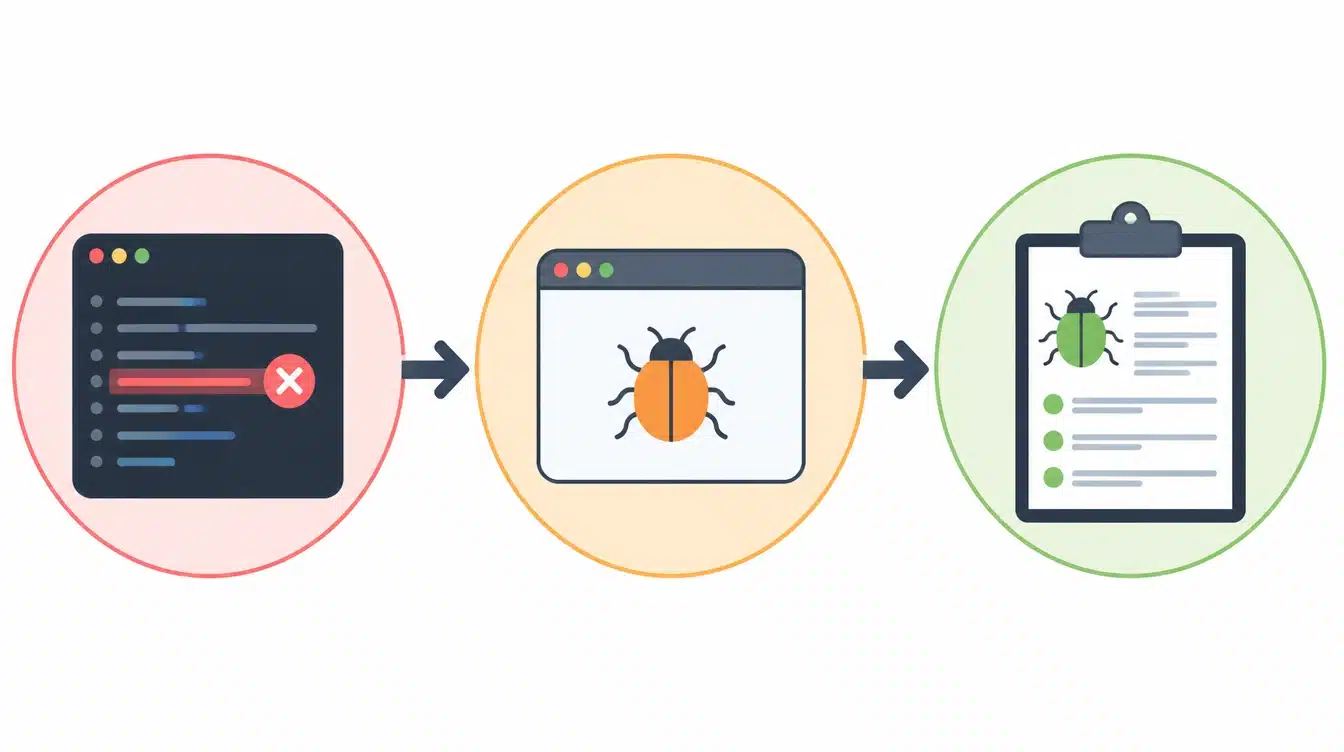
These three terms are often used interchangeably, but each one describes a different stage of a software issue as it moves from creation to identification. Knowing where one ends and the next begins makes conversations between developers, testers, and managers far clearer.
- Error: A human mistake made while writing or coding the software, such as a wrong formula, a typo, or a misread requirement. It is the root cause that starts the whole chain.
- Bug: A problem or flaw inside the software that this mistake creates, causing the program to behave in a way no one intended once it runs.
- Defect: A bug that has been formally identified and logged during the testing process, ready to be tracked, prioritized, and fixed.
Understanding these differences helps teams communicate clearly and follow an issue all the way from a small coding mistake to a confirmed problem found during testing.
Software Bug Severity Levels Explained
Not every bug has the same impact. Teams use severity and priority levels to understand how serious an issue is and how quickly it needs attention.
| Level | Impact | Meaning | Example |
|---|---|---|---|
| P1: Critical Issue | Very High | Stops important parts of the software from working and requires immediate attention. | A payment system failure prevents users from completing transactions. |
| P2: High Impact | High | Affects a major feature but does not completely stop the application. | A core feature becomes unavailable or does not work correctly. |
| P3: Lower Impact | Low | Affects smaller parts of the software and does not prevent normal usage. | Minor display issues or small visual errors. |
Understanding the difference between severity and priority also helps teams decide how to handle each bug.
Severity measures the impact of an issue, while priority determines how quickly it should be fixed. A bug’s severity and priority may differ based on its effect on users and business needs.
How Software Bugs are Fixed
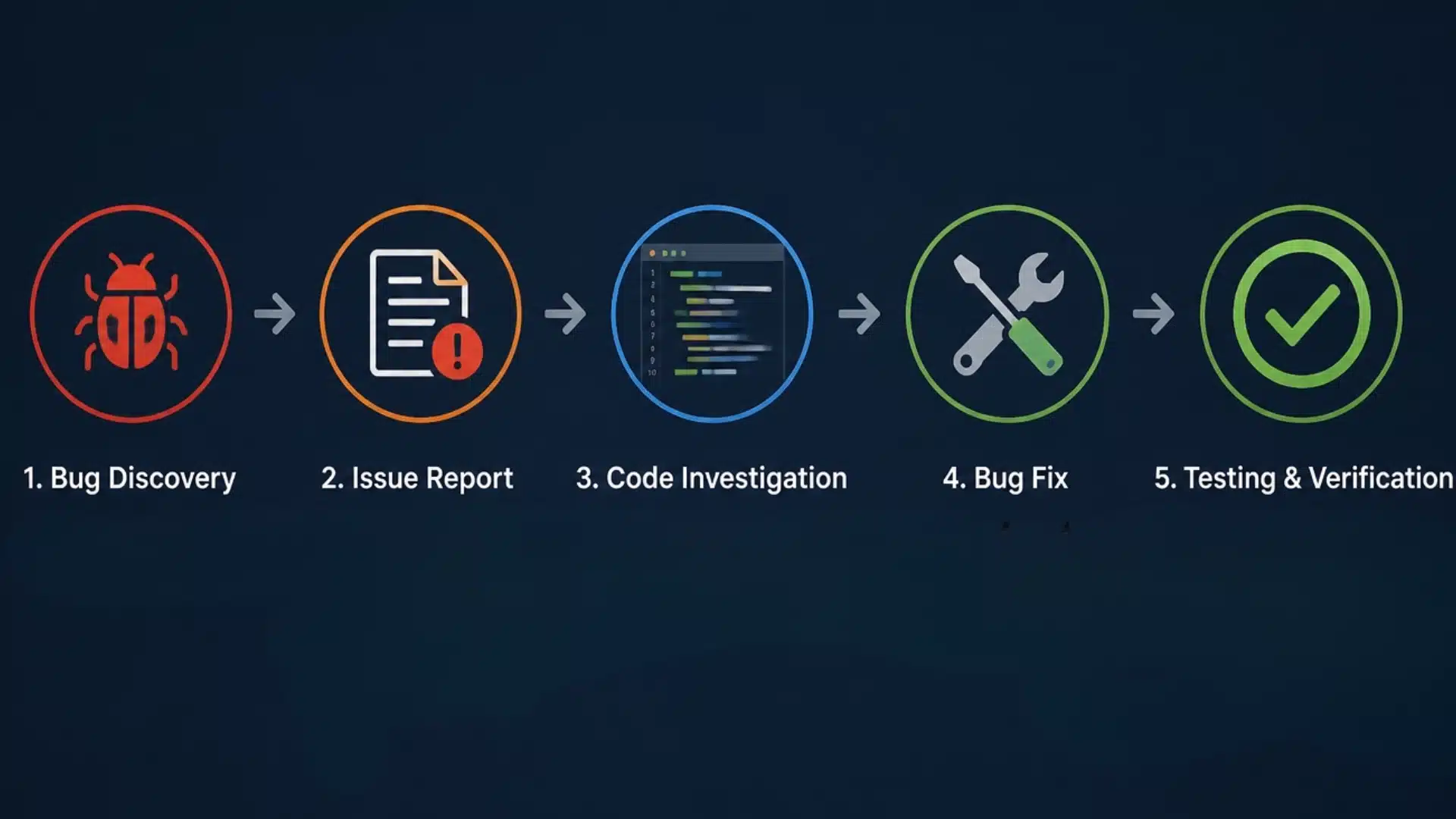
Finding and fixing software bugs follows a structured process where teams identify issues, analyze their causes, test solutions, and apply fixes to improve software performance and reliability. For the everyday software glitches behind many of these bugs, this rundown of common computer issues and fixes walks through app crashes, error messages, and driver problems in more detail.
1. Testing
Testing is the first step in finding software bugs. Testers examine the application to identify unexpected behavior, broken features, or performance problems.
This can be done manually by checking the software like a user or through automated tests that run repeated checks using scripts. Both methods help teams catch issues before they affect users.
2. Bug Reporting
After finding a bug, testers create a detailed report that explains the issue clearly for developers.
A useful bug report includes information such as the steps to reproduce the problem, the expected outcome, the actual result, and details about the environment where the issue occurred.
Clear reports help developers understand and fix problems faster.
3. Debugging and Fixing
During debugging, developers investigate the reported issue to find the source of the problem within the code.
After identifying the cause, they make changes to fix the bug and run tests again to confirm the solution works. Retesting also checks that the fix has not affected other parts of the software.
How Developers Prevent Software Bugs
Preventing software bugs requires careful practices throughout development. Teams use different methods to catch problems early, improve code quality, and reduce issues before software reaches users.
- Reviews: Team members check each other’s code.
- Automation: Automated tests catch problems early.
- Updates: Regular updates fix known issues.
- Documentation: Clear notes reduce confusion.
- Security: Extra testing protects user data.
No process can prevent every bug, but these practices help teams build more reliable software. Regular checks, testing, and clear communication make problems easier to manage.
Common Software Bug Examples
Software bugs can appear in the apps people use every day, affecting basic tasks and user experiences. These examples show how small errors can interrupt important functions across different types of applications.
- Banking App: Shows an incorrect account balance after a transaction or fails to update recent activity properly.
- Shopping App: Checkout does not complete, preventing users from placing an order.
- Video App: Playback stops, buffers repeatedly, or fails to load videos correctly.
- Game: Characters may glitch, move incorrectly, or behave unexpectedly during gameplay.
When one of these bugs makes an app quit without warning, the same steps people use to stop apps from crashing often lead straight to the fault behind it, from a corrupted install to a conflict with another program.
These examples show how bugs can affect different parts of an application, from essential features to user interactions. Identifying these problems helps developers test, fix, and improve software before they impact more users.
Final Thoughts
Software bugs are a normal part of building and using technology. As you’ve seen, they come in many forms, from functional and logical bugs to performance, security, and compatibility issues.
Now that you know what are the types of software bugs, you can see how each one affects an application differently and carries its own level of severity.
Knowing these types helps you spot problems faster and understand what developers deal with behind the scenes.
Testing, reviews, and good habits keep most bugs in check. If you found this helpful, share it with someone who’s learning about software, and keep looking at how the apps you use every day really work.
Drop a comment below and let me know if this helped you.
Frequently Asked Questions
Why Do Software Bugs Happen?
Bugs usually come from human mistakes in code, unclear design, missing test cases, or separate systems that fail to work together correctly.
What is the Most Common Type of Software Bug?
Functional bugs are among the most common. They happen when a feature does not work as expected, like a button that fails to respond when you click it.
How Do Developers Find Software Bugs?
Developers and testers find bugs through methods like code reviews, manual testing, automated tests, user feedback, and monitoring software performance after release.
Can Software Bugs Be Completely Removed?
Not entirely. Even well-tested software can contain hidden bugs. Good testing and reviews reduce them a lot, but no complex program is ever truly perfect.
Why Do Software Bugs Happen?
Bugs usually come from human mistakes in code, unclear design, missing test cases, or separate systems that fail to work together correctly.