Picking the right note-taking app for your iPad usually comes down to one frustrating afternoon of downloading five apps and deleting four. I have done that too many times, testing handwriting response, search accuracy, and sync reliability across an iPad Air and an iPad Pro.
The best iPad note-taking apps are not the ones with the longest feature list; they are the ones that match how you write, organize, and revisit information.
Some readers want a paper-like handwriting feel, others want lecture audio synced to their notes, and a few just want something free that works. This breakdown compares eleven apps, including what real iPad users on Reddit say works and what does not.
Quick Look at the Best iPad Note-Taking Apps
Before comparing individual apps, it helps to see how the most popular options differ. Each app has a different strength, and the right choice depends on how you plan to write, organize, and review your notes, much like sorting through everyday productivity tools before settling on one.
|
App |
Best For |
Main Strength |
Pricing Style |
|---|---|---|---|
|
Goodnotes |
Handwritten notes |
Paper-like writing experience |
Free version with paid features |
|
Notability |
Students and lectures |
Audio synced with notes |
Free version with paid features |
|
Apple Notes |
Everyday users |
Simple built-in note system |
Completely free |
|
Microsoft OneNote |
Cross-platform users |
Organization and collaboration |
Free |
|
Noteful |
Budget users |
Layers and templates |
One-time purchase |
The strongest note-taking app is not always the one with the longest feature list. Your writing habits, device setup, and daily needs matter more than popularity alone.
How These Apps Were Tested
For this comparison, I used an 11-inch iPad Pro (M4) and an iPad Air (M2), switching between an Apple Pencil Pro and the older USB-C Apple Pencil, since not every app behaves the same way with each stylus, much like how handy iPad accessories can vary just as much from one setup to the next.
I tested it through normal daily use for several weeks: handwritten meeting notes, marked-up PDFs, a few recorded lectures, and quick sketches.
I paid attention to four things that spec sheets rarely capture: how the pen line looks when writing fast, how accurate handwritten search is, how painless exporting a finished notebook is, and whether syncing ever silently failed.
When an app’s pricing or feature set has changed recently, I checked the official pricing page directly rather than relying on older reviews, since these apps often update pricing tiers.
Best iPad Note-Taking Apps
These apps stand out because they solve different note-taking needs. Some focus on handwriting, while others excel at organization, collaboration, or simple everyday notes.
1. GoodNotes
If you want your iPad to feel like an actual paper notebook, GoodNotes is usually the first app people recommend, and in testing it is easy to see why: the pen line kept up even when I wrote quickly, with almost no visible lag.
GoodNotes combines that writing feel with a strong PDF annotation system and a notebook structure that stays organized even with hundreds of pages. It’s the kind of decision that often comes right after picking your tablet in the first place.
- Features: Paper-like handwriting experience, Apple Pencil support, searchable handwritten notes, customizable templates, PDF annotation, notebook organization
- Best for: Students, planners, professionals, and users who want a complete digital notebook replacement
2. Notability
Notability is designed for users who need more than simple written notes. Its combination of handwriting and audio recording makes it especially useful for lectures, meetings, and presentations. Users can review written information alongside recorded discussions, helping them remember important details.
The app works well for study-focused workflows but may feel unnecessary for users who only need basic notes.
- Features: Audio recording, synced handwritten notes, Apple Pencil support, PDF annotation, typed and handwritten notes, study-focused organization
- Best for: College students, teachers, meeting notes, and users who need to review recorded information
3. Apple Notes
Apple Notes asks nothing of you beyond opening it: no download, no account setup, no subscription decision. It is built for quick writing, checklists, document scanning, sketches, and everyday organization, and it syncs reliably through iCloud across every Apple device.
It is also the app I reach for when I just need to jot something down before a train of thought disappears, since there is no app-switching delay.
- Features: Free access, iCloud syncing, handwritten notes, document scanning, checklists, Quick Notes, text formatting
- Best for: Everyday users, Apple ecosystem users, and people who need simple note-taking without extra costs
4. Microsoft OneNote
Microsoft OneNote is a flexible note-taking app built for users who need their information available across different devices. It combines typed notes, handwriting, images, and documents within a customizable workspace.
The app is especially useful for professionals and students who move between iPads, Windows computers, and other platforms while keeping notes organized.
- Features: Cross-device syncing, collaboration tools, handwritten notes, text formatting, flexible page layouts, Microsoft integration
- Best for: Professionals, teams, students, and users who need access across multiple devices
5. Noteful
Noteful is built around one idea: writing should not require a subscription. It skips the recurring fee model most competitors use and instead charges once, while still offering layers, templates, and a writing feel that holds up well against pricier apps.
Some longtime GoodNotes users describe switching to Noteful specifically because they wanted an app focused on writing rather than an expanding feature list.
- Features: Layer support, Apple Pencil compatibility, templates, handwriting tools, PDF annotation, affordable pricing
- Best for: Students, budget-conscious users, and people who want advanced features without high costs
6. Nebo
Nebo changes handwritten notes into editable digital text while maintaining a natural writing experience. It is useful for users who prefer writing with Apple Pencil but need searchable and organized content afterward.
The app is particularly helpful for students, professionals, and anyone who regularly converts handwritten ideas into polished digital documents.
- Features: Handwriting-to-text conversion, Apple Pencil support, editable notes, document creation, mathematical expression recognition
- Best for: Students, professionals, researchers, and users who want to convert handwritten notes into text
7. Freeform
Apple Freeform provides a flexible workspace for users who organize ideas visually rather than through traditional pages. The infinite canvas allows users to combine drawings, text, images, links, and notes in one place.
It works well for brainstorming, planning, and creative projects, though users who want structured notebooks may prefer dedicated note-taking apps.
- Features: Infinite canvas, drawing tools, image support, sticky notes, collaboration, Apple Pencil support
- Best for: Designers, creative users, brainstormers, and people who organize ideas visually
8. Noteshelf
Noteshelf recreates the traditional notebook experience with customizable pages, handwriting tools, and journal-style layouts. It appeals to users who enjoy creative note organization and a more personal writing environment.
The app provides useful tools for planning, journaling, and handwritten notes while maintaining a familiar notebook appearance.
- Features: Digital notebooks, handwriting tools, templates, audio notes, PDF annotation, planner layouts
- Best for: Journal users, planners, students, and people who enjoy notebook-style organization
9. CollaNote
CollaNote is a free note-taking option that provides handwriting, drawing, and collaboration tools for users who want more features without paying upfront. It is popular among students and casual users who need creative note options.
While it offers many useful tools, advanced users may find dedicated premium apps better suited to complex workflows.
- Features: Handwriting tools, drawing options, templates, collaboration features, PDF support, free access
- Best for: Students, casual users, and people looking for a free handwriting-focused app
10. MarginNote
MarginNote is designed for users who work with large amounts of reading material and research documents. It combines PDF reading, highlighting, annotations, and information organization in one workspace.
The app helps students and researchers connect ideas from multiple sources, though its advanced features may take time to learn.
- Features: PDF annotation, highlighting, mind maps, study organization, document linking, research tools
- Best for: Researchers, academic users, students, and people managing large amounts of information
11. Concepts
Concepts is created for users who prefer visual organization, sketching, and flexible idea development. Its infinite canvas allows users to create diagrams, drawings, and notes without page restrictions.
The app is more focused on creative workflows than traditional writing, making it suitable for users who think through visuals and designs.
- Features: Infinite canvas, precision drawing tools, diagrams, sketching features, Apple Pencil support, flexible layouts
- Best for: Designers, artists, architects, and users who prefer visual note-taking
Key Features to Compare Before You Buy
Across the best iPad note-taking apps, a handful of features actually decide whether you will still be using the app in six months, more than any marketing page will tell you.
- Handwriting engine: how natural the pen feels at normal writing speed, not just in a slow demo video.
- Apple Pencil compatibility: Apple Pencil Pro only works with the iPad Pro (M4 or M5), iPad Air (M2 or M3), and iPad mini (A17 Pro), running iPadOS 17.5 or later. Older iPads still work fine with the standard Apple Pencil or the USB-C Apple Pencil, just without features like squeeze and barrel roll.
- Handwritten search: whether the app can actually find a note you wrote by hand months ago.
- Export options: PDF export is close to universal, but exporting to an editable format like Word or plain text is not, which matters if notes need to leave the app.
- Sync reliability: how consistently notes appear across iPhone, iPad, and Mac without manual refreshing.
- Pricing model: most major apps have shifted toward free-with-subscription, so check whether a one-time purchase option like Noteful’s still exists if you want to avoid recurring costs.
Free vs Paid iPad Note-Taking Apps
Many users hesitate between free and paid note-taking apps because the basic features often look similar. The main differences usually appear in handwriting tools, organization options, advanced editing, and specialized workflows.
|
Type |
Examples |
Best For |
|---|---|---|
|
Free apps |
Apple Notes, OneNote, CollaNote |
Everyday notes and basic organization |
|
Paid apps |
GoodNotes, Notability, Noteshelf |
Advanced handwriting and professional workflows |
|
One-time purchase apps |
Noteful |
Users avoiding subscriptions |
Free apps are enough for users who mainly write reminders, lists, and simple notes. Paid apps become more valuable for people who use their iPad as a complete notebook replacement, manage large documents, or rely heavily on Apple Pencil features.
Which iPad Note App Fits Your Use Case
If the list above still feels like too many options, matching your situation to an app usually settles it faster than comparing feature lists:
- Heavy PDF annotation or reading: GoodNotes or MarginNote
- Recording and reviewing lectures or meetings: Notability
- Already living inside Microsoft 365: OneNote
- Want free and already installed: Apple Notes
- Want to avoid subscriptions entirely: Noteful
- Converting handwriting into typed text: Nebo
- Visual brainstorming, sketching, or mind maps: Freeform or Concepts
What Reddit Users Commonly Prefer in iPad Note Apps
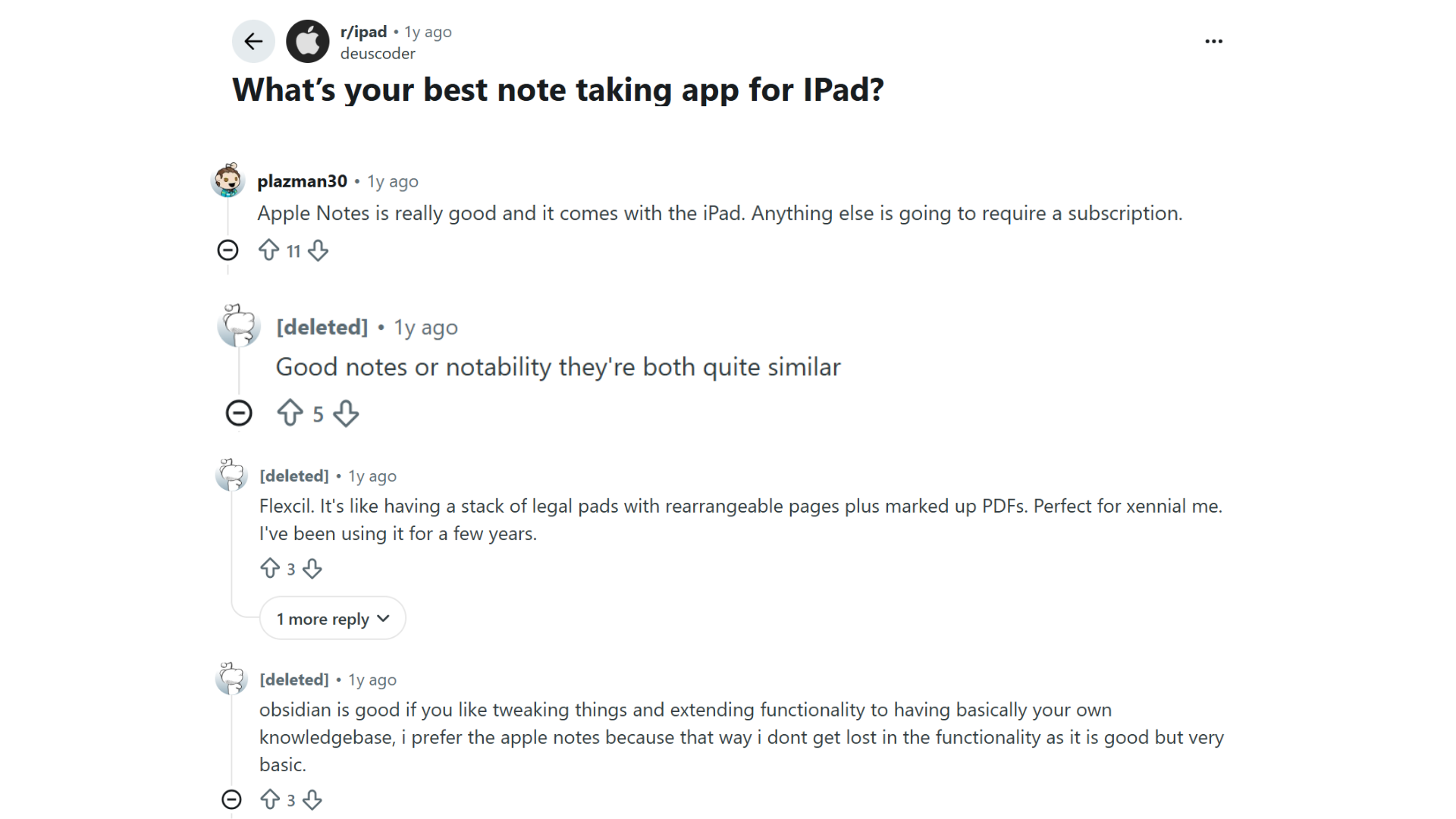
Reddit users often compare note-taking apps based on simplicity, features, and long-term usability.
In discussions on r/ipad and related communities, GoodNotes and Notability are the two names that come up most consistently, often described as close enough in quality that the choice comes down to personal preference rather than one being clearly better.
Apple Notes gets frequent mentions from users who simply do not want another subscription.
Obsidian shows up repeatedly too, though usually from people who want a personal knowledge base rather than a handwriting app, since it stores everything in plain Markdown files they control.
The takeaway is that the best choice depends on whether you want a simple built-in app or a more customizable note management system.
Common Mistakes When Choosing an iPad Note-Taking App
A note-taking app can have excellent features but still feel unsuitable if it does not match your habits. Many users switch apps because they choose based on popularity instead of their actual needs.
- Choosing an app only because it is popular
- Ignoring storage and backup options
- Paying before testing the workflow
- Forgetting device compatibility
- Assuming every Apple Pencil model works the same way with every app
- Overlooking subscription costs
- Selecting advanced tools they will never use
A simple app that fits your routine can often be more useful than a feature-heavy option that feels complicated.
Conclusion
After weeks of switching between all eleven apps on the same iPad, the differences come down to habits more than hype.
GoodNotes and Notability remain the most polished choices for handwriting and lecture notes, Apple Notes and OneNote cover free and cross-device needs well, and apps like Nebo and Concepts serve very specific workflows most people never think to look for.
None of the best iPad note-taking apps here is objectively wrong; they simply solve different problems, which is also why Reddit threads on this topic rarely agree on one winner.
Match the app to how you already work instead of chasing every new feature. Tried one of these yourself? Drop your experience in the comments.
Frequently Asked Questions
Do I Need Apple Pencil Pro to Use These Apps Well?
No. Most of these apps work fine with any Apple Pencil model, or even a finger, but Apple Pencil Pro adds extras like barrel roll shading and squeeze gestures, and only on the iPad Pro (M4 or M5), iPad Air (M2 or M3), and iPad mini (A17 Pro).
Can iPad Note-Taking Apps Work without Apple Pencil?
Yes, most iPad note apps support typing and finger input. Apple Pencil still provides a better experience for handwriting, drawing, and detailed annotations.
Which iPad Note-Taking App Is Best for Recording and Reviewing Lectures?
Notability is the strongest option here because it links audio recordings directly to the notes taken at the same time, so tapping a line jumps straight to that point in the recording.
Which iPad Note App Uses the Least Storage?
Storage use depends on the number of pages, images, recordings, and PDFs saved. Simple text-based apps usually use less space than apps that store large handwritten documents.
What Do Reddit Users Recommend Most Often for iPad Note-Taking?
GoodNotes and Notability dominate most Reddit recommendations for handwriting on iPad, with Apple Notes often mentioned as the free, no-subscription option, and Obsidian mentioned by users who want a customizable, long-term knowledge base instead of a handwriting-first app.