Many Android users still assume FaceTime is completely off-limits unless they own an iPhone. That assumption is outdated. Learning how to FaceTime on Android now comes down to one thing: a link shared by someone on an iPhone or Mac, opened in the right browser.
When I first tested this on a Galaxy phone, the whole process took less than a minute from tapping the link to seeing a face on screen.
Here is exactly how that link works, what Android can and cannot do once inside the call, why the connection sometimes stalls, and which apps make more sense when Android needs to start the call instead of just joining one.
Can You FaceTime on an Android Phone?
Yes. Android users can join real FaceTime calls through a web browser after receiving a link from someone using a supported Apple device.
According to Apple’s FaceTime support page for Android and Windows, FaceTime on the web requires an Android or Windows device, a strong Wi-Fi or cellular connection, and the latest Google Chrome or Microsoft Edge. Browser participants don’t need an Apple Account login.
Apple’s supported Android route is the browser link, not an Android FaceTime app. The same method applies to Samsung Galaxy phones that meet the browser requirements.
Don’t confuse apps from other vendors that claim to provide FaceTime access with Apple’s supported browser method. This cross-platform option means the iPhone versus Android debate doesn’t have to get in the way of a simple video call. Once the link opens, the remaining process takes only a few taps.
How to FaceTime on Android Step by Step
The Apple user handles the invitation, then the Android user completes the join request. Keeping those roles separate makes the process much easier to follow.
1. Ask the Apple User to Create a FaceTime Link
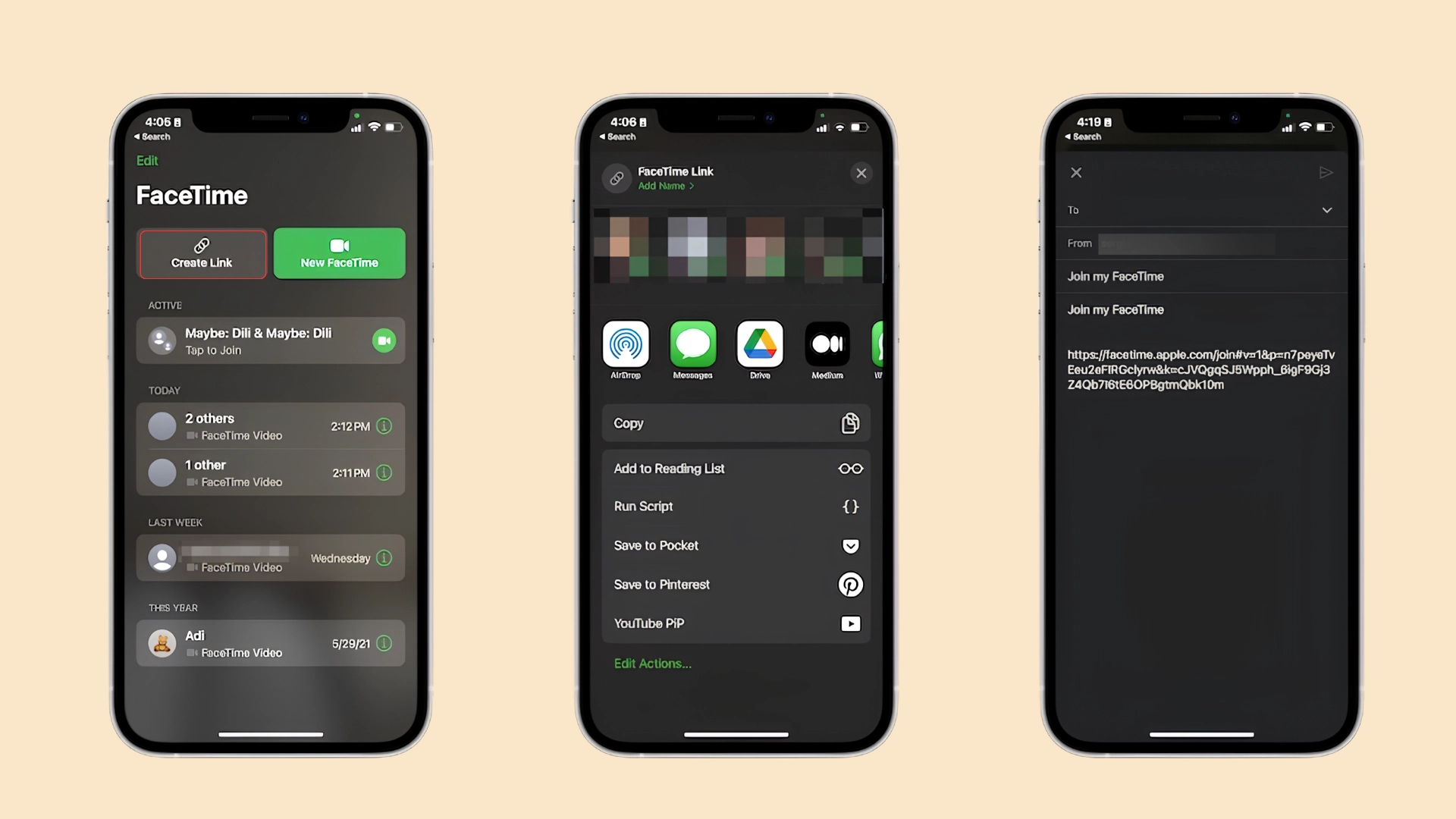
On an iPhone, open FaceTime, tap New Call, then choose Create Link. Apple’s instructions for creating a FaceTime link on iPhone confirm that you can share the link through options such as Messages or Mail.
People without Apple devices can then open the invitation in a supported browser without signing in.
2. Open the FaceTime Link on Android
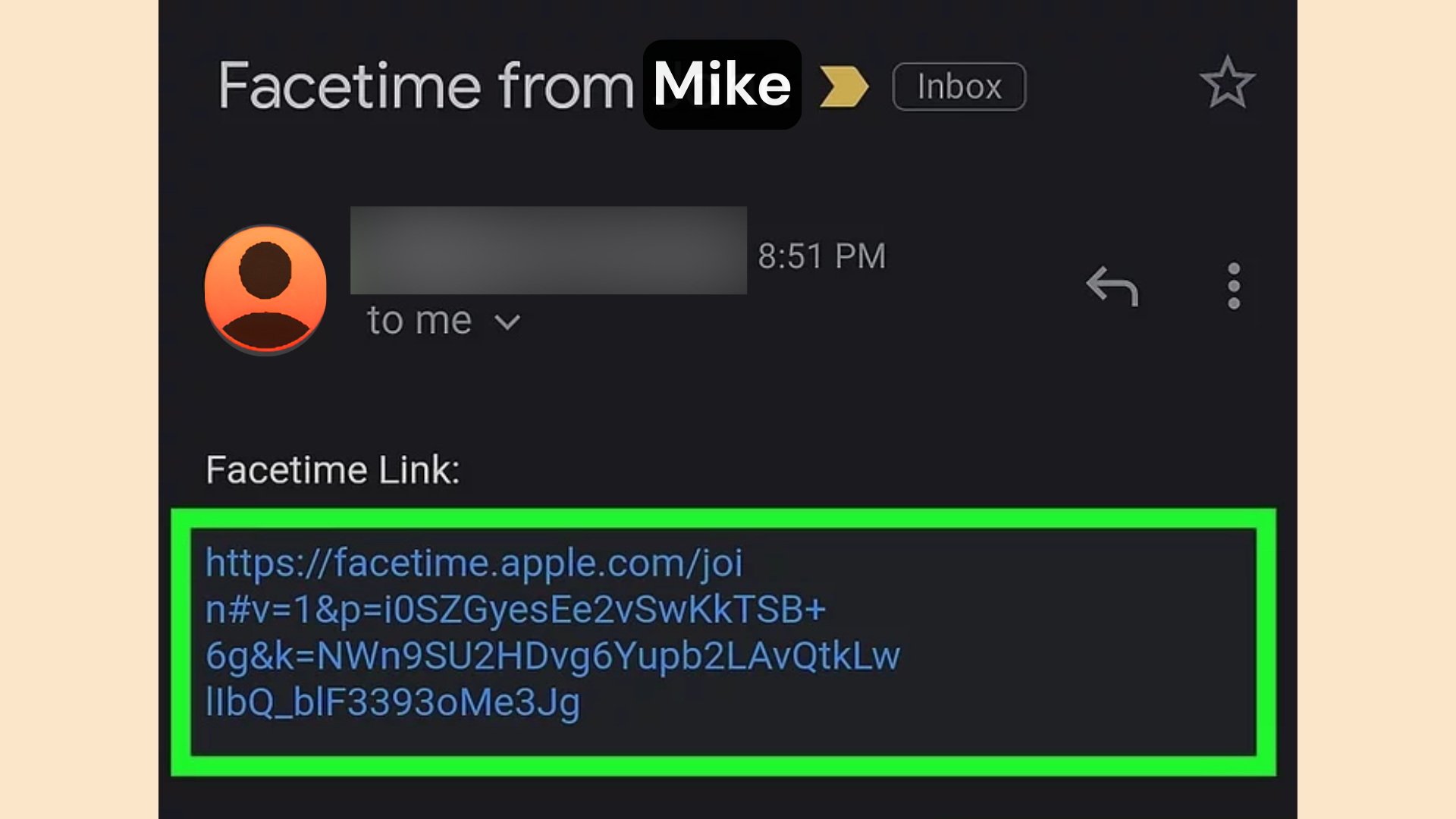
Tap the received link and open it in the latest version of Google Chrome or Microsoft Edge. Apple recommends a strong Wi-Fi or cellular internet connection for FaceTime on the web. A stable connection makes a real difference here, and a few smoother video call tips can help before the call even begins.
If another browser opens automatically and the page does not load correctly, copy the link into Chrome or Edge before changing broader phone settings.
3. Enter a Name and Allow Call Permissions
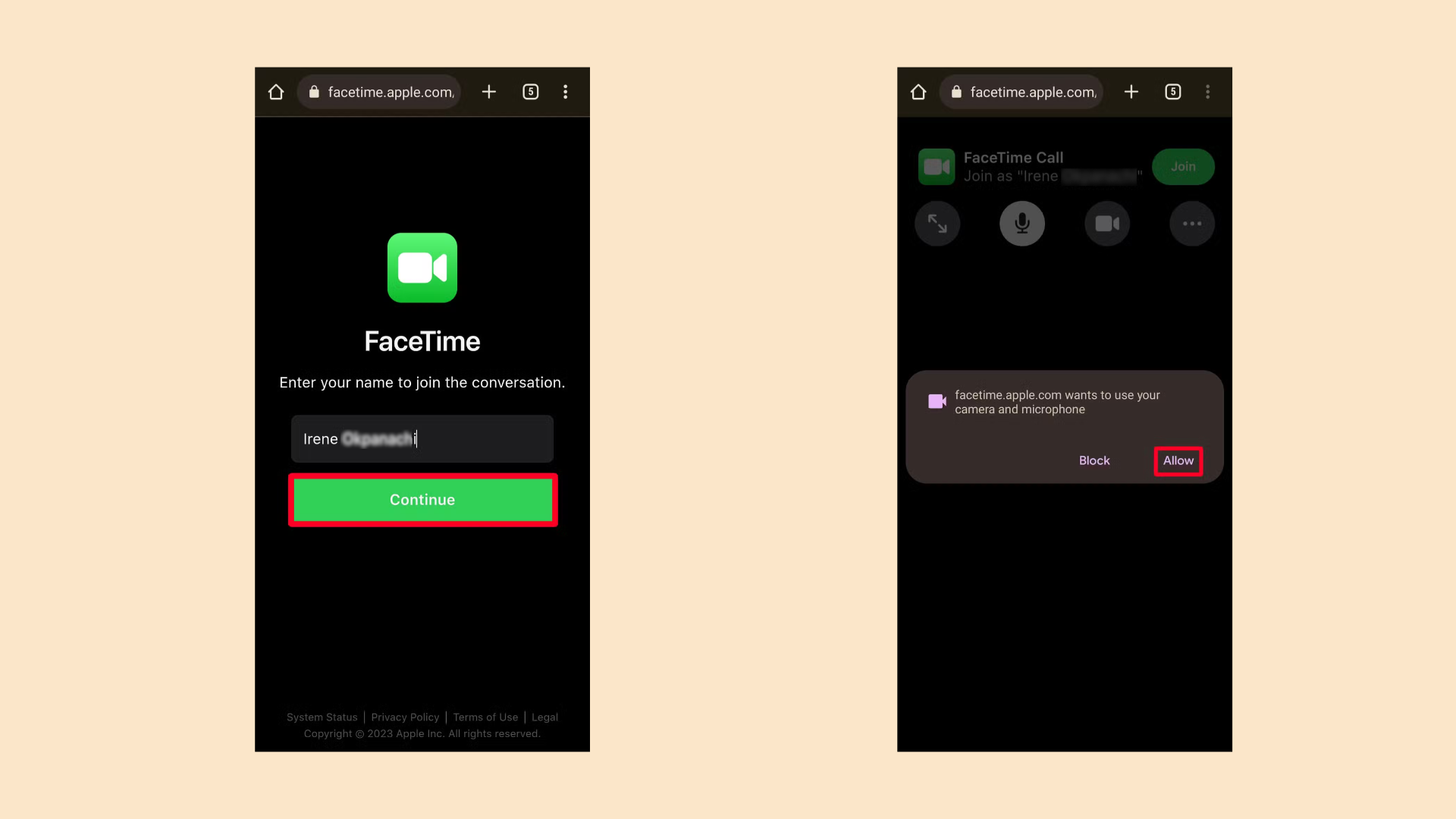
Type the name that should appear in the call, then select Continue. The browser may ask for permission to use the camera and microphone.
Allow both for normal video calling. Apple’s joining instructions specifically note that FaceTime may request these permissions before the participant enters the call.
4. Select Join and Wait for the Host
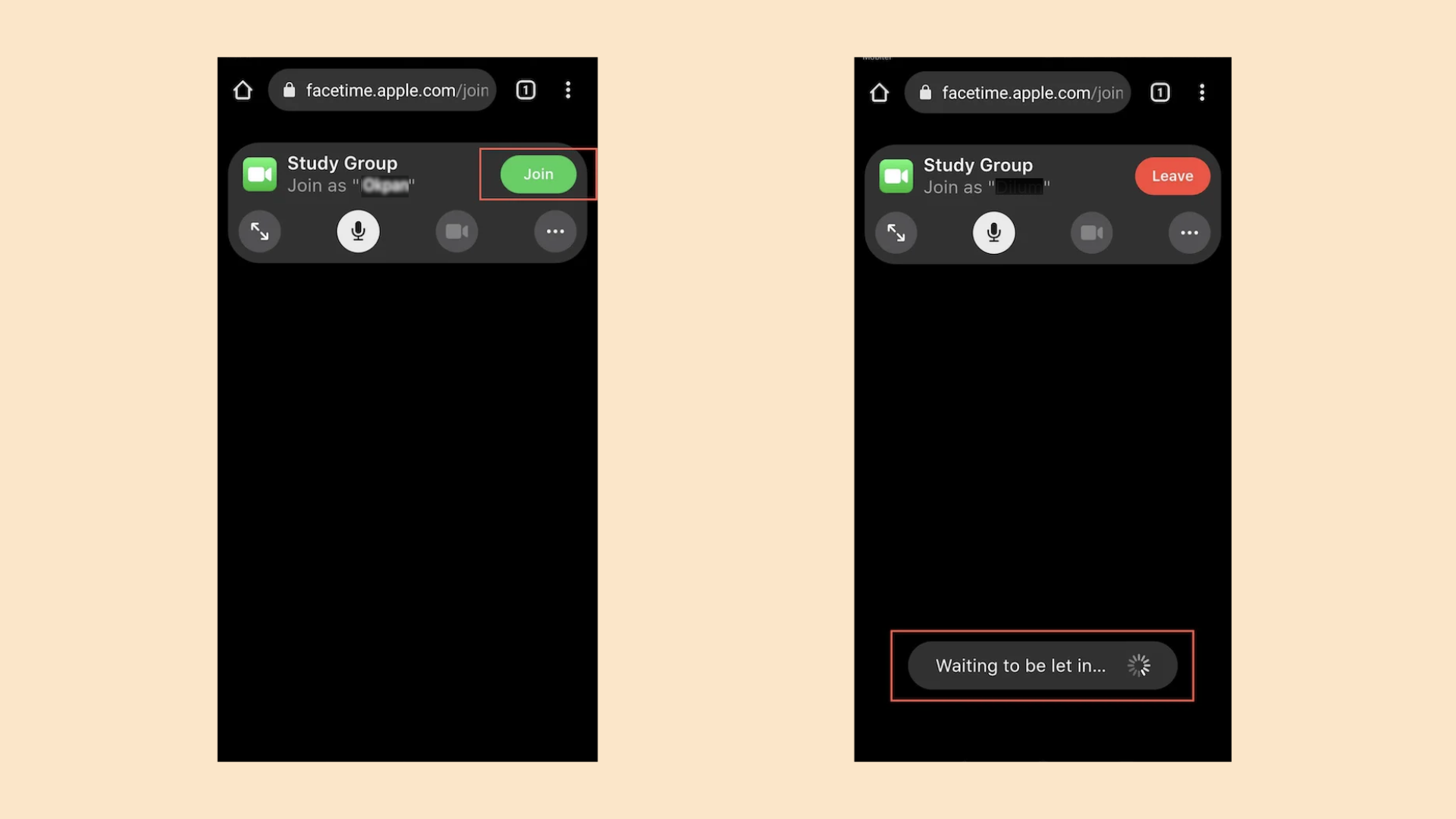
Select Join after the preview screen appears. FaceTime may show a waiting state because the host must approve the request before the Android participant enters.
A waiting message does not automatically mean the link failed. If it remains for too long, the Apple user should check for a pending participant request.
5. Use the Call Controls and Leave when Finished
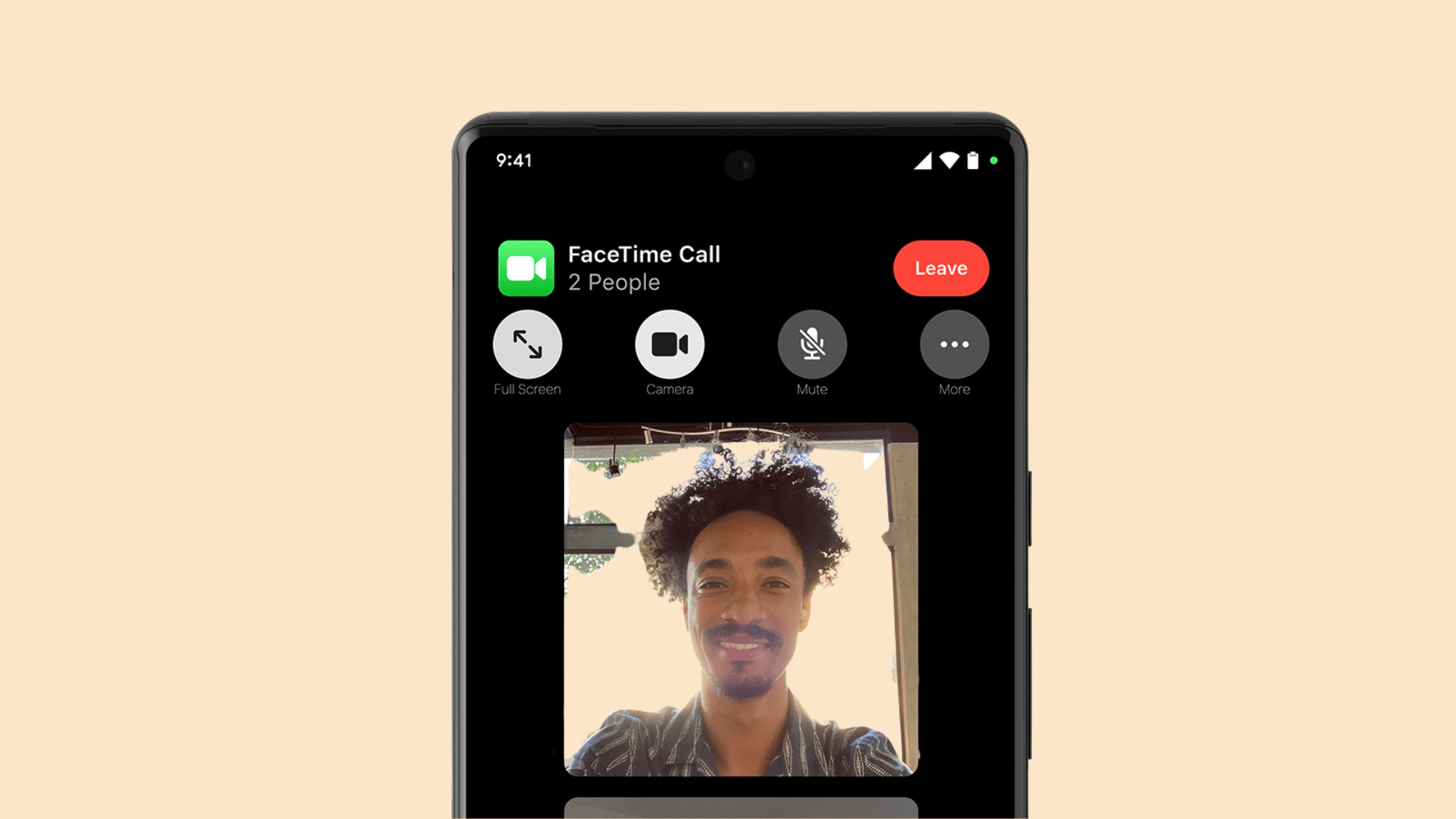
Once admitted, the Android participant can mute the microphone, turn the camera on or off, use grid layout in group calls, and share the existing link.
Full-screen and camera-flip controls appear when those buttons appear; Apple currently describes both features this way. Select Leave when the call is finished.
What Works on FaceTime for Android?
FaceTime on the web covers the main calling controls, but it doesn’t match every feature in Apple’s own FaceTime apps. The differences are easiest to scan below.
|
FaceTime Function |
Android Web Access |
|---|---|
|
Join video calls |
Yes |
|
Mute or unmute microphone |
Yes |
|
Turn camera on or off |
Yes |
|
View group calls in grid layout |
Yes |
|
Share an existing FaceTime link |
Yes |
|
Use full-screen mode |
Available when shown |
|
Switch front and rear cameras |
Available when shown |
|
SharePlay |
No |
|
Screen sharing |
No |
For a normal conversation, the browser version covers the essential controls. Apple’s web version doesn’t support SharePlay or screen sharing, so anyone who wants to watch Netflix together mid-call will need a separate setup.
Why FaceTime Sometimes Won’t Load on Android
Most failed joins come from the browser, permissions, connection, or host approval, not the Android phone itself. These checks address the most common causes first.
- Browser: Open the link in the latest Chrome or Microsoft Edge if another browser does not handle the FaceTime page correctly.
- Camera: Allow camera access if the video preview is blank or other participants cannot see the Android user.
- Microphone: Check browser microphone permission and the mute control if audio is missing.
- Waiting: Ask the Apple host to check for a pending request if the screen remains on the waiting message.
- Connection: Move to a stronger Wi-Fi or cellular connection if the call freezes, drops, or struggles to load. The FCC’s federal bandwidth benchmarks for video calls offer a useful baseline for what “strong enough” actually looks like.
- Link: Ask the Apple user to create a new link if the original FaceTime link was deleted.
Start with the browser and permissions before changing phone-wide settings. If those are correct, host approval and connection quality are the next useful checks.
Is Joining FaceTime on Android Safe and Private?
Joining through a browser doesn’t require an Apple ID or any download, which actually limits how much access the call gets to the rest of the phone.
The browser only asks for camera and microphone permission inside that one tab, and closing the tab ends the connection completely, with nothing left running in the background. The part worth being careful about isn’t Apple’s side; it’s the link itself.
Anyone holding a FaceTime link can request to join, so it’s worth only accepting links from people already expected on the call, and treating the host’s approval screen as a real checkpoint instead of something to tap through without checking who’s asking. The bigger risk is a shared link landing somewhere it shouldn’t, not the browser itself.
Does FaceTime on Android Use a Lot of Data or Battery?
Video calls are generally data-heavy, and FaceTime’s web version follows the same pattern. Here’s roughly what to expect:
- Data usage: about 200MB to 500MB per hour, depending on call quality and how many people are on screen at once.
- Wi-Fi vs cellular: the higher end of that range hits limited mobile data plans harder than a home Wi-Fi connection.
- Battery drain: it runs a bit higher than a dedicated native app, since the browser renders the call interface itself instead of a purpose-built app doing it more efficiently.
- Video quality: lowering resolution or switching off the camera during longer calls cuts both data and battery use noticeably.
- Quick fix: switching to Wi-Fi and dimming the screen brightness helps with both data and battery during longer calls.
When a FaceTime Alternative Is Easier

FaceTime links work well when someone with an iPhone is starting the call, but Android has no way to generate one on its own. That’s where these three fit in, especially when Android needs to send the invite rather than just accept it.
Google Meet: lets an Android user create a meeting link right from the app and send it to anyone, Apple or not. In my own comparisons, Meet has been the most consistent option when it isn’t clear who’s joining from a phone versus a laptop.
WhatsApp: if both people already have it installed, opening a contact’s chat and tapping the video icon is faster than sending any link at all. This works best for one-on-one calls rather than larger groups.
Zoom: still makes the most sense for scheduled or recurring calls, like family check-ins or classes, since you can set up invitations ahead of time instead of sending them in the moment.
Conclusion
FaceTime works on Android once the link-based setup is clear. I have spent more than a decade helping readers make connected-home technology easier to use, and simple cross-platform tools often prevent the most frustration.
If you are learning how to FaceTime on Android, remember that an Apple user creates the link, while Android joins through a supported browser.
The main call controls work well, but features such as SharePlay and screen sharing remain limited. For regular calls that need to start on either platform, Google Meet, WhatsApp, or Zoom may be easier.
I always suggest choosing the simplest option that fits the household. Try the method that suits your setup, then share your experience in the comments or read more of our tech tips.
Frequently Asked Questions
Is FaceTime on Android Completely Free to Use?
Yes. Joining a FaceTime call through the browser costs nothing beyond whatever data or Wi-Fi you’re already using. The web version has no purchase, subscription, or in-app payment tied to it.
Does a FaceTime Link Expire After the First Use?
Not automatically. A link stays active until the Apple side host deletes it or starts a new call, which is why the same link can sometimes be reused for a follow-up call with the same group.
Can an Android User Record a FaceTime Call?
Not through FaceTime itself. Recording isn’t part of the web experience, so anyone who wants a recording on the Android side would need a separate screen-recording app and should ideally let the group know first.
Does FaceTime on Android Need a Specific Android Version to Work?
Apple’s requirement is really about the browser, not the Android version itself. As long as Chrome or Edge on the device is reasonably current, both older and newer Android phones tend to work the same way.