When your event tools live online, a weak setup can slow check-ins, data access, and the whole team’s performance.
Cloud computing can make work easier, but it can also create problems when teams ignore cost, security, and internet needs.
For event teams, the advantages and disadvantages of cloud computing matter because every platform choice affects live operations and attendee data.
I will tell you about the benefits, risks, cloud models, and setup options to help you choose better tools. You will also see how issues such as downtime, vendor lock-in, and rising costs can affect real-event workflows daily.
Before choosing any cloud platform, let us first break down what cloud computing really means for your setup and workflow.
What is Cloud Computing?
Cloud computing means accessing computing resources over the internet rather than running them on your own physical hardware.
Instead of buying servers, maintaining a data center, and paying an IT team to manage it all, you rent access from a provider and pay for what you use.
The way cloud services are structured comes down to different service models:
- IaaS (Infrastructure as a Service): You rent basic resources like servers and storage, while handling setup, configuration, and management yourself.
- PaaS (Platform as a Service): You get a ready-to-use environment for building and deploying applications without worrying about the underlying setup.
- SaaS (Software as a Service): You use complete applications through a browser, with everything managed by the provider.
Deployment models add another layer of choice. Public cloud runs on shared infrastructure managed by providers such as AWS, Google Cloud, or Microsoft Azure. Private cloud is dedicated to a single organization, giving more control at a higher cost.
Advantages of Cloud Computing
According to Flexera’s State of the Cloud Report, enterprise cloud adoption has reached 94%.
The business case is real, and the benefits below explain why so many organizations have moved their operations off physical hardware.
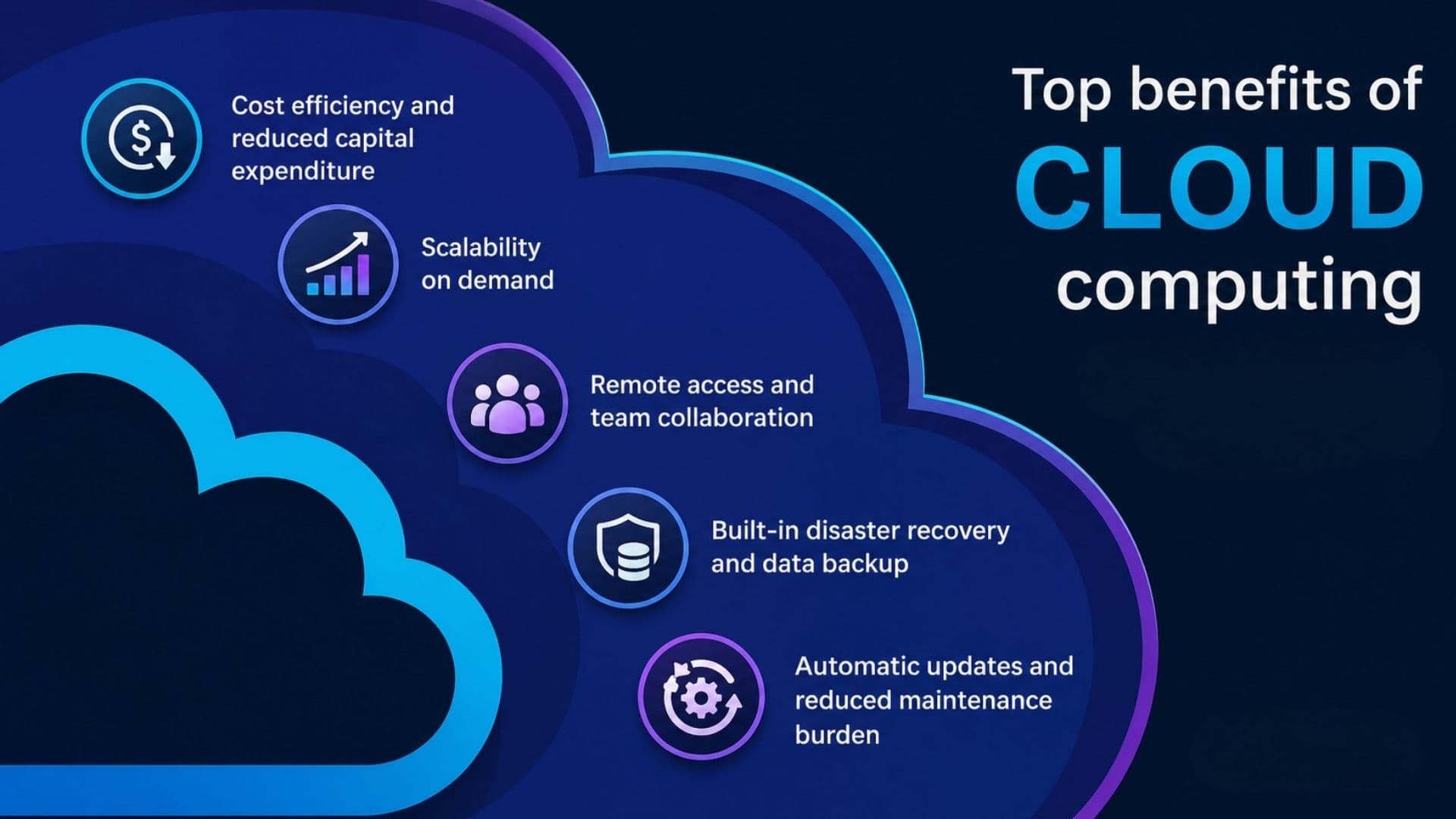
1. Cost Efficiency and Reduced Capital Expenditure
Cloud replaces large upfront hardware purchases with predictable monthly costs.
You avoid spending on servers, data center space, and maintenance contracts before your first user logs in.
For growing organizations, shifting from capital to operating expenses frees up budget for the work that actually drives results.
In my experience reviewing workflow tools with teams of different sizes, the shift from capital to operating expenses is one of the first things smaller organizations notice and appreciate.
Budget that once went to hardware procurement can now go toward the people and processes that actually drive results.
2. Scalability on Demand
Cloud resources scale based on actual usage.
An event registration platform handling 200 attendees one week and 5,000 the next does not need separate infrastructure for each scenario.
If you request more capacity, the provider allocates it, and you pay only for what you use during that period.
Teams focused on streamlining their event registration process will find that cloud-based platforms handle attendance spikes without any manual infrastructure changes.
3. Remote Access and Team Collaboration
Any authorized user with an internet connection can reach cloud-hosted data and tools.
For event teams split across venues, offices, and remote setups, that matters.
Your operations lead can pull real-time check-in numbers from across the country, and your registration data stays current regardless of who last touched it.
4. Built-in Disaster Recovery and Data Backup
Cloud providers replicate data across multiple physical locations by default.
If one data center fails, your data is still available in another region.
Building that level of redundancy on-premises requires significant investment that most organizations do not have, which makes the cloud a genuine resilience upgrade for the majority of buyers.
5. Automatic Updates and Reduced Maintenance Burden
Your provider patches the infrastructure, updates security protocols, and rolls out new features without requiring your team to schedule downtime.
For event professionals without a dedicated IT department, that reduction in maintenance overhead is one of the more underappreciated benefits of moving to a cloud-based platform.
Disadvantages of Cloud Computing
Cloud’s disadvantages are just as well-documented as its benefits. These are the real trade-offs, not theoretical risks.
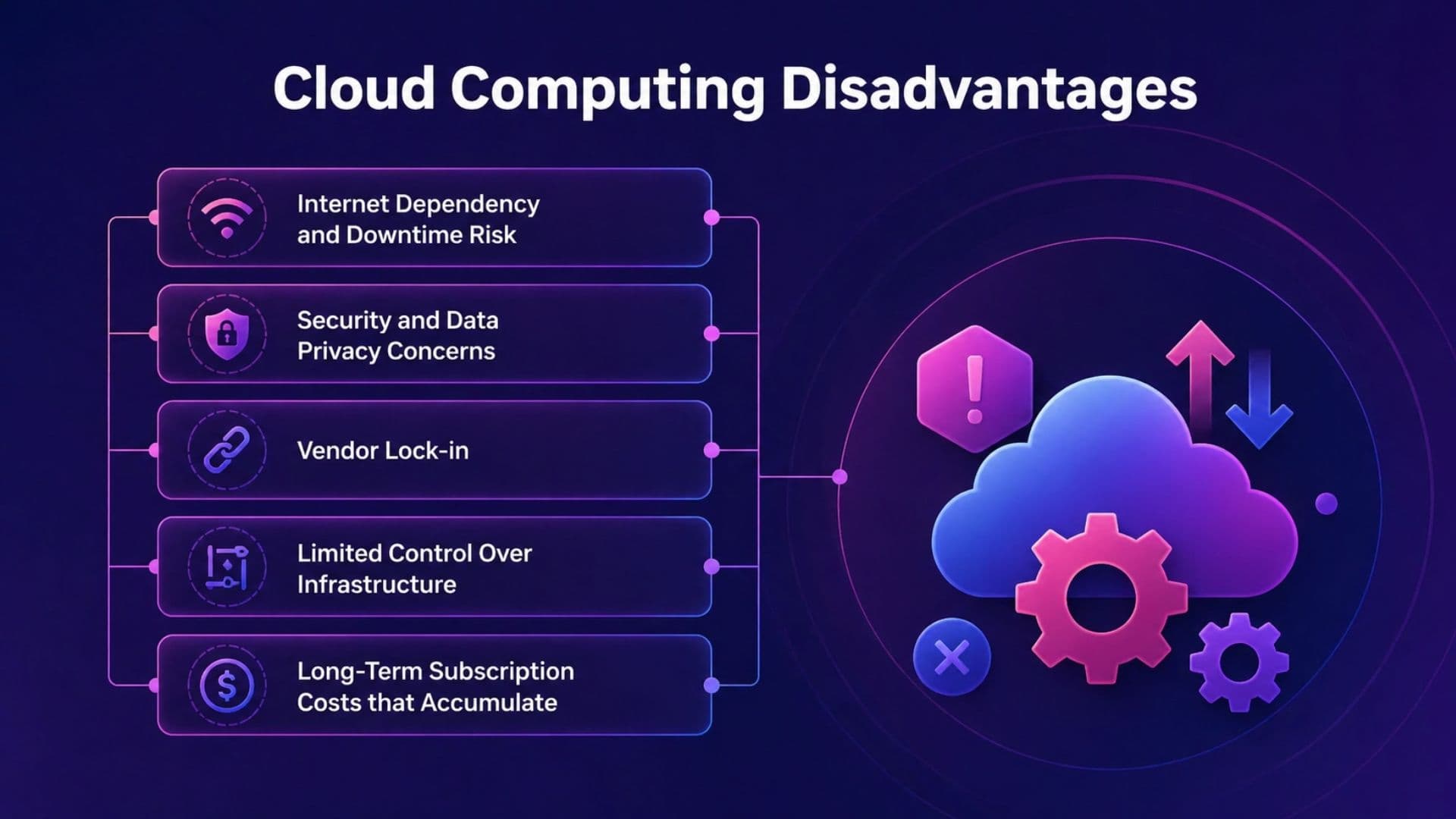
1. Internet Dependency and Downtime Risk
Cloud services require a working internet connection.
The implications hit hardest during a live event. I have spoken with event coordinators who described the moment venue Wi-Fi dropped during peak check-in as among the most stressful of their careers.
A connectivity failure means your team cannot access registration data, badge printing queues, or real-time attendee counts until service returns.
Even reliable providers experience outages, and you cannot fix one when it happens.
2. Security and Data Privacy Concerns
Cloud infrastructure is shared, which creates a broader attack surface.
According to cloud adoption and security data from Softjourn, 98% of organizations experienced at least one cloud security incident in the past two years.
Storing attendee data with a third-party provider means relying on their compliance posture to protect yours.
3. Vendor Lock-in
Migrating away from a cloud provider is harder than signing up.
Proprietary data formats, custom integrations, and pricing that rewards long-term commitment all create friction when you want to switch. The longer you use a platform, the more embedded it becomes.
Think about exit terms and data portability standards before you commit, not after.
Standard portable export formats and clear migration clauses are easy to overlook at the start of a vendor relationship and difficult to renegotiate later.
4. Limited Control Over Infrastructure
You cannot customize the underlying hardware or enforce specific server configurations in a public cloud environment.
For most event technology use cases, that constraint is irrelevant.
For organizations with strict compliance requirements around where data physically sits or how it is processed, the lack of control can create real problems.
5. Long-Term Subscription Costs that Accumulate
Pay-as-you-go pricing works when usage is predictable. When it is not, costs compound.
Research from CloudZero shows that managing cloud spend is the top challenge for 82% of decision-makers.
Monthly fees that seem modest at contract start often look different two years in, especially across multiple tools.
Advantages vs. Disadvantages: A Quick Comparison
Before looking at each point in detail, here is a quick side-by-side view of where cloud computing helps and where it can create problems.
| Advantages | Disadvantages |
|---|---|
| Low upfront cost; pay for what you use | Subscription costs accumulate over time |
| Scales instantly with demand | Requires a reliable internet connection |
| Accessible from anywhere | Security depends on the provider |
| Maintenance handled by the provider | Vendor lock-in limits flexibility |
| Built-in disaster recovery across regions | Limited control over infrastructure |
Public, Private, and Hybrid Cloud: Which Model Fits Your Needs?
Most organizations use public cloud because it is the most accessible and cost-efficient option for standard workloads.
A public cloud provider manages the infrastructure, handles security at the platform level, and lets you start immediately without capital investment.
The tradeoff is shared infrastructure and limited control.
Private cloud makes sense when regulatory requirements or data sensitivity demand dedicated infrastructure. Financial services, healthcare, and defense organizations tend to lean here.
The control is real, and so is the cost. Running a private cloud requires the same investment in hardware and expertise that you were trying to avoid by moving off-premise in the first place.
Hybrid cloud sits between them and works well for organizations with workloads that require strict data governance and for those that benefit from public cloud flexibility.
Event platforms that handle both attendee data (sensitive data) and operational tooling (scalability) are a reasonable fit for a hybrid approach.
For a deeper breakdown of how each deployment model compares in practice, our guide to cloud deployment models covers the cost implications and use cases for each setup.
For teams managing hybrid and in-person events, the architecture of the platforms you choose affects more than just cost.
Tips for Choosing the Best Cloud Provider
The decision to move a workflow to the cloud does not end with choosing a category.
Choosing the right provider within that category matters just as much. These are the factors worth scrutinizing before you sign anything.
- Uptime SLA: A 99.9% guarantee still allows roughly 8.7 hours of downtime per year. For events running on tight schedules, that is not a rounding error. Confirm what compensation the provider offers when they miss their own commitment.
- Data residency and compliance: GDPR applies to any attendee data collected from EU residents, regardless of where your company is based. Your provider needs to demonstrate compliance documentation, not just claim adherence to it.
- Peak-event cost modeling: Some providers offer tiered pricing that appears efficient at moderate usage but becomes expensive at higher volumes. Run the numbers on a sold-out event scenario before committing to a contract.
- Support tier and response time: The difference between a 48-hour email response and a 24/7 phone line is significant when something breaks at 8 am on event day. Confirm the exact support level included in your plan before you need it.
- Offline functionality: Some platforms cache data locally and allow offline check-in if venue connectivity fails. Others go completely dark. Our breakdown of the best hybrid event platforms covers which tools support offline mode and what to look for in them. For event technology specifically, this distinction is worth verifying with any vendor before signing.
- Exit terms and data portability: Standard portable export formats and clear migration terms protect you if you need to switch providers. These clauses are easy to overlook at the start of a relationship and difficult to renegotiate later.
Conclusion
Cloud computing can be a smart move for event teams, but only when the setup aligns with your actual workflow and risk level.
The best choice is not always the cheapest plan, because uptime, support, security, and data access matter during live events.
I would treat cloud tools like part of your event floor, not just another software bill sitting in the background.
If your check-in data, attendee records, or badge system depends on it, the provider choice needs serious thought early.
You should compare cost, storage needs, downtime plans, security terms, and exit options before signing any cloud platform contract today.
That way, the advantages of cloud computing help your team without letting the disadvantages surprise you later during an event.
Have cloud tools helped or hurt your event workflow? Tell us what changed, share with us in the comments below.
Frequently Asked Questions
What is the Difference Between Cloud Computing and Traditional Hosting?
Cloud computing scales resources on demand, so you pay for what you use and add capacity when needed.
Traditional hosting uses fixed servers provisioned in advance for expected peak load, which often means paying for capacity you do not actually use.
For event teams with unpredictable traffic spikes, the cloud is typically the more practical choice.
Is Cloud Computing Safe for Storing Sensitive Attendee Data?
Yes, if properly configured. Security depends on the provider’s compliance posture and your own access controls, not the cloud model itself.
Before signing with any vendor, ask for their data residency documentation, breach notification policy, and relevant compliance certifications such as SOC 2 or GDPR.
Can Small Event Companies Benefit from Cloud Computing?
Yes. Cloud reduces upfront costs and gives smaller teams access to enterprise-grade tools without the hardware investment.
SaaS-based event platforms let you pay per event or per seat rather than committing to infrastructure you only need a few days a year.
What is the Biggest Disadvantage of Cloud Computing for Live Events?
Internet dependency is the most operationally impactful disadvantage when you are running a live event.
If venue connectivity fails during peak check-in, your team loses access to registration data, badge printing, and real-time attendee counts.
Verifying whether your platform supports offline mode is one of the most practical steps you can take before event day.