Imagine handing off a coding task the way you would to a teammate. You describe what you need, and it gets planned, written, tested, and handed back for review. That is what agentic coding makes possible.
For years, AI could only suggest code while you did the real work. Now, AI agents can plan a task, write the code, test it, and fix their own errors. This changes how software gets built.
Below, this article will walk you through what agentic coding means, how it works, where developers use it, the tools worth knowing, and the benefits and limits to weigh before you start.
What is Agentic Coding?
Agentic coding is a way of building software where AI agents can plan, write, test, and fix code with limited human help. You describe a goal in plain language, and the agent breaks it into steps, works through them, and reviews its own results.
The word “agentic” simply means the AI acts with some independence, carrying out a whole task from start to finish rather than answering one question at a time.
These agents rely on three things to do their work:
- Reasoning: They break a goal into smaller tasks and decide what to do first.
- Tools: They can run code, read files, and use a terminal like a developer would.
- Context: They look at your existing project to understand how it is built.
The key idea is simple. You describe the result you want, and the agent handles the process to get there.
How Agentic Coding is Different
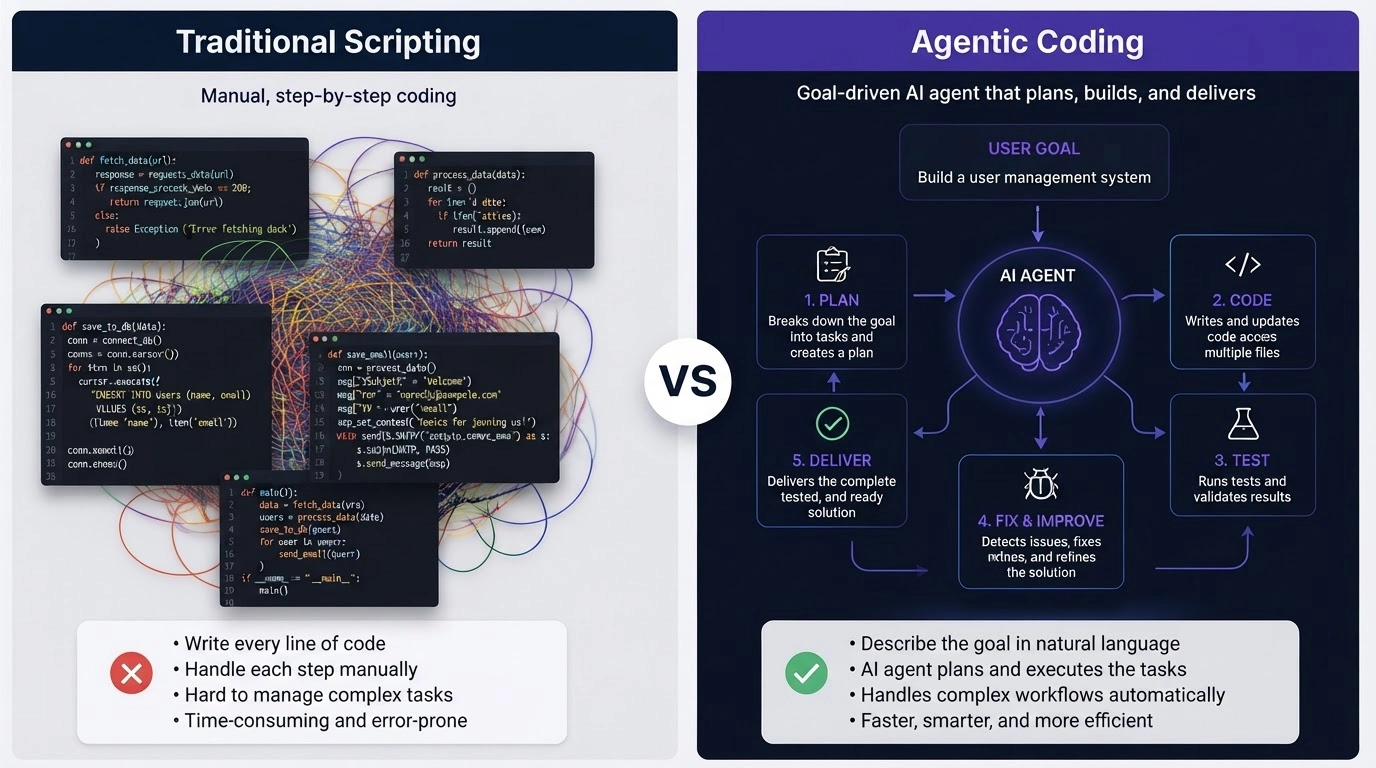
It helps to see agentic coding next to the AI tools you may already use. Regular AI coding tools wait for your prompt and hand back a snippet. Agentic tools take a goal and work toward it across several steps. Here is a side-by-side look at what changes.
| Traditional AI Coding Assistants | Agentic Coding |
|---|---|
| Suggests single code snippets | Completes full, multi-step tasks |
| Waits for each direct prompt | Works toward a goal on its own |
| Needs step-by-step instructions | Builds and follows its own plan |
| Edits one spot at a time | Change many files at once |
| You run and connect each step | The agent runs the whole workflow |
| Forgets the wider project | Uses project context to decide |
The short version: assistants help you write code, while agents help you finish the job. That shift from snippets to full tasks is the heart of what makes this approach different.
How Does Agentic Coding Work?
Agentic coding follows a simple loop: understand the goal, plan, make changes, and check the results. Here is each stage in order.
Step 1: Understanding the goal: You provide a high-level request, such as “Add user authentication to my app.” The agent reads the request, studies your project, and works out what the change actually involves.
Step 2: Planning the tasks: The agent splits the big request into smaller tasks. It decides which files need changes and builds a simple plan before writing anything.
Step 3: Writing and changing code: The agent gets to work. It creates new code, updates existing files, and keeps related parts of the project in sync as it goes.
Step 4: Testing and debugging: The agent runs tests, reads any error messages, and fixes anything what breaks. It repeats this until the output works as expected.
Step 5: Reviewing the results: The last stage is human review. You check the quality, confirm the logic, and look for security problems before anything is approved.
Together, these five stages form one full cycle, and understanding them makes the workflow below easy to follow.
The Agentic Coding Workflow
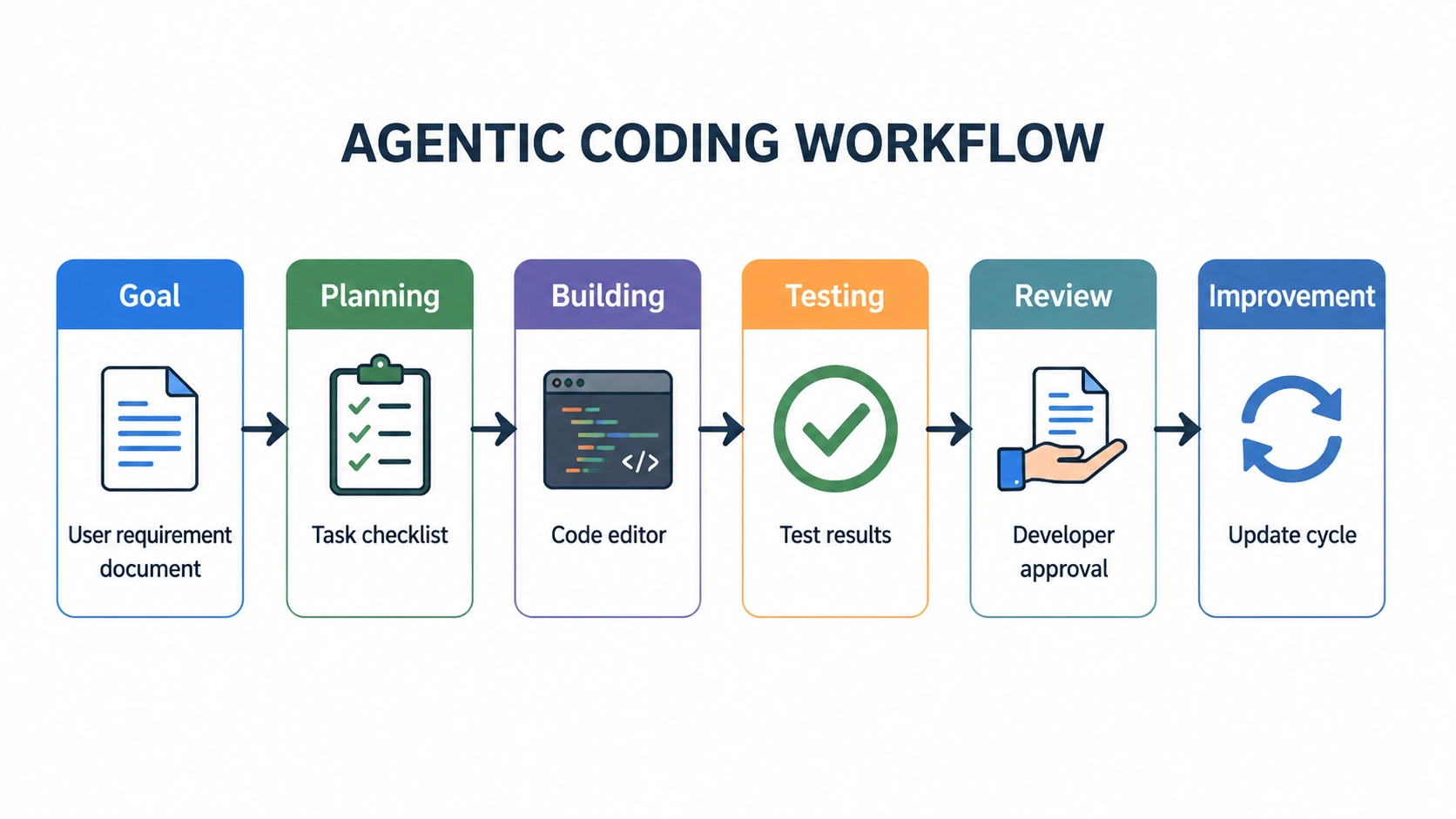
If you want one simple picture to remember, this is the flow to keep in mind. It sums up everything the agent does from start to finish.
Goal → Planning → Building → Testing → Review → Improvement
- Goal: You state what you want.
- Planning: The agent maps out the steps.
- Building: The agent writes and edits the code.
- Testing: The agent runs checks and fixes errors.
- Review: You inspect the changes.
- Improvement: The agent refines based on feedback.
Each cycle moves the project forward while keeping you in control. The loop can repeat as many times as needed. If a test fails or you want a change, the agent plans again and reworks the code. This steady rhythm of plan, build, and check is what makes agentic coding dependable on bigger tasks, not just quick fixes.
| Tip: The clearer your goal, the better the result. Instead of “fix my app,” try “fix the login error that appears when the password field is empty.” Specific goals give the agent the context it needs to get things right the first time. |
Real Uses in Software Development
Theory is useful, but the value shows up in daily work. Agentic coding shines on tasks that involve many steps, not just single lines of code. Here is where developers put it to work.
1. Building New Features
An agent can turn a request into a working feature. Ask for a payment system or a login flow, and it will plan the parts, edit the needed files, and test the feature before you review it.
2. Fixing Bugs Faster
Agents read error logs, trace the likely cause, and suggest a fix. Then they test the change to confirm it holds. This cuts down the slow, manual hunt for what went wrong.
3. Cleaning Up Old Code
Over time, code gets messy. Agents can restructure old sections, remove repeated blocks, and update outdated parts. This keeps large projects easier to maintain.
4. Writing and Running Tests
Agents can write test cases, run them automatically, and flag failures. Better test coverage means fewer surprises later and more reliable software.
5. Updating Dependencies and Docs
Small maintenance jobs add up. Agents can update libraries, adjust config files, and generate documentation so these tasks stop piling up.
6. Handling End-To-End Tasks
Some jobs touch the whole project. Say you ask, “Improve app performance.” The agent reviews the codebase, finds slow spots, applies changes, and runs tests. You then review and approve the result.
Across all these tasks, the pattern is the same: the agent handles the busywork, and you focus on the decisions that matter.
The same approach is influencing how AI is changing the way businesses work, with AI taking over repetitive processes across many industries.
Popular Agentic Coding Tools
The agentic coding space is growing rapidly, and a few tools are leading the way. Here are five worth knowing, along with what makes each one useful.
- Cursor: It is an AI-first code editor built on the VS Code base. Its agent mode can read your project, edit many files at once, and run terminal commands. This makes it a strong pick for larger changes across a codebase rather than one-off edits.
- Claude Code: It is a coding agent that lives in your terminal. It can read your files, run commands, write tests, and work through debugging tasks step by step. You can follow its plan as it works, which helps you stay in control.
- GitHub Copilot Coding Agents: GitHub Copilot’s coding agent works right inside your repository. You can assign it an issue, and it will plan, write code on a branch, and open a pull request for you to review. For setup and full details, see the official GitHub Copilot documentation.
- OpenAI Codex: It is a coding agent built to handle software tasks from plain language. It can write code, run it, and automate parts of the development process, which suits repeatable jobs across a project.
- Model Context Protocol (MCP): It is an open standard that connects AI agents to external tools and data in a safe, consistent way. It lets agents reach project information without custom setup for every source.
Each tool fits a different style of work, so try a couple on small tasks and keep the one that matches your workflow.
Pros and Cons of Agentic Coding
Every tool has two sides, and agentic coding is no different. The table below lines up the main benefits against the limits, factor by factor, so you can weigh them at a glance.
| Factor | Pros | Cons |
|---|---|---|
| Speed | Repetitive coding work gets done much faster | Fast output still needs a careful review |
| Focus | You spend more time planning and reviewing | Design and structure choices still need a person |
| Code quality | Agents can catch and fix many errors | They can misread a request and write code that does not fit |
| Security | Agents can flag some weak spots early | Generated code may hide vulnerabilities or expose data |
| Scale | Multi-step, multi-file tasks are easier to manage | Agents can lose track of large or unfamiliar projects |
| Debugging | Agents read logs, trace causes, and suggest fixes | Fixes still need testing and human sign-off |
The takeaway is simple: agentic coding works best as a partner, not a replacement. Lean on the pros, plan for the cons, and you will get steady, reliable results.
| Caution: Never ship agent-written code without first reviewing it. Agents can miss context, add security gaps, or misread your intent. Always read the changes, run your tests, and check for sensitive data before the code goes live. |
The Future of Agentic Coding
So where is all of this headed? Agentic coding is still young, but the direction is clear. Expect more capable development assistants, better project memory, and smoother integration with the tools you already use. Automation will spread across everyday tasks, from testing to documentation.
The bigger theme is people and AI working together, with humans setting the goals and agents handling the steps.
This shift reflects the broader ways artificial intelligence is shaping the future across industries, workplaces, and everyday technology.
Agents will also link up with more systems safely and reliably over time. Rather than replacing skill, these tools are set to make good developers more effective.
To stay ready for this shift, it helps to understand how AI agents work at a basic level.
Conclusion
Agentic coding takes AI from handing you code snippets to handling real development work. You set a goal, and an agent plans, builds, tests, and refines the result while you stay in charge.
Understanding how agentic coding works, where it fits in daily development, the tools worth trying, and its limitations helps developers get the most from these AI agents.
These agents are powerful, yet they do not replace human judgment. Careful review keeps the code secure, and clear instructions help the agent stay on track.
The best results come from developers who learn to guide these tools effectively. Pick one agentic coding tool this week, give it a small task, and see how it fits into your workflow. Then share what you build.
Frequently Asked Questions
Do I Need Coding Skills to Use Agentic Coding?
Some coding knowledge helps a lot. You still need to read, review, and approve the agent’s work, so skilled developers get far more value than complete beginners do today.
How Much Does Agentic Coding Cost?
Costs vary by tool. Many charge a monthly subscription, while others bill by usage or tokens. Some offer free tiers with limits, so check each provider’s current pricing page.
Can Agentic Coding Work with Any Programming Language?
Most agents support popular languages like Python, JavaScript, Java, and more. Support for niche or older languages may be weaker, so results depend on the tool and your codebase.
How Long Does an Agentic Coding Task Take?
It depends on the task size. A small fix may take minutes, while a full feature can take longer as the agent plans, writes, and tests across several steps.
Is My Code Private When Using these Tools?
Privacy depends on the provider. Some process code on their servers, while others offer local or private options. Always read the tool’s data policy before using sensitive or company code.