Most B2B teams have their customer data scattered across multiple systems.
Sales tracks deals in one tool, marketing runs campaigns elsewhere, and support has no clear view of what was promised before a customer signed.
Most software teams I have worked with eventually hit a place where no one has a clear view of what is actually happening with a given customer.
That is the problem HubSpot was built to solve when Brian Halligan and Dharmesh Shah founded it in 2006 with inbound marketing as its core philosophy.
In this guide, you will get a clear, current picture of what HubSpot is, how its Hub structure works, what the free CRM includes, and whether the platform is worth the investment for your team in 2026.
Is HubSpot a CRM?
Yes, HubSpot is a CRM, and that is the right place to start.
A CRM (Customer Relationship Management system) stores and organizes data about your contacts, companies, and deals so your team can track every interaction and take the right next step.
What separates HubSpot’s Smart CRM from a basic contact database is that it does not just store data.
It connects that data across your entire business so every team (marketing, sales, service, and operations) can act on it without manually passing files back and forth.
The CRM is the foundation of every HubSpot account, and it is free. On top of it, you layer the Hubs you need.
That modular design is why people sometimes debate whether HubSpot is “just a CRM” or a full marketing platform.
The Core HubSpot Hubs
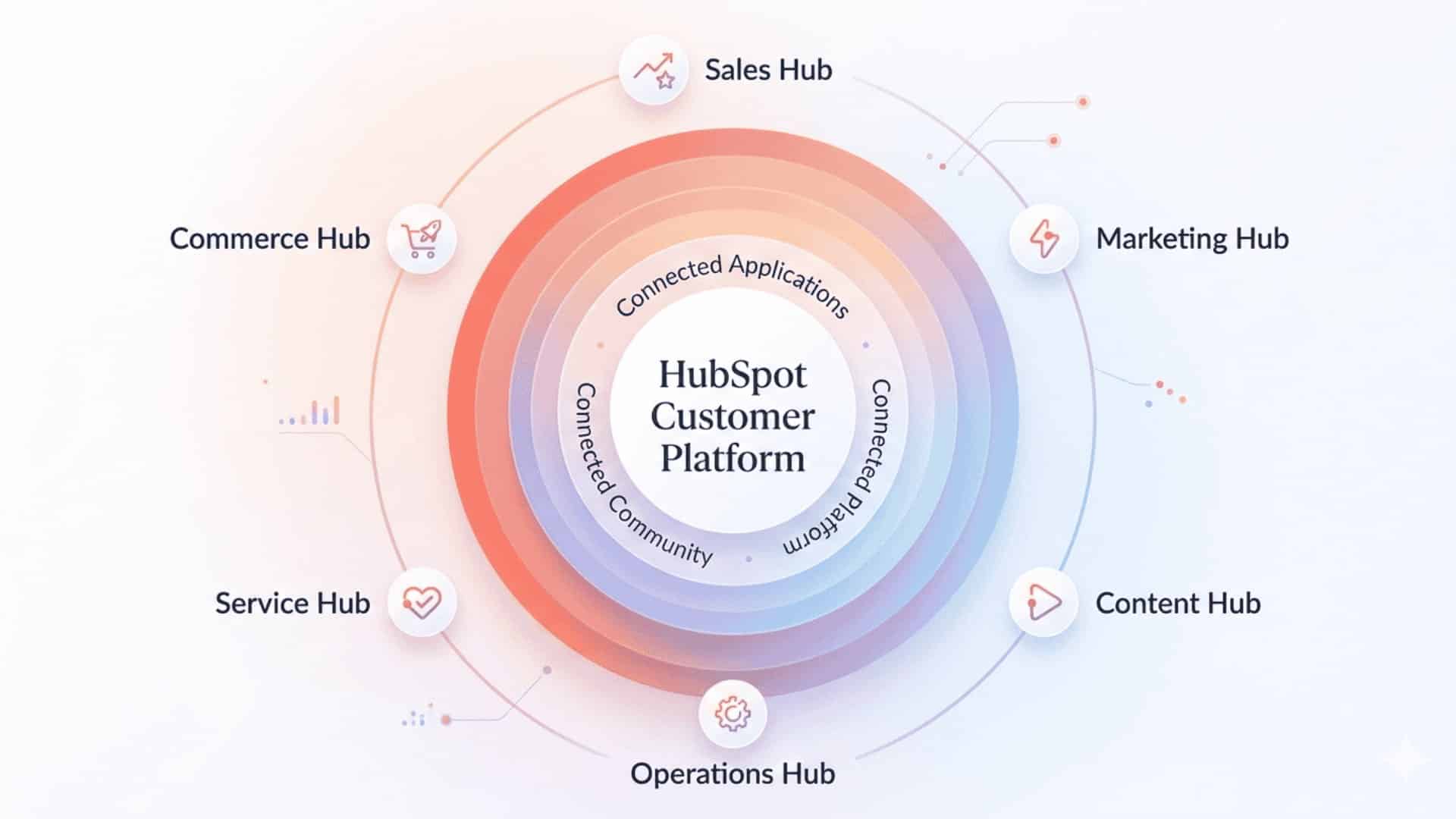
The six core functions of HubSpot are called “Hubs,” and each Hub comes with its own suite of tools. They are built to work independently or together, making the platform useful for businesses running an event management platform guide.
1. Marketing Hub
Marketing Hub is where HubSpot built its reputation. It covers email marketing, landing page creation, ad management across Google and social platforms, lead capture forms, and marketing automation workflows.
The Professional tier unlocks the full workflow builder, A/B testing, SEO tools, and social media scheduling.
At scale, Marketing Hub pricing can climb quickly because it charges per marketing contact in addition to per seat, so teams with large lists should model costs carefully before committing.
2. Sales Hub
Sales Hub gives revenue teams the tools to manage their pipeline without living in spreadsheets.
Features include deal tracking, email sequences, call logging, meeting scheduling, and one-to-one video messaging.
The Professional tier adds Breeze AI-powered forecasting and predictive lead scoring, which analyzes historical deal data to surface which opportunities are most likely to close.
3. Service Hub
Service Hub is HubSpot’s customer support module. It includes a ticketing system, help desk tools, knowledge base builder, and customer portals.
The Breeze Customer Agent, available on Professional and Enterprise plans, handles tier-one support conversations automatically.
As of April 2026, HubSpot shifted this agent to outcome-based pricing at $0.50 per resolved conversation, down from the previous flat-rate model.
4. Content Hub
Content Hub replaces what HubSpot previously called the CMS Hub. It handles website creation, blog publishing, content distribution, and AI-powered content generation.
The Breeze Content Agent drafts blog posts, landing pages, and social updates from simple prompts, and the Content Remix feature takes high-performing posts and suggests repurposed assets across channels.
Content Hub is most useful for teams that want their website, CRM, and marketing automation to live in the same system rather than stitching together a separate CMS.
5. Operations Hub (Data Hub)
Operations Hub, now branded as Data Hub, is the layer most users do not see, but everyone benefits from.
It syncs data between HubSpot and third-party apps, runs automated data cleaning and formatting, and supports programmable workflows for teams with complex automation needs.
If your contact records are riddled with duplicates or inconsistent field values, Data Hub is where you fix that. It is the right investment before scaling any other Hub, not after.
6. Commerce Hub
Commerce Hub handles quotes, payment links, subscriptions, and invoicing directly inside HubSpot.
There is no additional monthly software fee. Instead, HubSpot charges a transaction percentage on payments processed through the platform.
It integrates with Stripe for US-based teams and automatically ties revenue data back into your CRM records, so sales teams can see deal status and payment history in one place.
HubSpot Pricing in 2026: What You’re Really Paying for
HubSpot uses a seat-based pricing model, so total costs depend on user access, marketing contacts, and selected Hubs.
You can review the full breakdown on the HubSpot pricing page before modeling costs for your team. The table below covers the main tiers to know upfront.
| Plan / Feature | Simple Breakdown |
|---|---|
| Core Seats | Full editing access across purchased Hubs |
| Sales & Service Seats | Advanced tools like forecasting, sequences, and ticket routing |
| View Only Seats | Free access for managers and executives |
| Free Plan | Basic CRM tools with limited features |
| Starter Plan | Around $20 per seat monthly |
| Starter Customer Platform | About $15 per seat monthly across all five Hubs |
| Marketing Hub Professional | Around $890 monthly for 2,000 contacts |
| Marketing Hub Onboarding | One-time fee of about $3,000 |
| Sales Hub Professional Onboarding | About $1,500 one time |
What HubSpot’s Free CRM Actually Includes
HubSpot’s free plan is genuinely useful, not just a stripped-down trial.
It includes contact and company management, deal pipeline tracking, basic email sending (up to 2,000 emails per month), live chat, lead-capture forms, and a limited reporting dashboard.
The Breeze Assistant is also available on the free plan for basic AI tasks.
The limitations are real, though. The free plan caps at two users, which becomes a problem fast for any team larger than a founding pair. HubSpot branding appears on all outgoing emails, forms, meeting pages, and live chat widgets.
Automation is minimal: one automated email per form submission and a total of one automated action.
If your team needs sequences, workflow automation, or anything that resembles a serious marketing operation, you will quickly outgrow the free plan.
The free tier is best for individual sales reps or early-stage teams testing whether HubSpot fits their process before committing to a paid plan.
What Reddit Users Really Think About HubSpot
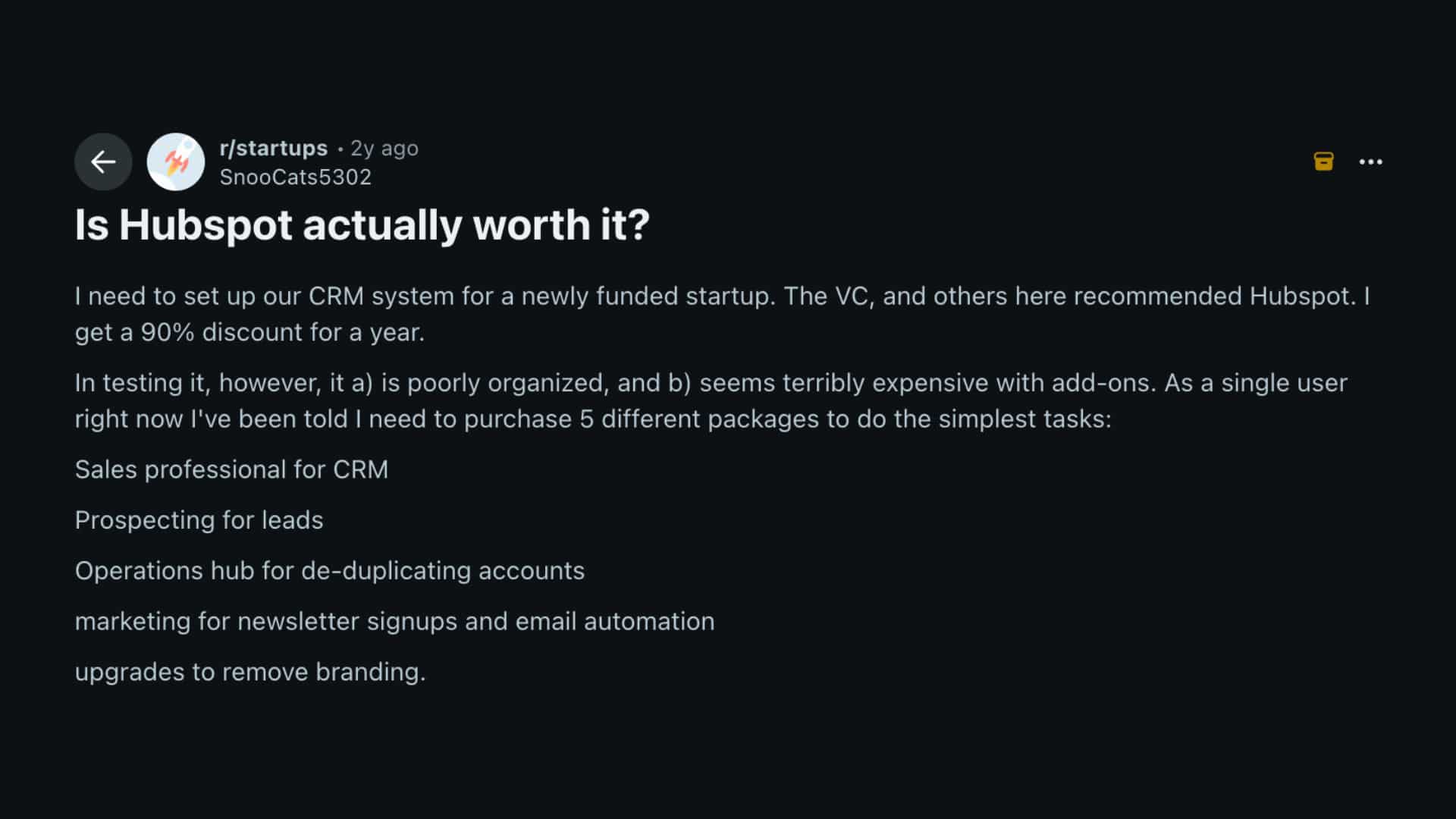
Discussions on Reddit show mixed opinions about HubSpot, especially among startups and growing businesses.
Many users praise the platform for combining CRM, marketing, sales, and automation tools into a single system, reducing the need for multiple subscriptions.
Startup founders also mention that the free CRM is strong enough for early-stage operations and simple lead management.
At the same time, several Reddit users warn that costs rise quickly once teams move into Professional or Enterprise plans.
Others still believed the platform was worth the investment because of its ease of use, integrations, and centralized reporting.
The overall Reddit consensus suggests HubSpot works best for teams ready to fully use its ecosystem rather than companies needing only basic CRM functions
Who HubSpot is Actually a Good Fit for
HubSpot works best for growing B2B teams that want a single, connected platform rather than a stack of tools that do not integrate.
If your marketing, sales, and service teams are currently operating in separate systems and you are spending real time reconciling data between them, HubSpot is a practical solution.
It is a strong fit for:
- Small to mid-sized B2B companies with active sales pipelines and marketing programs running in parallel
- Event-driven organizations that need CRM data tied to check-in, badge printing, and post-event follow-up, and who are already thinking through event strategy and planning at a systems level
- Teams that want to consolidate tools rather than manage six separate vendor relationships
Where it gets complicated is the cost at scale. Marketing Hub’s contact-based pricing model means that as your database grows, so does your bill.
Teams with contact lists above 10,000 should run the numbers carefully against the pricing calculator before committing to a Professional tier.
Is HubSpot Worth It for Your B2B Team?
The honest answer is: it depends on how your team is structured today and how much of the platform you will actually use.
HubSpot tends to pay off when your sales, marketing, and service teams are currently operating in separate tools and spending real time reconciling data between them.
The more Hubs you run on a shared CRM, the stronger the compounding return.
A sales team using Sales Hub alone gets a capable pipeline tool. That same team running Sales Hub alongside Marketing Hub and Service Hub gets something different: a single view of every customer interaction from first ad click to open support ticket.
It is harder to justify when you only need one function. If you want email marketing alone, there are cheaper tools.
If you want a support ticketing system in isolation, there are better-priced options. HubSpot rewards teams that commit to the ecosystem.
Teams that cherry-pick a single Hub at the Professional tier often pay a premium for features they could get elsewhere for less.
The other factor is implementation. HubSpot is not difficult to learn, but it does require a deliberate setup.
Teams that treat onboarding as an afterthought typically end up with a cluttered CRM and workflows that do not reflect how they actually sell.
If your team does not have someone willing to own the configuration, factor that into the decision alongside the seat cost.
Conclusion
HubSpot is one of the most complete business platforms available today, and that is both its strength and the reason it requires careful evaluation before buying in.
The CRM is free and genuinely capable. The six Hubs each solve a real problem, and when they work together on a shared data foundation, the payoff is teams that actually stay aligned.
That said, HubSpot rewards teams that implement it thoughtfully.
The free plan is a good starting point. The Starter bundle is the right move for most small B2B teams.
The professional tier is where the real automation power lives, but the cost jump is significant. Match your tier to where your team actually is today, not where you hope to be in two years.
Which Hub are you most interested in exploring? Drop a comment below and share what your team is trying to solve.
Frequently Asked Questions
Can You Use HubSpot Without Ever Paying for It?
Yes. HubSpot’s free CRM has no time limit and no credit card required to get started. You can manage contacts, track deals, send up to 2,000 emails per month, and use live chat indefinitely on the free plan.
Does HubSpot Integrate with Tools Like Salesforce, Zoom, or Slack?
HubSpot has a native integration marketplace with over 1,700 apps, including direct connections to Salesforce, Zoom, Slack, Google Workspace, Microsoft Teams, and Shopify.
Is HubSpot GDPR Compliant?
HubSpot is GDPR-compliant and provides built-in tools to help users meet data privacy obligations, including form consent tracking, data deletion workflows, and cookie consent banners for websites hosted on Content Hub.