If you’ve ever wondered what really counts when choosing the best software for photo editing, you’re not alone.
I’ve been in that same spot, trying to sort through tools that promise more than I actually need.
After spending time with different editors, I realized the best choice isn’t always the one with the longest feature list but the one that supports the way I like to work.
Some tools focus on speed, others on style, and many try to do everything at once.
This guide explains the features that genuinely matter, if you want simple AI help, an all-in-one setup, or something made for a specific workflow.
As you read, think about what fits your needs instead of what the marketing highlights, so you can choose a tool that actually works for you.
How to Find the Best Software for Photo Editing?
Finding software for photo editing starts with understanding the tools needed for everyday work, from basic adjustments to advanced retouching.
Each program offers different features, so comparing layout, speed, and available presets can help narrow the choices.
Some users prefer simple drag-and-drop editors, while others rely on layered workflows for detailed control.
The best software for photo editing often includes strong color correction tools, efficient file handling, and support for standard image formats.
Cost also plays a role, since options range from free apps to complete professional suites. Cloud syncing, plugin support, and AI tools can further shape the decision.
Best Software for Photo Editing (All-in-One)
Choosing an all-in-one photo editor helps simplify editing, organization, and creative work.
1. Luminar Neo
It offers AI-powered editing tools designed for fast, high-quality results.
Its standout features include sky replacement, portrait enhancement, noise reduction, and one-click adjustments that streamline photo correction.
The software focuses on simplifying complex edits, making advanced upgrades accessible to users without requiring excellent technical skills.
Luminar Neo is suitable for photographers who want powerful enhancements without long manual workflows.
2. ON1 Photo RAW Max
It delivers a full ecosystem for photo editing, complete with RAW processing, masking options, and a wide set of creative effects.
Generative Erase can remove unwanted objects with notable accuracy, and Brilliance AI helps refine color and tone with minimal effort.
Depth masks also play a key role, allowing distance-based adjustments that work well for both portraits and landscapes.
ON1 Photo RAW Max blends creative tools with technical precision, making it a strong choice for photographers who want automation and full manual control in the same workflow.
3. Capture One Pro
It stands out for exceptional RAW rendering, detailed color grading, and professional tethering support.
Its color tools are among the most advanced in photo editing, offering fine control over hue, saturation, and luminance.
Session-based workflows help organize client projects efficiently, making it a strong choice for studio photographers.
The software’s tethering capabilities ensure fast, reliable previews during live shoots, with customizable adjustments applied instantly.
4. Adobe Lightroom
It provides a streamlined editing and organization system built for efficiency, especially when managing large photo libraries.
Its catalog-based structure keeps images searchable through tags, ratings, and albums.
Lightroom’s editing tools support batch adjustments, local corrections, lens profiles, and color grading, making it useful for photographers with repetitive workflows.
Cloud syncing ensures access across devices, enabling editing on desktop, mobile, or web.
5. Adobe Photoshop
It remains the industry standard for advanced image manipulation, compositing, and graphic design.
Its layer-based structure supports complex edits, giving users granular control over every detail.
Tools such as generative AI fills, selection refinement, and content-aware operations enable intricate transformations.
Photoshop excels in creating composites, retouching, and preparing images for design or digital art applications.
6. CyberLink PhotoDirector
It combines image management tools with creative editing features, making it a versatile option for users who want both organizational support and stylized enhancements.
The software blends Lightroom-style cataloging with Photoshop-like effects, offering layers, AI tools, guided edits, and animated photo features.
Integration with Getty Images provides access to stock content for creative projects.
Its suite includes portrait retouching, color tuning, sky replacement, and object removal, along with templates for quick design tasks.
7. DxO PhotoLab
It focuses on delivering high-quality image correction, powered by sophisticated algorithms for noise reduction, optical adjustments, and RAW processing.
Its DeepPRIME and DeepPRIME XD technologies stand out for exceptional performance in high-ISO and low-light situations.
PhotoLab automatically applies lens and camera body corrections based on extensive DxO testing, ensuring maximum sharpness and clarity.
The software also offers precise local adjustments, controlled through U Point technology, enabling targeted enhancements without complex masking.
8. Affinity Photo
It provides a robust editing environment with a one-time purchase model, appealing to users who prefer lifetime access without subscriptions.
The software includes professional-grade tools such as HDR merge, panorama stitching, focus stacking, and non-destructive editing through its persona-based workflow.
It supports advanced retouching, RAW development, layer manipulation, and custom brushes.
Its interface mirrors high-end professional editors, offering flexibility for detailed projects while remaining cost-effective.
9. Corel PaintShop Pro
It is a budget-conscious photo editing solution that offers a broad mix of tools for creative and corrective work.
Features include AI upsampling, background replacement, noise reduction, and layer-based editing.
Users benefit from an accessible interface that supports both beginners and experienced editors.
PaintShop Pro balances affordability with functionality, offering enough depth for hobby editing and light professional use.
Best Software for Volume Photography
Software for volume photography focuses on fast sorting, and automated delivery. These tools help manage thousands of images efficiently while supporting sales workflows.
10. Adobe Lightroom Classic
It supports non-destructive editing and efficient batch processing, making it suitable for handling thousands of images from events or high-volume shoots.
Its AI-powered selection tools speed up masking, subject isolation, and background adjustments with reliable accuracy.
The catalog system keeps large libraries organized through keywords, collections, ratings, and smart folders.
Desktop and cloud syncing offer flexibility for working across devices while maintaining a consistent workflow.
11. PhotoDay
It offers a fully online workflow for volume photographers, built around facial recognition and automated client communication.
Its system enables families to locate their photos instantly without relying on access codes, reducing time spent troubleshooting gallery access.
SMS-based marketing notifies customers as soon as images are ready, encouraging faster engagement and purchases.
The platform integrates with professional labs for direct fulfillment, eliminating manual order handling.
12. Proofpix
It focuses on fast, convenient client delivery through mobile-friendly online galleries and efficient bulk upload tools.
Its tagging features allow easy organization of large groups, making it practical for dance studios, sports teams, and school events.
The platform supports Stripe payments, enabling quick checkout with secure processing. Automated reminders and gallery expiration notices help encourage timely purchases.
Proofpix also offers customizable storefronts, image protection options, and digital download delivery.
13. ShootProof
It supports mid-to-high volume photography with tools for contracts, invoicing, client galleries, and print fulfillment.
Its galleries present images in a clean, professional layout, suitable for schools, sports, and large portrait events.
Photographers can sell prints through partner labs or choose self-fulfillment for greater control.
Administrative features, including digital contracts and online payments, help manage business needs alongside image delivery.
Ai All-In-One Tools vs. Specialized Workflow Tools
AI all-in-one tools handle general editing with automation and simplicity, while specialized workflow tools support specific tasks requiring precision and efficiency across photo projects.
| Feature / Focus | AI All-in-One Tools | Specialized Workflow Tools |
|---|---|---|
| Primary Purpose | Broad editing tasks with automated enhancements and quick results | Specific workflows such as volume work, tethering, or style-based editing |
| Learning Curve | Easier to use with guided or AI-driven tools | More complex due to advanced, niche features |
| Speed | Fast for quick edits and auto adjustments | Fast for repetitive or high-volume tasks using tailored systems |
| Flexibility | Good general editing but less control in specialized scenarios | High control with workflow-specific precision tools |
| User Type | Casual creators, small businesses, beginners | Studio photographers, event shooters, volume specialists |
| Best For | Everyday edits, social content, simple enhancements | Consistency, batch management, color accuracy, tethered shooting |
Community Reviews About Photo Editing Software
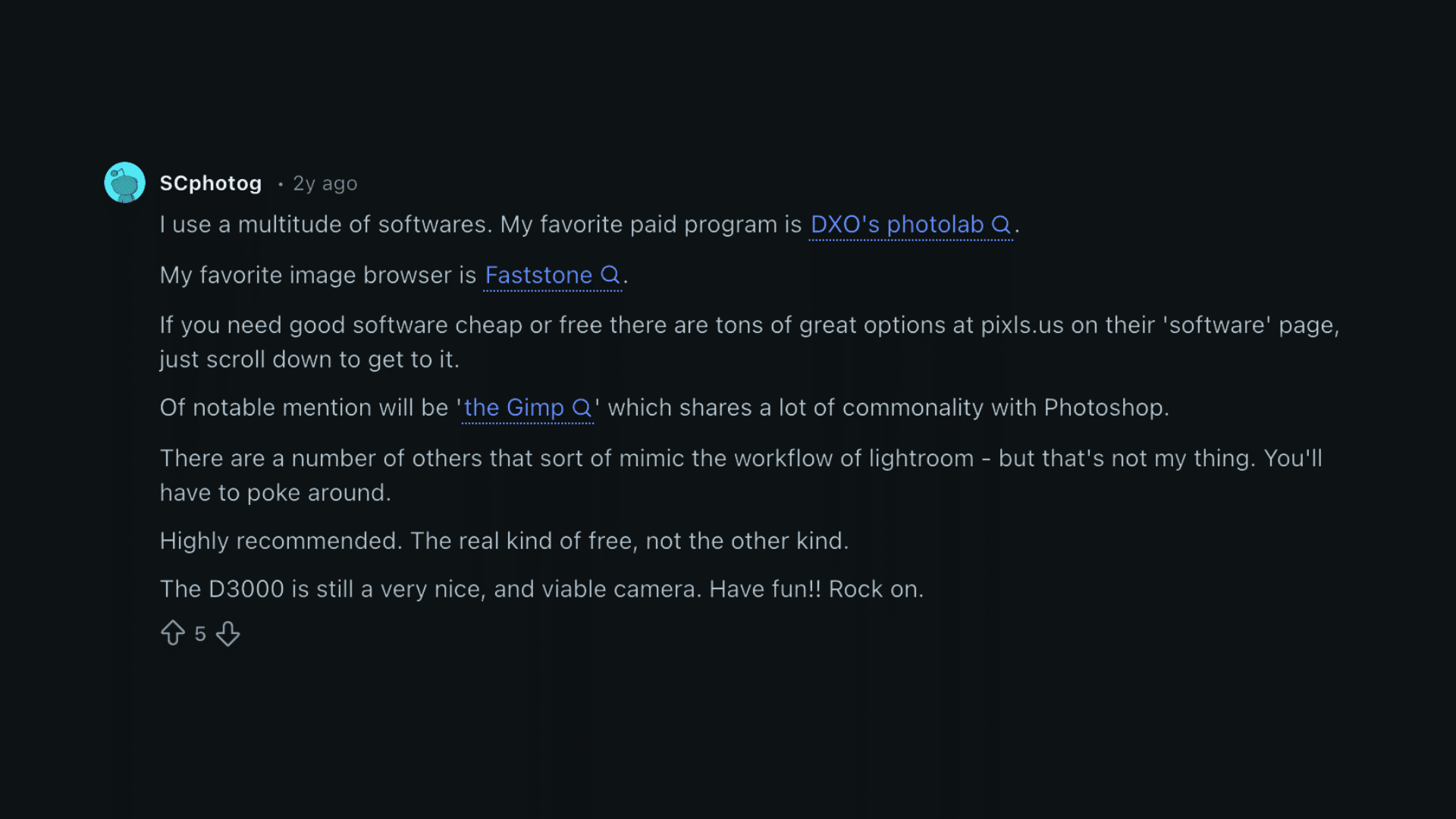
Reddit users often highlight a mix of paid and free tools when discussing the best software for photo editing.
DXO PhotoLab is frequently praised for its strong processing quality and reliable results. FastStone is noted as a favorite image browser thanks to its speed and simple layout.
For users seeking affordable or free options, the software list on pixls.us is widely recommended, offering programs that cover both basic and advanced needs.
GIMP receives regular mention as a free alternative with similarities to Photoshop, making it useful for detailed editing.
Some tools mimic Lightroom-style workflows, though preferences vary across the community.
Overall, Reddit feedback shows that both paid and free solutions can deliver excellent results depending on individual editing styles and workflow priorities.
Tips for Choosing the Best Software for Photo Editing
Choosing the best software for photo editing can feel overwhelming, so I focus on the features that actually support everyday editing needs.
- Check automation quality: Ensure AI tools perform accurate enhancements without over-editing.
- Review workflow speed: Look for fast processing, quick previews, and smooth batch edits.
- Compare tool variety: Confirm the editor includes essentials like masking, retouching, and noise control.
- Assess ease of use: Choose software with clear menus and simple controls for efficient editing.
- Consider pricing options: Determine whether a one-time purchase or subscription fits long-term use.
Conclusion
Choosing the best software for photo editing becomes much easier once the workflow, editing needs, and long-term goals are straightforward.
I’ve learned that no single tool fits every situation, and that’s why comparing AI all-in-one options with specialized workflow tools matters.
Some editors offer speed and automation. Others deliver precision and control.
The right choice depends on how often I edit, how much detail I need, and how quickly I want to finish a project.
As you narrow down your options, focus on tools that make your work feel lighter, not harder.
If you’re ready to find the various software for photo editing, start testing a few today and notice which one actually supports your workflow.
What tool are you thinking about trying first? Comment your pick below and join the conversation.