Every piece of software goes through some form of testing before it reaches real users, but few people outside of development teams understand just how structured that process actually is.
So, what are the stages of software testing, exactly?
It’s a full process made up of distinct stages, starting with understanding requirements and planning a strategy, moving through designing test cases and setting up the right environment, and finishing with execution, defect tracking, and final reporting.
Layered on top of these stages are different testing types, like functional, performance, security, and regression testing, each aimed at checking a different part of software quality.
What is Software Testing?
Software testing is the process of checking a software application to identify defects, confirm expected behavior, and ensure it meets the original requirements.
It helps teams find issues before release, improve software reliability, and verify that features work correctly for users and stakeholders.
Testing covers different checks, including whether the application functions properly, handles expected inputs, and performs as intended. The main goal of software testing is to detect problems and provide clear reports about what is not working.
Debugging happens after testing and focuses on finding the source of those problems.
In simple terms, testing identifies the issue, while debugging helps developers understand the cause and apply the required fix. Both processes work together to improve software quality.
What are the Stages of Software Testing?
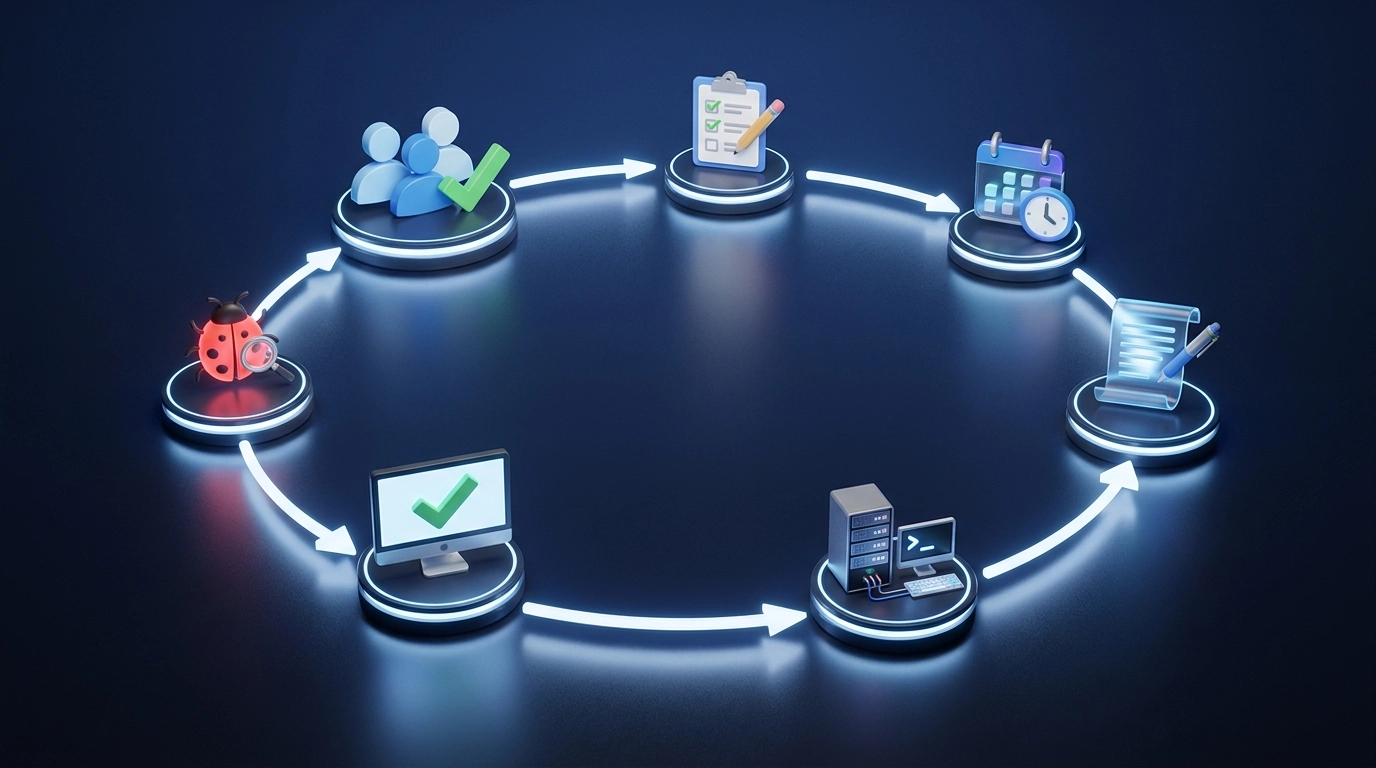
In short, they follow a structured cycle: requirement analysis, test planning, test case design, environment setup, execution, defect reporting, and test closure, with each stage building on the one before it.
Stage 1: Requirement Analysis
Requirement analysis is where testers make sense of what the software is actually supposed to do, so nothing gets tested against the wrong expectations later on.
- Testers review the software’s requirements before testing begins
- Identify the features that need to be tested
- Understand what users expect from the software
- Separate functional requirements (what the software should do) from non-functional requirements (like performance or security expectations)
A clear, well-understood set of requirements makes it much easier to build accurate test cases down the line, while a rushed or unclear requirement analysis tends to create confusion later in the process.
Stage 2: Test Planning
Test planning is where the team decides how testing will happen, not just what needs to be tested, but who does it, with what tools, and on what timeline.
- Once requirements are understood, the team puts together a test plan
- Define the testing goals for the project
- Determine the resources needed to carry out testing
- Set a realistic timeline for testing activities
- Choose the tools that will be used throughout the process
- Keep everyone aligned on what’s being tested and how
Tip: Keep the test plan somewhere the whole team can reference throughout the project, not just at kickoff. Plans that get written once and forgotten tend to drift out of sync with what’s actually being tested.
Stage 3: Test Case Design and Development
Test case design is where testers translate requirements into concrete scenarios, spelling out exactly what to check and what a passing result should look like.
- With a plan in place, testers start writing test cases based on the requirements gathered earlier.
- Each test case describes a specific scenario to check
- Define the outcome that should happen if the software is working correctly
- Cover both expected, everyday scenarios and edge cases
- Review test cases for clarity before execution begins
Well-written test cases make execution far more consistent, since anyone running them later knows exactly what to check and what “correct” looks like.
Stage 4: Setting Up the Test Environment
Test environment setup is about recreating the conditions the software will actually face once it’s live, so results reflect real-world behavior rather than a mismatched setup.
- Before execution can begin, the right test environment needs to be in place.
- Set up the hardware, software, databases, and tools needed for testing
- Mirror the environment the software will actually run in once it’s released
- Confirm all systems and tools are configured correctly before testing starts
- Coordinate with development or IT teams to resolve any setup issues early
Skipping this step or testing in a mismatched environment can hide real problems, or worse, surface issues that don’t actually exist once the software reaches production.
Stage 5: Test Execution
Test execution is the stage most people picture when they think of software testing: running through test cases one by one and checking whether the software behaves the way it’s supposed to.
- Testers run the test cases planned and designed in earlier stages
- Check the software’s behavior against the expected results
- Carry out execution manually, with a tester walking through each scenario by hand
- Or run it through automated scripts that execute test cases without manual input
- Record whether each test case passes or fails as it runs
Execution is where all the earlier planning and preparation pay off, since this is the stage that actually surfaces whether the software works as intended.
Stage 6: Defect Reporting and Management
Defect reporting and management is how the issues found during execution get documented, tracked, and pushed toward a fix, rather than getting lost or forgotten.
- Whenever a test uncovers a problem, that issue gets documented right away
- Track the defect through a defined defect life cycle
- Assign the issue to the right person or team for a fix
- Retest once a fix has been made to confirm it works
- Close out the defect once it’s verified as resolved
A clear defect reporting process keeps issues from slipping through the cracks, and it gives the whole team visibility into what’s broken, what’s being worked on, and what’s actually resolved.
Stage 7: Test Closure
Test closure is the final stage where the team steps back, reviews what happened, and formally wraps up the testing effort.
- Once testing wraps up, the team reviews the results
- Document what was found throughout the testing cycle
- Formally close out the testing effort
- Reflect on what went well and what could improve next time
- Prepare final reports and get sign-off before release
The lessons captured here often end up shaping how the next testing cycle gets planned, making each round a little smoother than the last.
Software Testing Stages at a Glance
Most testing teams follow a structured process known as the Software Testing Life Cycle (STLC). Each stage in the STLC has a specific purpose, and together they take a project from initial requirements all the way through to a fully tested, ready-to-release product.
| Testing Stage | Main Purpose |
| Requirement Analysis | Understanding what needs to be tested |
| Test Planning | Creating testing strategy and resources |
| Test Case Design | Preparing test scenarios and cases |
| Test Environment Setup | Preparing systems and tools |
| Test Execution | Running tests and finding defects |
| Defect Reporting | Tracking and fixing issues |
| Test Closure | Reviewing results and completing testing |
Together, these seven stages form a complete cycle that takes a project from raw requirements to a fully tested, release-ready product.
Different Types of Software Testing Beyond Testing Stages
It helps to separate testing stages from testing types. Stages describe the process testing moves through, from planning to closure, while types describe what’s actually being checked at each point, whether that’s functionality, performance, security, or something else.
1. Functional Testing
Functional testing checks whether the software’s features work according to the requirements it was built against. It usually includes:
- Unit testing
- Integration testing
- System testing
- User acceptance testing
Together, these functional checks confirm that a feature doesn’t just exist; it actually does what it’s supposed to do, at every level from a single function up to the finished product.
Integration checks, in particular, depend on how well separate services communicate, which is why teams pay close attention to API integrations when a feature spans several systems.
2. Regression Testing
Regression testing confirms that new updates or changes haven’t broken existing features that were already working.
- Run after any code change, big or small
- Confirms existing features still work as expected
- Becomes especially important during frequent software updates
- Helps catch issues introduced by new code layered on top of what already works
Ultimately, regression testing is what gives teams the confidence to keep shipping updates without constantly worrying that yesterday’s fix broke today’s feature.
3. Performance Testing
Performance testing checks how well software holds up under real-world conditions, focusing on speed, stability, and responsiveness. It includes:
- Focuses on speed, stability, and responsiveness
- Includes load testing to check behavior under expected demand
- Includes stress testing to check behavior under extreme demand
- Includes scalability testing to check how well the software grows with increased load
Catching performance issues before release matters most in situations where real users won’t be as forgiving as a test environment, especially once traffic or data volume scales up.
This gets more involved for software built on distributed computing, where the workload spreads across many machines, and each added node brings its own behavior to account for.
4. Security Testing
Beyond making sure features work, it’s just as important to make sure they can’t be exploited. Security testing looks at software from an attacker’s perspective to catch weaknesses before someone else finds them. It typically checks:
- Checks how well data protection measures hold up
- Verifies authentication processes work as intended
- Reviews access controls to confirm only the right users can reach sensitive areas
- Scans for vulnerabilities that attackers could exploit
Security issues caught during testing are far cheaper and less damaging to fix than ones discovered after release, which is part of why security testing keeps gaining more attention across development teams.
5. Usability Testing
Software can work perfectly and still frustrate users if it’s hard to navigate. Usability Testing shifts the focus from whether something works to whether people can use it easily. It focuses on:
- Shifts the focus from whether something works to whether people can use it comfortably
- Checks the clarity and layout of the user interface
- Checks how easily users can move through menus and features
- Checks overall user experience and satisfaction
Even a technically flawless application can fall flat if it’s confusing to use, which is exactly the gap usability testing is meant to catch before real users ever get there.
Levels of Software Testing
Beyond testing types, software testing is also organized into levels, which describe how much of the system is being tested at once.
| Testing Level | What It Covers | Typically Performed By |
| Unit Testing | Individual components or functions in isolation | Developers |
| Integration Testing | How different modules or components work together | Developers or QA teams |
| System Testing | The complete, fully integrated software application | QA teams |
| User Acceptance Testing (UAT) | Whether the software meets real business needs | Actual users or clients |
Moving through these levels one at a time, from the smallest pieces up to the full user experience, helps catch problems at the point where they’re easiest and cheapest to fix, rather than letting them surface further down the line.
Best Practices and Common Roadblocks
Effective software testing usually comes down to a handful of steady habits. It helps to start testing early during development, so problems surface while they are still cheap and simple to fix.
Clear, well-kept documentation keeps everyone on the same page, while focusing on the most important features first makes sure critical parts get the attention they deserve.
Strong teams tend to combine manual and automated testing, check how software behaves across different devices, and revisit their own process from time to time to sharpen it.
Even with these habits in place, familiar hurdles still show up.
Requirements shift partway through a project, testing time runs short, and resources stay tight. Some bugs are hard to reproduce, which makes them tricky to pin down, and testing across multiple platforms adds another layer of complexity to manage.
Final Vision
Once you understand what the stages of software testing are, following that structured process gives teams a clear, repeatable way to catch issues before they reach users.
Each stage, from requirement analysis through test closure, plays its own part in improving software quality, and pairing those stages with the right testing types and levels leads to more reliable, better-tested software overall.
Skipping steps or rushing through them tends to catch up with a project later, usually at a more expensive point than if the issue had been caught early.
If your team is looking to tighten up its own testing process, start by mapping your current workflow against these seven stages. Chances are, that’s where the biggest gaps will show up first. Drop a comment below and let me know if this helped.
Frequently Asked Questions
Is Software Testing a Good Career Path?
Yes, software testing (often called QA) is a stable, in-demand career path, with roles ranging from manual testers to automation engineers and dedicated performance or security specialists as you gain experience.
Can Artificial Intelligence Help with Software Testing?
Yes, AI-assisted tools are increasingly used to generate test cases, identify likely problem areas in code, and speed up regression testing. However, human oversight is still needed to catch issues automated tools might miss.
Is it Worth Outsourcing Software Testing?
It depends on the team’s size and budget. Outsourcing can bring in specialized expertise or extra capacity for larger projects, while smaller teams may find it more practical to keep testing in-house alongside development.
How Do Teams Decide When Testing Is Finished?
Testing typically wraps up once a project hits predefined exit criteria, such as passing a set percentage of test cases, resolving critical defects, or reaching an agreed coverage target, rather than continuing indefinitely.