Have you ever wanted to show that a word, message, or task has changed in a Discord conversation without deleting the original text?
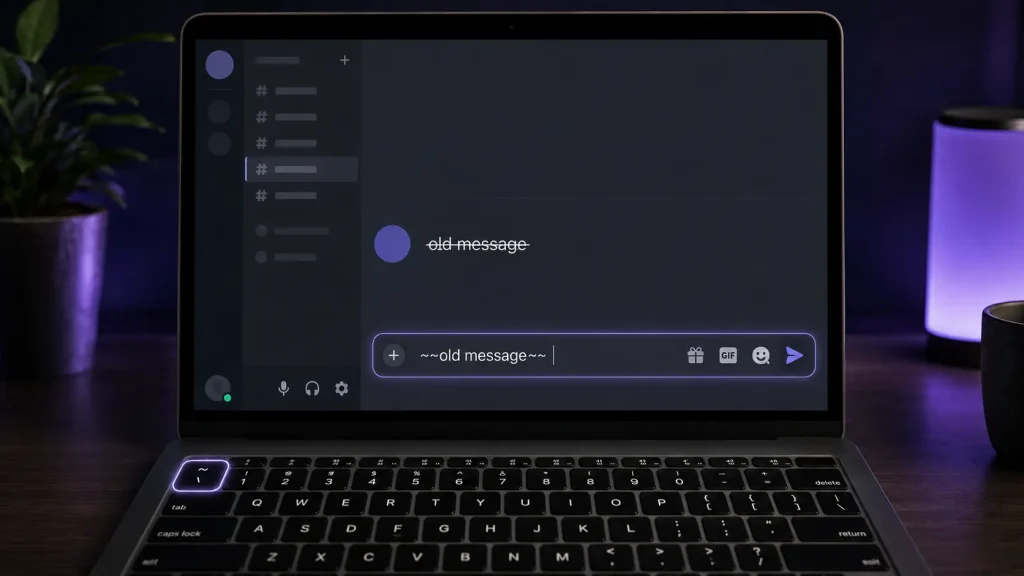
In Discord, you can cross out text by typing two tildes (~~) directly before and after the words, and Discord displays the text with a line through it once the message is sent.
Desktop and web users also have a second option: highlight text and click the strikethrough icon in the context menu, though this shortcut isn’t available on mobile.
The steps below cover both methods on desktop and mobile, plus how to fix common formatting issues and combine strikethrough with other Discord text styles. Neither method needs a bot, plugin, or extra setting. Discord applies the effect automatically.
What is Strikethrough Text in Discord?
Strikethrough text is a Markdown formatting style that places a line through selected words by adding two tildes (~~) before and after them. In Discord, it shows that something has been changed, removed, or replaced while still letting other users see the original wording.
Discord uses Markdown formatting commands to adjust how messages look. These commands work by adding special characters around text. For crossed-out text, Discord uses two tilde symbols before and after the selected words.
For example: ~~old message~~ becomes: old message
This formatting option is useful when you want to update information without creating confusion. It allows users to show updated information while keeping the message context clear.
Users often apply this style in gaming servers, study groups, community channels, and personal chats. It helps keep discussions clear when information changes over time.
How to Strikethrough Text In Discord
Discord uses Markdown formatting to create crossed-out text. Strikethrough helps you show corrections, updates, or removed details without deleting the original message.
1. Discord Strikethrough Markdown Format
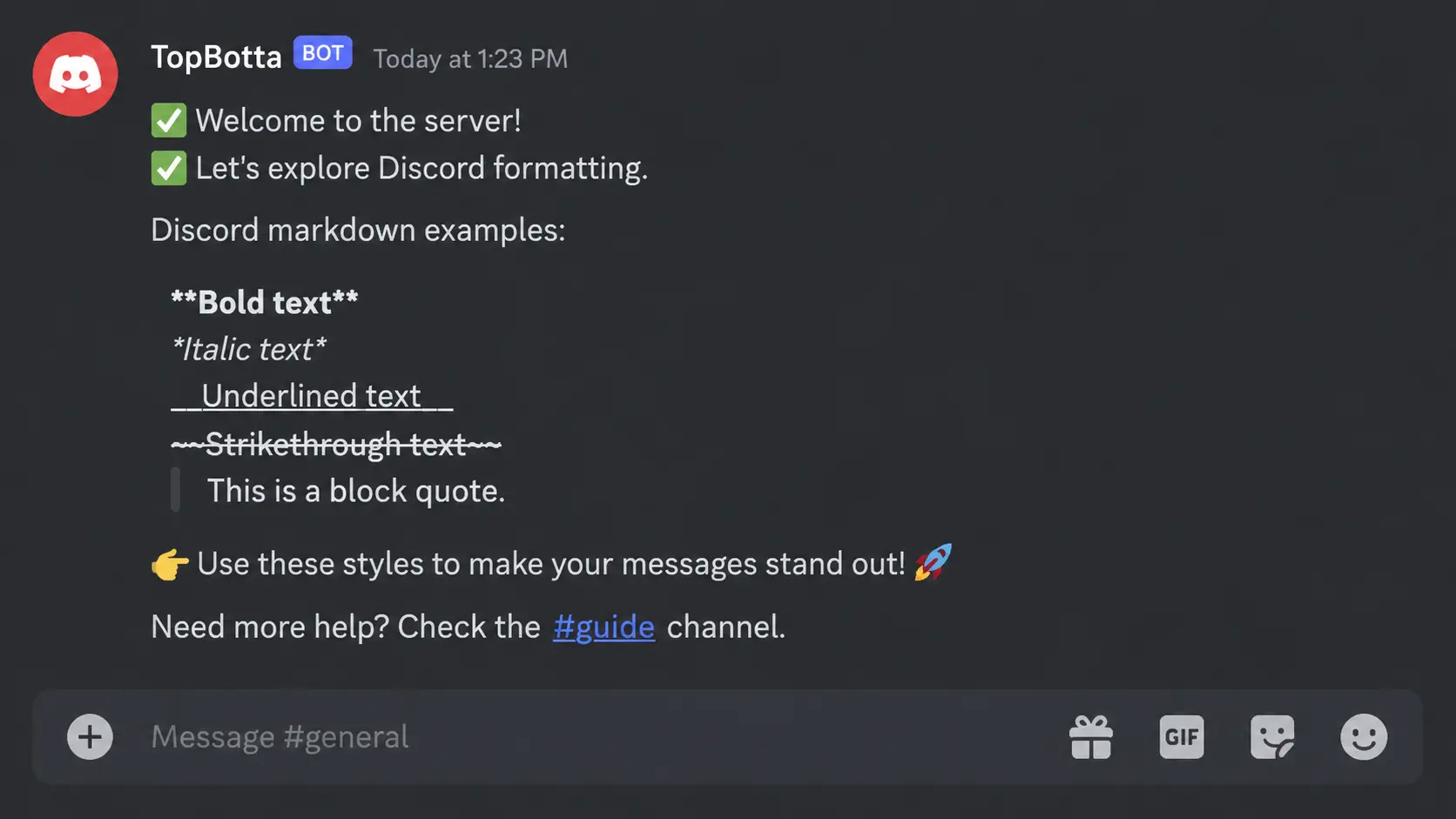
Discord uses the tilde symbol (~) to create strikethrough text. This Markdown feature lets you cross out words, phrases, or sentences in messages.
Here’s how it works:
- Type two tilde symbols (
~~) before the text you want to format. - Write the word, phrase, or sentence you want to cross out.
- Add two more tilde symbols (
~~) after the text. - Send the message to apply the crossed-out effect.
The Markdown format works directly in Discord messages and doesn’t require bots, plugins, or extra settings.
2. Strikethrough Discord On Desktop
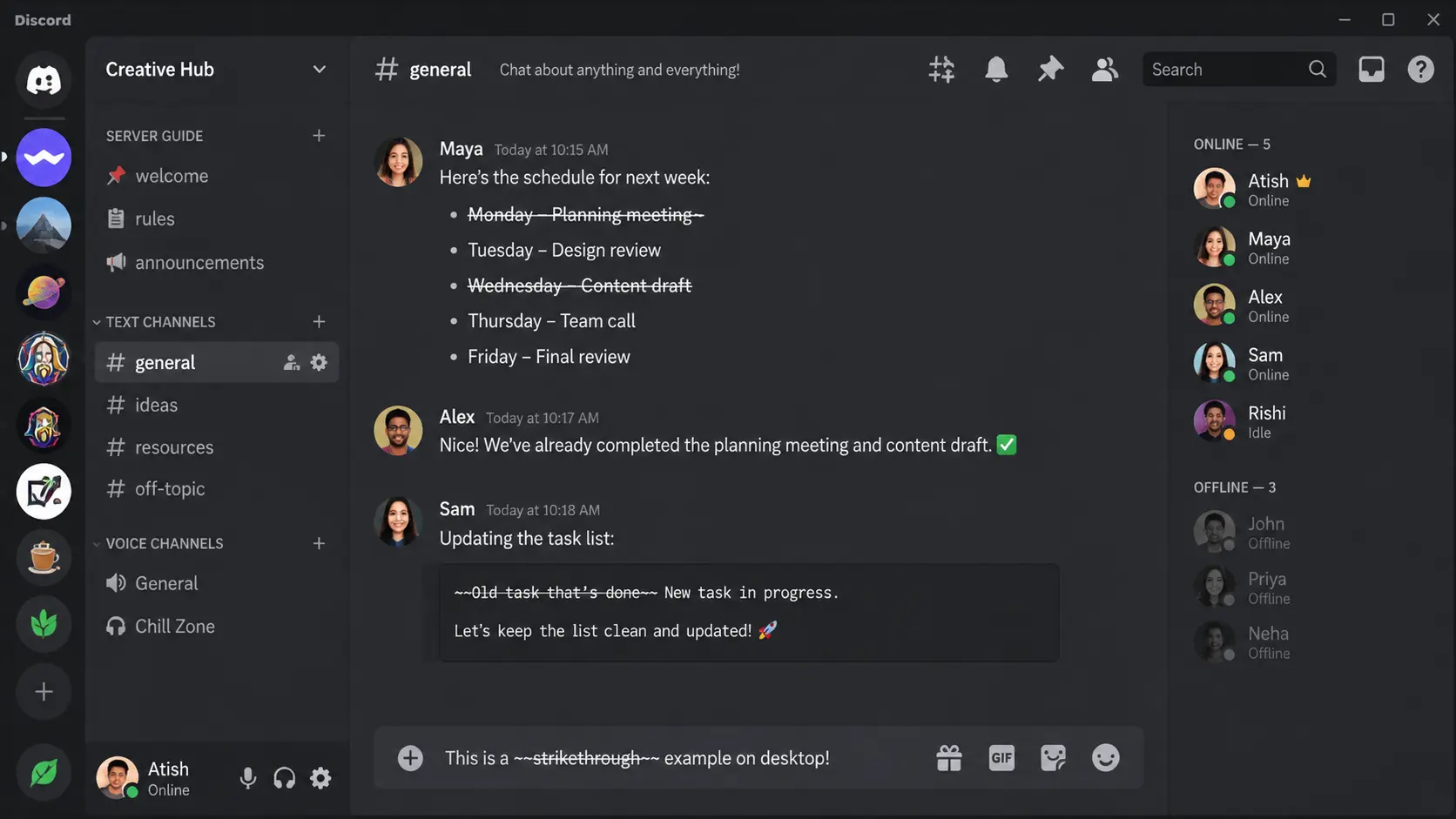
Discord desktop users can add crossed-out text directly from the message box. The same Markdown formatting works in both the desktop app and browser version.
Follow these steps:
- Open Discord on your desktop and enter a server channel or direct message.
- Type two tilde symbols (
~~) before your selected text. - Add your word, phrase, or sentence.
- Place two more tilde symbols (
~~) at the end. - Send the message to apply the strikethrough effect.
The tilde symbol is usually located near the top-left corner of the keyboard, below the Escape key. Some keyboard layouts may require the Shift key to type it. This small formatting habit fits naturally into workflows built around remote work tools, where teams often need to flag quick updates.
3. Strikethrough Discord On Mobile
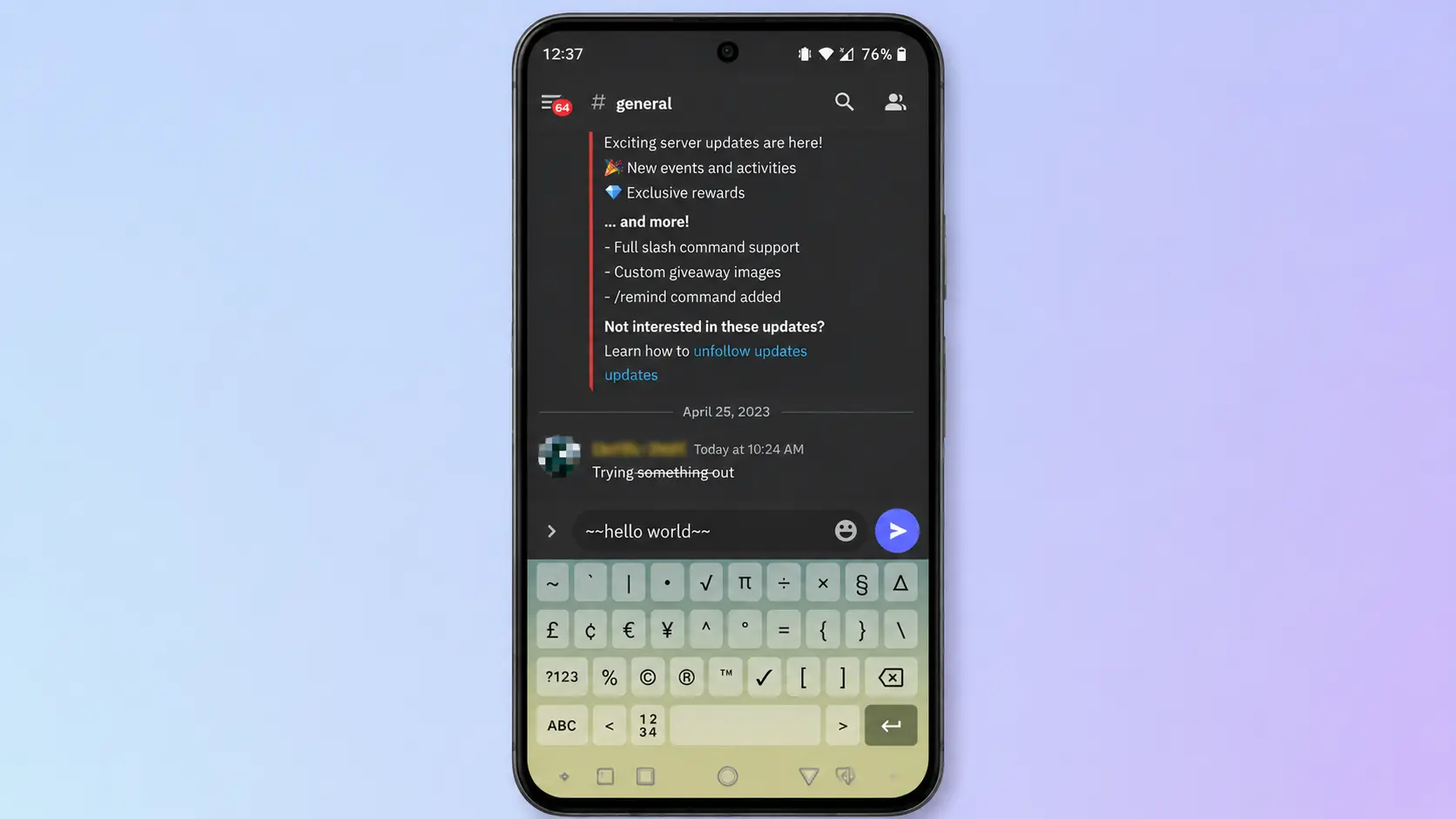
Discord mobile supports the same Markdown formatting on Android and iPhone devices. The main difference is accessing the tilde symbol through your phone keyboard.
Follow these steps:
- Open Discord and enter a server channel or direct message.
- Open the symbols section on your mobile keyboard.
- Add two tilde symbols (
~~) before the text. - Type the word, phrase, or sentence you want to format.
- Add two more tilde symbols (
~~) after the text and send the message.
Discord automatically applies the strikethrough effect after you send it. This method works without any additional tools or setup, and it pairs well with everyday productivity apps that people already use to stay on top of tasks while away from their desks.
When to Use Strikethrough In Discord Messages
Strikethrough helps organize Discord conversations by showing changes, corrections, and updates without removing the original text. It keeps previous information visible while making the latest details easier to understand.
| Use Case | How Strikethrough Helps |
|---|---|
| Correcting Mistakes | Shows incorrect details with updated information beside them, making corrections clearer without deleting the original message. |
| Managing Tasks | Works as a simple checklist by marking completed tasks while keeping finished items visible in gaming groups, study channels, and team discussions. |
| Updating Announcements | Highlights changed details in schedules, rules, or event updates while helping members understand what information has been replaced. |
| Adding Humor To Messages | Creates playful effects by crossing out words or phrases to show jokes, changed thoughts, or funny corrections. |
Using strikethrough correctly can make Discord messages easier to follow. It helps show edits, changes, and completed actions while keeping the original conversation context available, much like professional note-taking apps that track changes without erasing earlier entries.
Using Strikethrough with Other Discord Styles
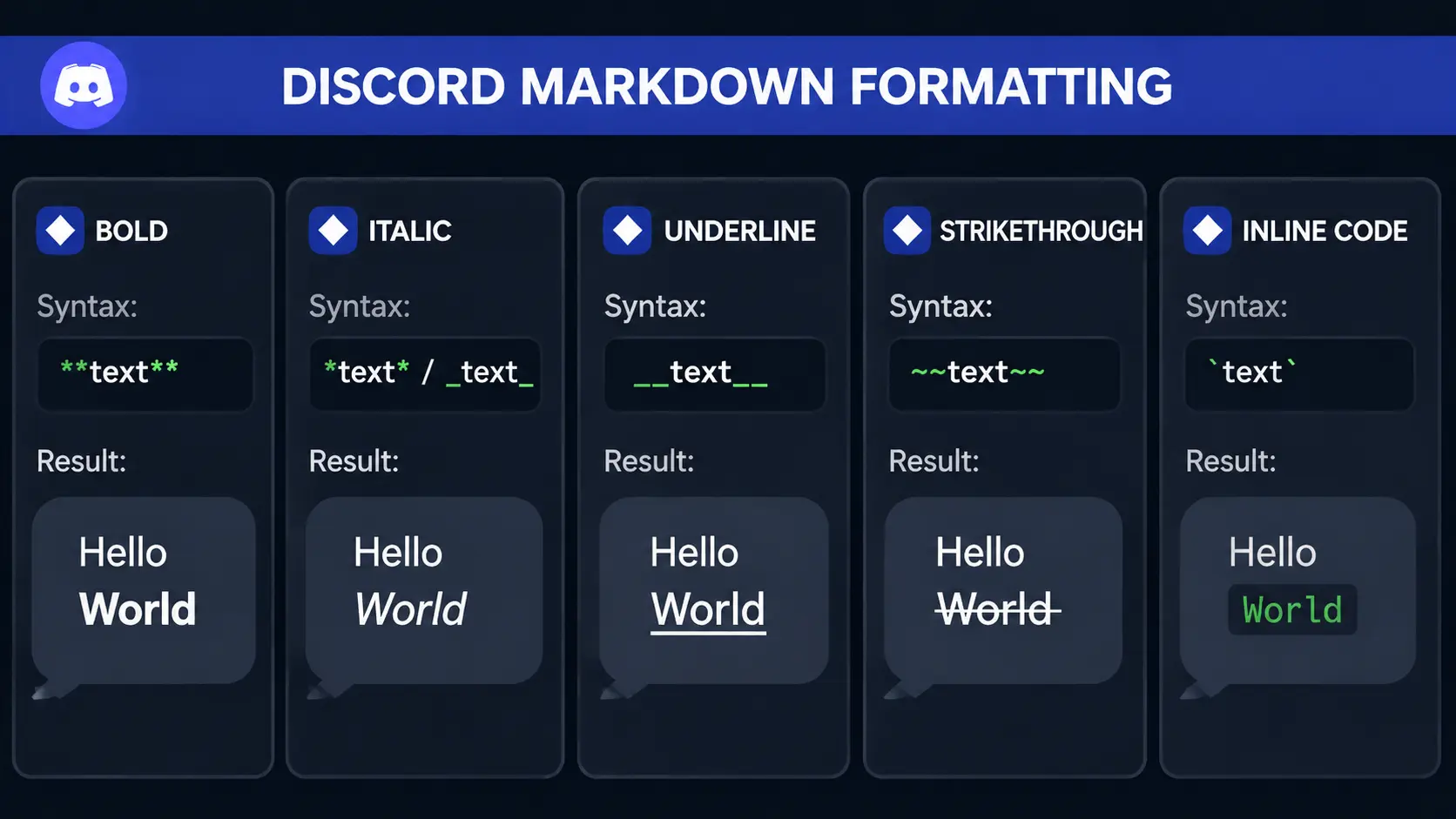
Discord allows you to combine strikethrough with other Markdown styles to create different text effects. These combinations can add emphasis, highlight changes, or make specific parts of a message easier to notice without affecting the overall meaning.
- Bold and Strikethrough: Bold formatting combined with strikethrough makes crossed-out text stand out more. This style works well when you want to draw attention to a correction, replaced detail, or important update inside a Discord conversation.
- Italic and Strikethrough: Italic formatting with strikethrough creates a softer text style for casual messages. It can be used when you want to show a changed thought, playful comment, or small correction while keeping the message easy to understand.
- Underline and Strikethrough: Underline formatting with strikethrough can add extra emphasis to crossed-out text. This combination may help highlight removed information, important changes, or specific parts of a message that need more visibility.
- Code Block and Strikethrough: Code formatting with strikethrough can be useful when showing changed commands, text examples, or updated code snippets. It helps keep the original format visible while showing that a specific part has been replaced or removed.
Combining Markdown styles can make certain parts of a Discord message stand out, but the formatting should match the purpose of the message. Simple combinations usually keep conversations easier to read.
Why Discord Strikethrough May Not Work
Discord strikethrough may fail when the Markdown symbols aren’t placed correctly or when unsupported characters are used. In most cases, the issue is caused by small typing errors or the wrong characters.
Check that your message follows the correct format and that both sides of the text include the required symbols. Discord needs two tilde symbols before and after the selected text. If one side is missing, the formatting will not activate.
The tilde symbol should also be the standard keyboard character (~) because similar-looking symbols may not work. Avoid adding spaces between the symbols and your text, as extra spacing can stop Discord from recognizing the command.
Strikethrough works best in regular Discord text messages. If you are sending messages through bots, special tools, or other features that change how content is displayed, the formatting may not appear as expected.
Common Uses of Discord Formatting Commands
Discord formatting commands are commonly used in different types of communities to make messages easier to understand. Each style has a different purpose depending on the type of conversation.
| Use Case | How Formatting Helps |
|---|---|
| Gaming communities | Highlights updates, changes, and completed tasks. |
| Study groups | Organizes notes, corrections, and shared information. |
| Server moderation | Makes announcements and rule updates clearer. |
| Team discussions | Helps show edited details and completed actions. |
Using the right formatting style can make Discord messages easier to scan and understand. These options help users present information clearly while keeping conversations organized across different types of communities.
Quick Tips for Using Strikethrough in Discord
Strikethrough is most effective for showing changes, corrections, or completed items. Following a few simple practices can keep your Discord messages clear and make crossed-out text easier for others to understand.
- Use it for updates: Show replaced information while keeping the original message visible for better context.
- Keep crossed-out text short: Make changes easier to notice and help readers understand the update quickly.
- Add updated details nearby: Place new information close to crossed-out text so readers can identify the latest details without confusion.
- Avoid excessive formatting: Use strikethrough only when needed to keep messages simple, clear, and easy to read.
These tips help you add strikethrough naturally without making your Discord messages hard to follow. Clear formatting improves communication, especially in active conversations.
How to Remove Strikethrough Formatting in Discord
Discord may show tilde symbols instead of applying the strikethrough effect when the Markdown format is not entered correctly. This usually happens when one tilde is missing, extra spaces are added between the symbols and text, or the wrong symbol is used.
To fix the issue, check that two tilde symbols (~~) appear before and after the selected text without spaces between them. Make sure you are using the standard tilde character from your keyboard rather than a similar-looking symbol.
Once the formatting is corrected, Discord should automatically display the text with a line through it. This method works in regular Discord messages on desktop and mobile.
Final Thoughts
Strikethrough Discord formatting makes it easier to show corrections, updates, and completed tasks while keeping the original message visible. By using the double tilde command, you can quickly create crossed-out text in desktop and mobile versions of Discord.
The feature works well for casual chats, gaming communities, server updates, and group discussions where information changes often. Learning strikethrough, along with other Discord Markdown options, gives you more control over message appearance.
Now that you know the steps, formatting options, and common fixes, try the tips in your next Discord conversation and share your thoughts on how you use text formatting.
Try these formatting options in your next Discord conversation and share your thoughts on which style works best for your messages.
Frequently Asked Questions
Why Does Discord Show Tildes Instead of Strikethrough Text?
Discord may show tilde symbols instead of crossed-out text when the symbols are placed incorrectly, missing on one side, or separated from the text with spaces. Checking the formatting usually fixes the issue.
Does Strikethrough Work in Discord Nicknames?
No, Discord Markdown formatting does not apply to usernames or nicknames. Strikethrough works mainly inside supported text messages where Discord processes Markdown commands.
Can You Use Strikethrough in Discord Polls?
No, Discord poll options don’t support normal Markdown formatting the same way as regular messages. Strikethrough is mainly available in standard text conversations.
Does Strikethrough Work in Discord Bots?
It depends on the bot and how it sends messages. Bots that support Discord Markdown formatting can display strikethrough text, while some custom message systems may not.
Can You Combine Strikethrough With Multiple Discord Styles?
Yes, Discord allows strikethrough to work with other Markdown styles like bold and italic. Combining formats can change how your message appears and highlight specific parts.