When Wi-Fi drops out at an airport, hotel, job site, or during a home outage, a phone can sometimes become the connection your other devices need.
If your question is “what is a mobile hotspot,” the simplest answer is that it shares an internet connection from a cellular device with nearby devices. That sounds similar to ordinary Wi-Fi, but the internet source, data limits, battery use, and security options differ.
I usually check those four things before relying on a hotspot for work or travel. Below, you will see how mobile hotspots work, the main hotspot types, setup steps for iPhone and Android, typical costs, speed limits, security, and when another connection makes more sense.
What is a Mobile Hotspot?
A mobile hotspot is a portable connection that uses a cellular network to create a private Wi-Fi network for other devices.
A mobile hotspot is a portable connection that pulls data from a cellular network and rebroadcasts it as a private Wi-Fi signal, so a laptop, tablet, or second phone can get online without its own SIM card.
Think of it as a translator: it speaks to a cell tower on one side and Wi-Fi on the other, converting one into the other. It does not generate internet on its own. It borrows from a phone plan or a dedicated hotspot plan and reshapes the internet source into something nearby devices can use.
A hotspot can live inside a smartphone you already own, or come from a separate device built only to share mobile internet. Either way, it helps most when regular Wi-Fi is unavailable, unreliable, or simply not somewhere you trust.
How Does a Mobile Hotspot Work
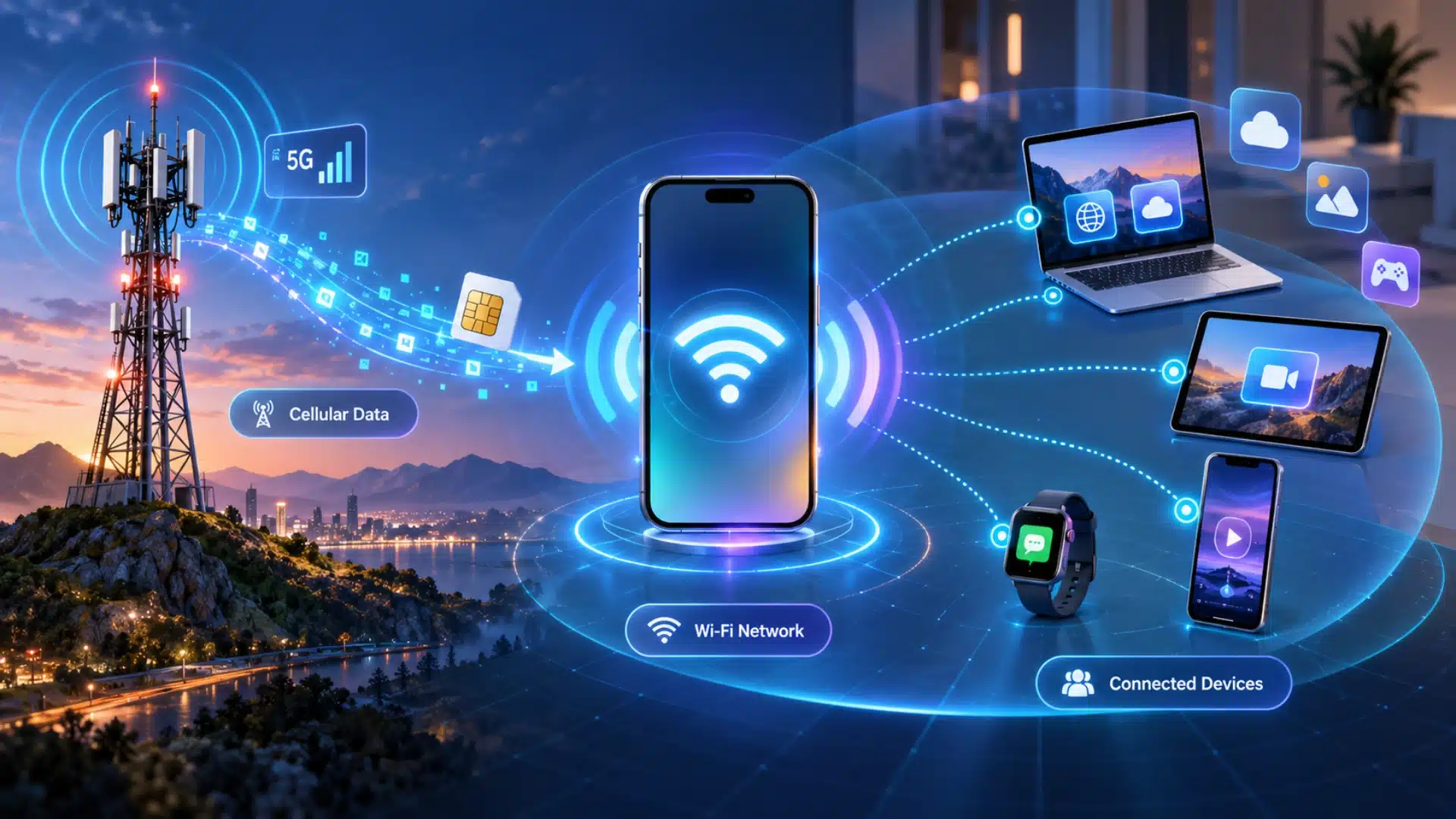
A mobile hotspot works in three simple stages. I find it easiest to understand by following how cellular data moves from a tower to connected devices.
1. It Connects to a Cellular Network
A mobile hotspot first connects to a nearby cellular tower using a SIM card or built-in mobile service. It receives internet access through a 4G LTE or 5G network, depending on the device, carrier, and local coverage.
I like to think of the hotspot as the middle point that receives cellular data first, then prepares that connection so nearby devices can use it.
2. It Creates a Private Wi-Fi Network
After receiving cellular data, the hotspot turns that connection into a local Wi-Fi network. It creates a network name, called an SSID, along with a password that approved devices can use to connect, and it follows basic wireless security steps to keep the network private.
The setup works much like a home router, but the internet source comes from a mobile network instead of a fixed cable, fiber, or broadband connection service.
3. Your Devices Share the Internet Connection
Once the Wi-Fi network is active, laptops, tablets, phones, and other compatible devices can connect using the hotspot password.
Each device then shares the same mobile data connection for browsing, email, video calls, streaming, or other online tasks.
I recommend checking how many devices are connected, because more users can divide the available bandwidth and may reduce speed for everyone on the network.
Note: most phones also let you set a maximum device limit on your hotspot (often 5 to 10 depending on the model). Lowering that limit yourself is one of the fastest ways to protect speed for the devices that matter.
Mobile Hotspot vs. Home Wi-Fi: What is the Difference?
These terms are easy to mix up because a mobile hotspot often uses Wi-Fi to connect nearby devices. The useful comparison is mobile hotspot service versus home internet delivered through a Wi-Fi router.
|
Feature |
Mobile Hotspot |
Tethering |
Traditional Wi-Fi |
|---|---|---|---|
|
Internet source |
Cellular network, shared over Wi-Fi |
Cellular network, shared over USB or Bluetooth |
Router connected to a fixed internet line |
|
Devices supported |
Multiple, over Wi-Fi |
Usually one, direct connection |
Multiple, over Wi-Fi |
|
Setup |
Password-protected network |
Cable or Bluetooth pairing |
Fixed router setup |
|
Best use |
Sharing with several devices at once |
A single laptop, more stable and battery-friendly than Wi-Fi hotspot mode |
Home and office daily use |
Types of Mobile Hotspots Explained
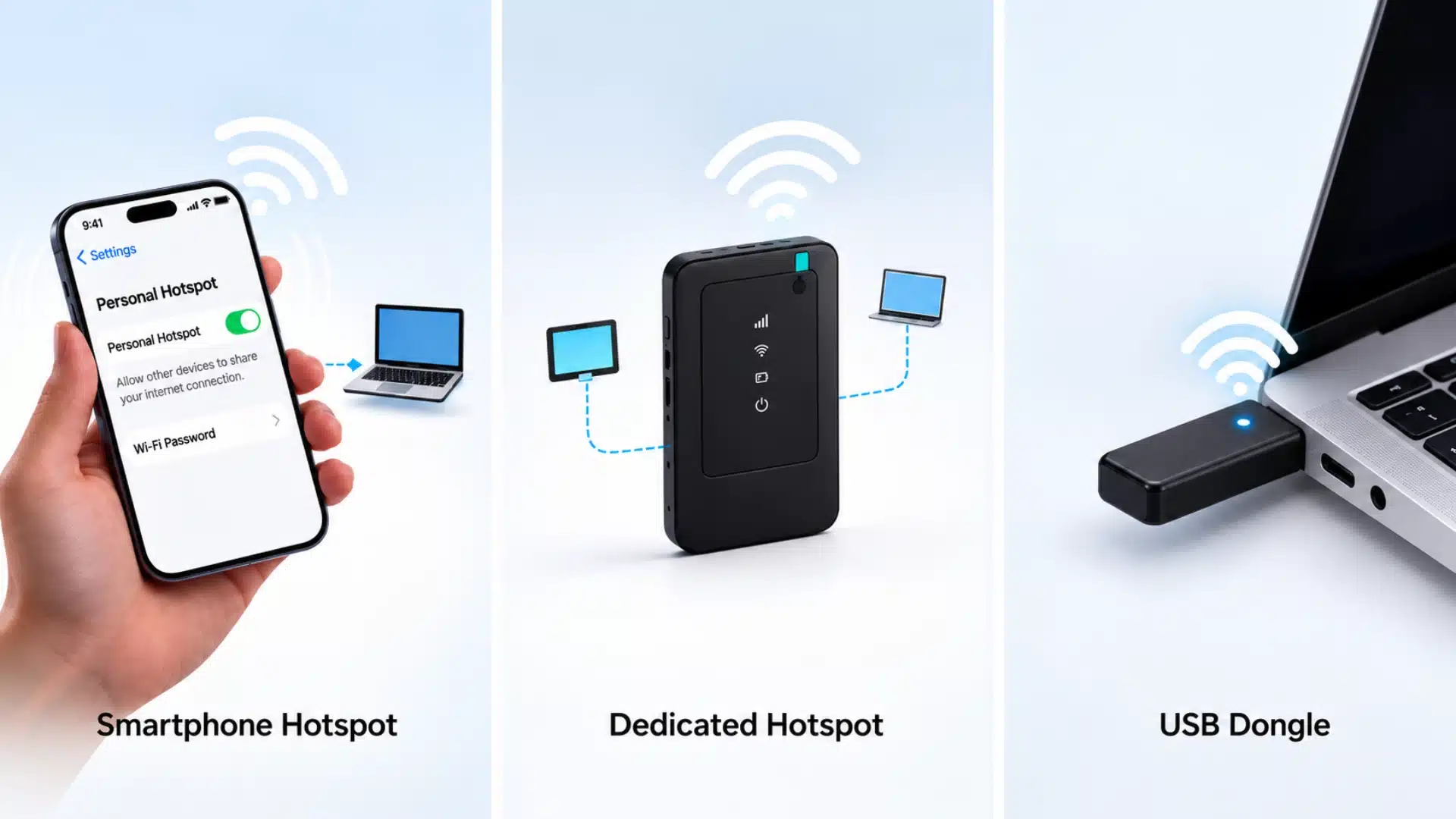
Mobile hotspots come in three common forms. The right one depends on how often you need a connection away from fixed Wi-Fi, and how many devices you’re feeding.
1. Smartphone Hotspot
A smartphone hotspot uses your phone’s built-in feature to share mobile data over Wi-Fi. It costs nothing extra beyond your data plan and needs no extra hardware, making it the default choice for occasional use.
The tradeoff is real: running hotspot mode for a few hours can drain a phone battery noticeably faster than normal use, and performance tends to dip once more than two or three devices join.
2. Dedicated Mobile Hotspot Device
A dedicated hotspot is a standalone unit built only to share cellular internet, such as a Netgear Nighthawk, Skyroam Solis, or a similar MiFi-style device.
These typically run their own battery (separate from your phone), hold a charge longer under heavy use, and support more simultaneous connections. It suits frequent travelers, field workers, or anyone who needs a hotspot running all day, and pairing it with basic app privacy checks is worth the extra minute.
3. USB Dongle Hotspot
A USB dongle plugs directly into a laptop and pulls a cellular signal without creating a Wi-Fi network at all; it’s a wired, single-device connection.
It tends to be more power-efficient and slightly more stable than Wi-Fi tethering because it has no wireless handoff, but it only serves the one device it’s plugged into.
How Much Does Hotspot Data Cost?
New section, fills a real content gap around cost, which the original never addressed despite being one of the most common questions people have.
Most postpaid phone plans include a set amount of hotspot data each month, commonly somewhere between 15GB and 50GB, after which speeds are usually reduced (often called deprioritization or throttling) rather than cut off entirely.
Prepaid and budget MVNO plans are more likely to exclude hotspot data altogether, or charge for it as a separate add-on.
I recommend checking your carrier’s account app or settings before a trip, rather than assuming your regular data allowance automatically covers hotspot use; that assumption is one of the most common reasons people get an unexpected slowdown or bill.
Dedicated hotspot devices usually run on their own prepaid or postpaid data plan, separate from your phone plan.
Is a Mobile Hotspot Secure?
A mobile hotspot is generally more private than public Wi-Fi because it’s your own encrypted network rather than one shared with strangers, but it isn’t automatically safe.
- Change the default network name and password before connecting other devices, especially on a dedicated hotspot device that ships with a factory password.
- Confirm the security type is set to WPA2 or WPA3, not an open, unsecured network, and keep steps for public networks in mind whenever you’re away from home.
- Turn the hotspot off when you’re not actively using it. It’s an easy step to forget, and one I’ve had to go back and fix more than once after leaving a hotspot broadcasting overnight in a hotel room.
None of this takes more than a minute to set up, but skipping it is exactly how a “private” hotspot ends up not so private.
Why Use a Mobile Hotspot?
A mobile hotspot helps you stay connected when regular Wi-Fi is unavailable, unreliable, or inconvenient. It provides a flexible internet option for different situations.
|
Use Case |
How It Helps |
|---|---|
|
Remote work |
Supports meetings, emails, and online tasks without relying on public Wi-Fi. |
|
Travel |
Keeps laptops and tablets connected during trips, hotels, airports, or road journeys. |
|
Backup internet |
Provides temporary access during outages for essential browsing and communication. |
|
Outdoor work |
Helps you stay online in parks, outdoor spaces, or locations without fixed internet. |
|
Multiple devices |
Allows phones, tablets, and laptops to share one mobile connection. |
I recommend using a hotspot as a convenient backup or travel solution. Consider your data plan, signal strength, and usage needs before relying on it regularly.
How to Set Up and Manage a Mobile Hotspot
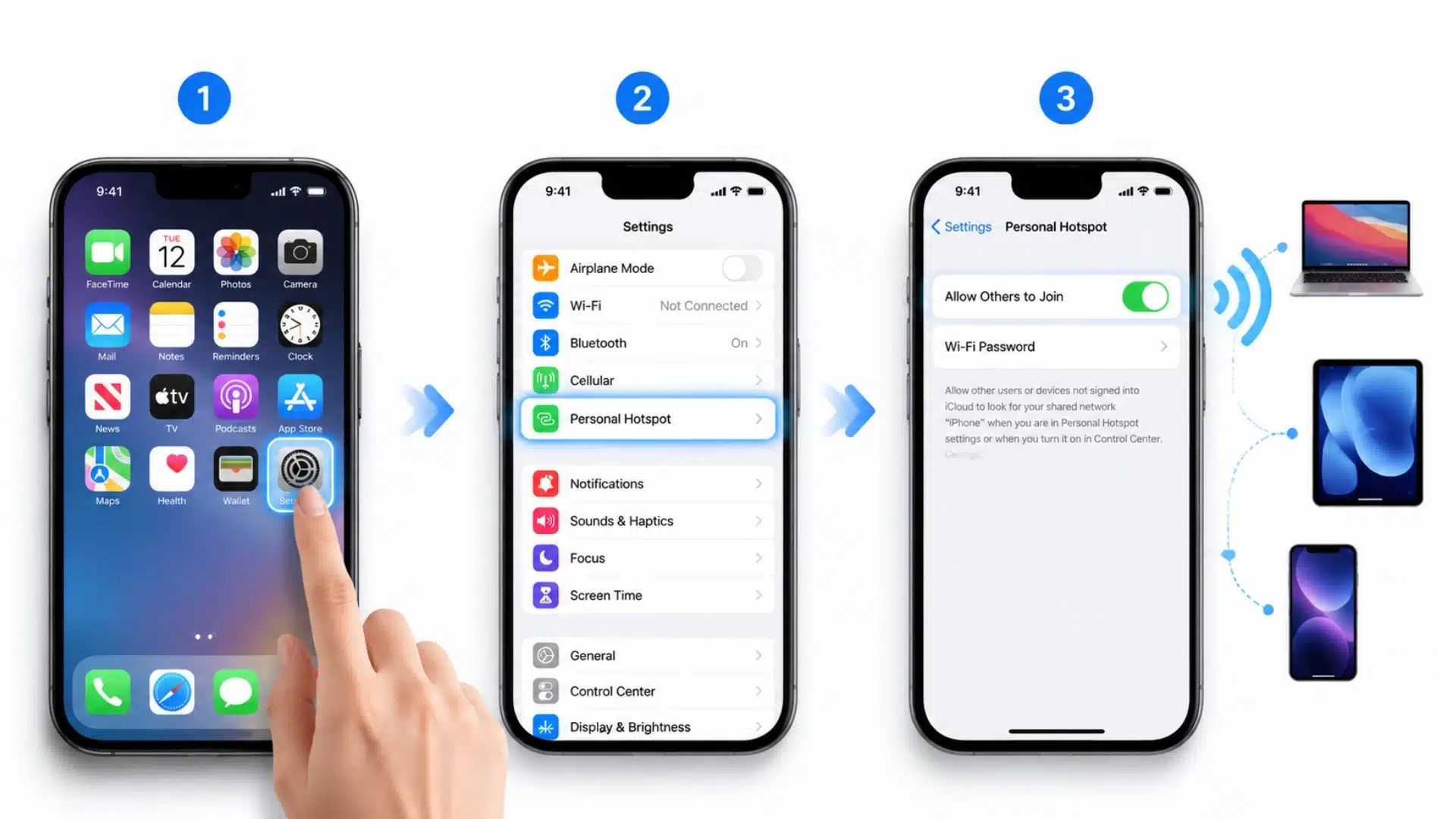
Setting up a hotspot is simple, but knowing how to connect devices and control usage helps you maintain better speed, security, and data management.
Turn On a Mobile Hotspot
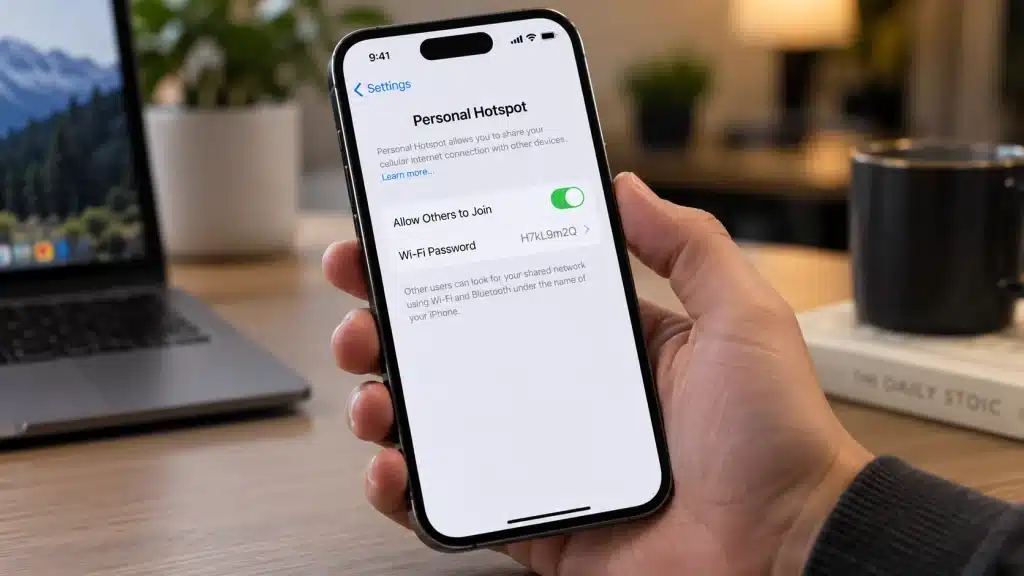
- On iPhone, open Settings > Personal Hotspot and enable Allow Others to Join.
- On Android, go to Settings > Network or Connections > Hotspot and Tethering and turn on Wi-Fi hotspot.
You can update the hotspot name and password before connecting other devices to keep your network secure.
Manage Connected Devices and Speed
- Check device limits: Connected devices depend on your hotspot type, carrier, and available bandwidth.
- Reduce connections: Remove unused devices to maintain better speed during high-data activities.
- Track data usage: Monitor consumption to avoid limits and unexpected slowdowns.
Use these simple steps to activate your hotspot and manage connected devices while keeping your connection secure, stable, and efficient.
What Affects Mobile Hotspot Speed and Battery Life?
Hotspot performance depends mainly on cellular signal, network demand, connected devices, and data use.
|
Factor |
Effect |
What to Do |
|---|---|---|
|
Weak signal |
Slower speeds and unstable calls |
Move to an area with better reception |
|
Busy network |
Speeds may drop despite strong signal |
Retry later or switch connections |
|
Multiple devices |
Bandwidth is divided |
Disconnect unused devices |
|
Heavy streaming or downloads |
Higher data and battery use |
Pause large downloads or high-resolution streaming |
|
Long sessions |
Faster battery drain and more heat |
Use a charger and allow airflow |
|
Plan limits |
Speeds may slow after a data threshold |
Check your carrier’s hotspot allowance |
Google recommends plugging in an Android device during longer tethering sessions and turning tethering off when finished. These habits can reduce unnecessary battery drain and keep the hotspot from running longer than needed.
When is a Mobile Hotspot Not the Best Choice?
A hotspot can be the wrong tool when the cellular signal is weak, your plan has a small tethering allowance, or several people need a stable connection for hours.
Large cloud backups, frequent high-resolution streaming, competitive online gaming, and long workdays can expose the limits of battery power, network latency, and mobile data policies.
For a permanent home setup, fixed broadband or another reliable primary internet service is usually easier to manage. At a trusted office or home, a wired or established Wi-Fi network may also be more consistent.
I treat a hotspot as a flexible connection first and a full-time replacement only when the local network and plan can genuinely support that workload.
Final Verdict
A mobile hotspot gives you a practical way to stay connected when regular internet options are not available. I find that understanding what a mobile hotspot is makes it easier to choose the right option for travel, work, and backup needs.
You now know how hotspots create Wi-Fi connections, what devices can use them, and the limits that affect speed and battery.
I recommend checking your phone settings and data plan before depending on a hotspot regularly. A little preparation can prevent connection problems when you need internet the most.
Share your hotspot experiences in the comments and let others know what setup works best for you.
Frequently Asked Questions
Can a Mobile Hotspot Work Internationally?
Yes, if your carrier supports roaming or you’re using a travel-specific data plan with cellular access in that country. Coverage and speed still depend on the local network your carrier partners with.
Does a Hotspot Work when My Phone Has No Signal?
No. A hotspot needs an active cellular connection to function. Without network coverage, it has no data to share, regardless of battery level or settings.
Does Hotspot Data Cost Extra?
It depends on the plan. Some postpaid plans bundle a set amount of hotspot data in, while prepaid or budget plans often require a separate add-on or charge for it entirely, so it’s worth checking before you rely on it.
How Many Devices Can Connect to a Mobile Hotspot at Once?
Most smartphones cap hotspot connections at around 5 to 10 devices, while dedicated hotspot devices can often support 10 to 15 or more, though actual usable speed drops well before you hit that ceiling.
Can I Charge My Phone While Using It as a Hotspot?
Yes, and it’s worth doing for anything beyond a short session. Hotspot mode uses noticeably more battery than normal phone use, so keeping it plugged in avoids a mid-task shutdown.