
A small green dot next to a friend’s name can spark more questions than it actually answers. If you’re asking what does the green dot mean on Snapchat, the short version is that it points to recent activity, not a live online status.
I’ve fielded this question from readers who assumed a friend was sitting on the app, phone in hand, deliberately not replying, when the dot was several minutes stale.
Snapchat calls this its Activity Indicator, and the wording stays deliberately loose since the app never publishes an exact timer behind it.
Here you will learn how reliable the indicator is, where it shows up, how it compares to Snap Map, and what other symbols reveal that this one cannot.
What Does the Green Dot Mean on Snapchat, Exactly?
Snapchat calls the green dot the Activity Indicator. Per Snapchat Support’s page on the Activity Indicator, it appears on a friend’s avatar when that account has been active on Snapchat recently.
That phrasing is vague by design. It signals account-level activity, not a timestamped log of what someone did inside the app, and Snapchat has never described it as a real-time presence marker.
Think of it less like a live “online now” badge you’d see on a messaging app, and more like a porch light left on: it tells you someone was recently home, not that they’re standing at the door.
The most useful way to read it is simple: the account was active recently. What “recently” means, and whether that tells you anything about the person’s availability, is where things get less certain.
How Accurate is the Snapchat Green Dot?
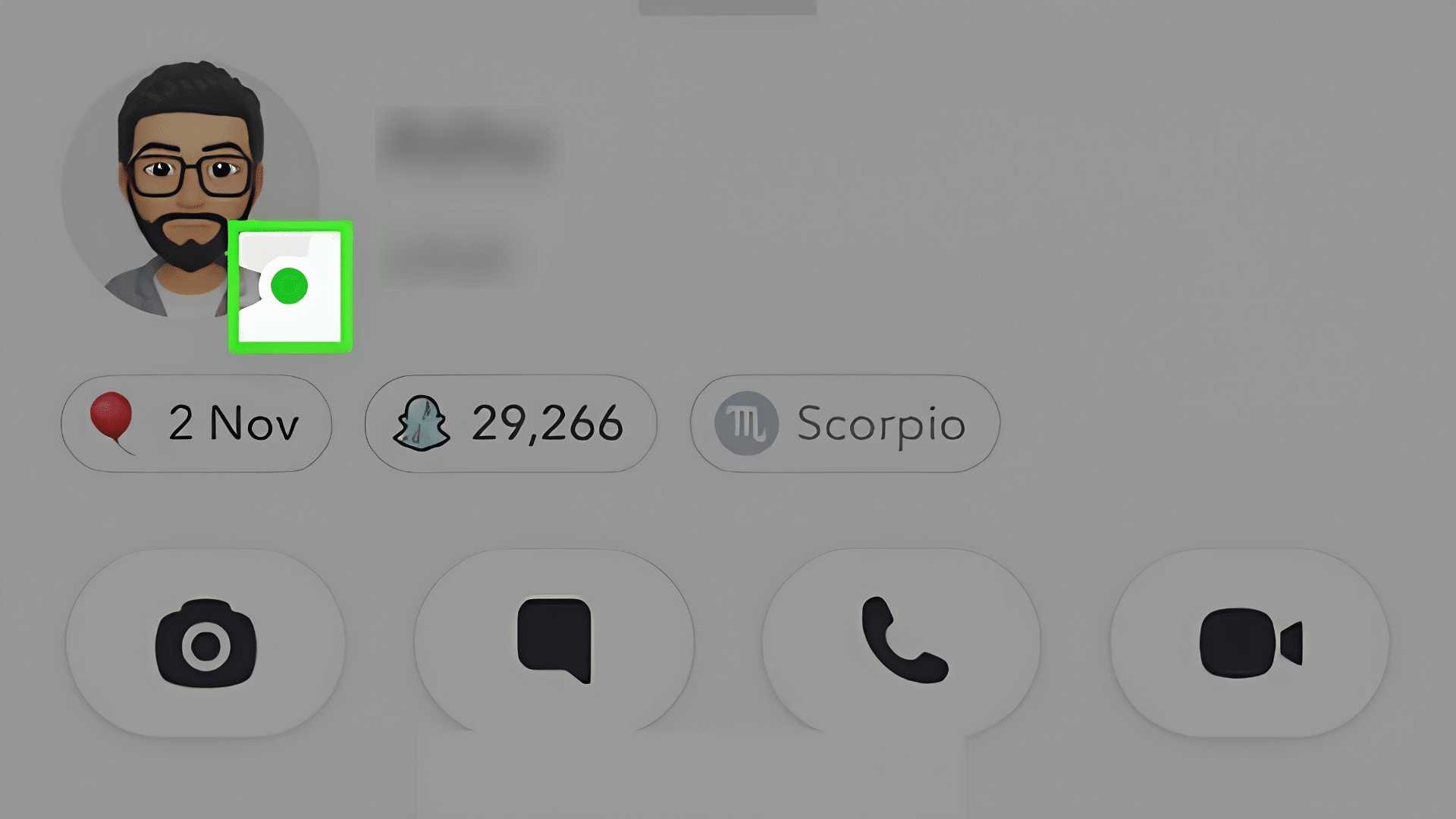
The green dot shows that a Snapchat account was active recently, but it does not confirm that someone is online right now or available to chat. Since Snapchat does not reveal the exact activity time behind the indicator, it is best viewed as a general recent-activity signal rather than a precise online tracker.
1. It Shows Recent Activity, Not Current Status
Snapchat’s official wording says the account has been active “recently,” not that the app is open at the moment you check.
A friend may have already closed Snapchat before you glance at their avatar, so the dot should never be treated as proof someone is available to reply, or that they’re deliberately not answering.
This kind of quiet signal isn’t unique to Snapchat, either; phones are full of features that run unnoticed, active without ever announcing themselves.
2. Nobody, Including Snapchat, Publishes a Time Limit
Snapchat’s current support page does not list a specific number of minutes or hours the dot stays lit before disappearing.
Any figure floating around online, including anything you read in this article, is an estimate based on user reports and observation rather than a confirmed rule from Snapchat itself, so treat those numbers as rough guesses, not fact.
3. A Missing Dot Doesn’t Mean Inactivity
Snapchat lets users turn off the Activity Indicator entirely in their settings, so someone can use the app daily without ever showing the dot to others.
Its absence may simply reflect that privacy choice rather than a lack of activity, which is one more reason the green dot alone should never be used to track someone’s behavior or availability.
The green dot is useful as a general recent-activity signal, but it cannot confirm current availability, exact timing, or a person’s intentions.
Why Snapchat Keeps This Signal Deliberately Vague
This newly added section adds topical depth and reduces reliance on repeating the same core claim throughout the article. It also folds in EEAT-style context about Snapchat’s design philosophy rather than just restating “recent, not live.”
Most messaging platforms that show live presence- a filled-in circle for “online” that disappears the second someone closes the app- do it because the product is built around instant back-and-forth conversation. Snapchat’s Activity Indicator works differently on purpose. It reports on the account, not the moment, which fits a platform built around asynchronous Snaps and Stories rather than real-time chat.
Having watched this feature confuse people for years, the pattern I see most often is someone treating the green dot like a countdown clock. It isn’t one. It’s closer to a light that stays on for a while after someone leaves the room. Reading it as a strict presence tracker is where the misunderstanding starts, not with the feature itself.
This design choice also lines up with how Snapchat handles other status signals across the app: Snap Map location, read receipts, and Friend Emojis are all opt-in or adjustable, rather than fixed, always-on trackers.
The green dot follows the same pattern: it gives users control over what they share. That same instinct, a toggle instead of an always-on default, shows up across most modern privacy setting choices, not just inside Snapchat.
Which Snapchat Status Signal Should You Trust?
Different Snapchat signals answer different questions, and mixing them up is where most confusion starts. The same mix-up often happens with notification icons on other devices, where one alert type gets mistaken for another. Here’s what each one actually confirms, and what it stops short of proving.
- Green dot: Shows the account was active recently. Does not prove the person is online this second.
- Opened or viewed icon: Confirms a specific Snap or Chat was opened or viewed. Does not prove the person is still using Snapchat now.
- Friends in Chat (Snapchat+): Shows a friend is present in your chat when the feature is enabled. Does not prove the friend is typing or plans to reply.
Snapchat documents opened and viewed icons separately from general activity, and Snapchat+ adds Friends in Chat on top of that, so each signal is tracked and shown on its own terms.
Snapchat Green Dot vs Snap Map Activity
The green dot and Snap Map answer different questions. One concerns recent app activity, while the other concerns location information shared through Snapchat’s Map features.
|
Feature |
What It Shows |
Key Privacy Control |
|---|---|---|
|
Green dot |
Recent Snapchat activity |
Activity Indicator |
|
Snap Map |
Location shared through Snap Map |
Map location settings |
|
Ghost Mode |
Hides your location from other people on the Map |
Ghost Mode setting |
Snapchat documents Ghost Mode and Snap Map location timing separately from the Activity Indicator, so map timing should not apply to the green dot.
How to Turn Off the Green Activity Indicator
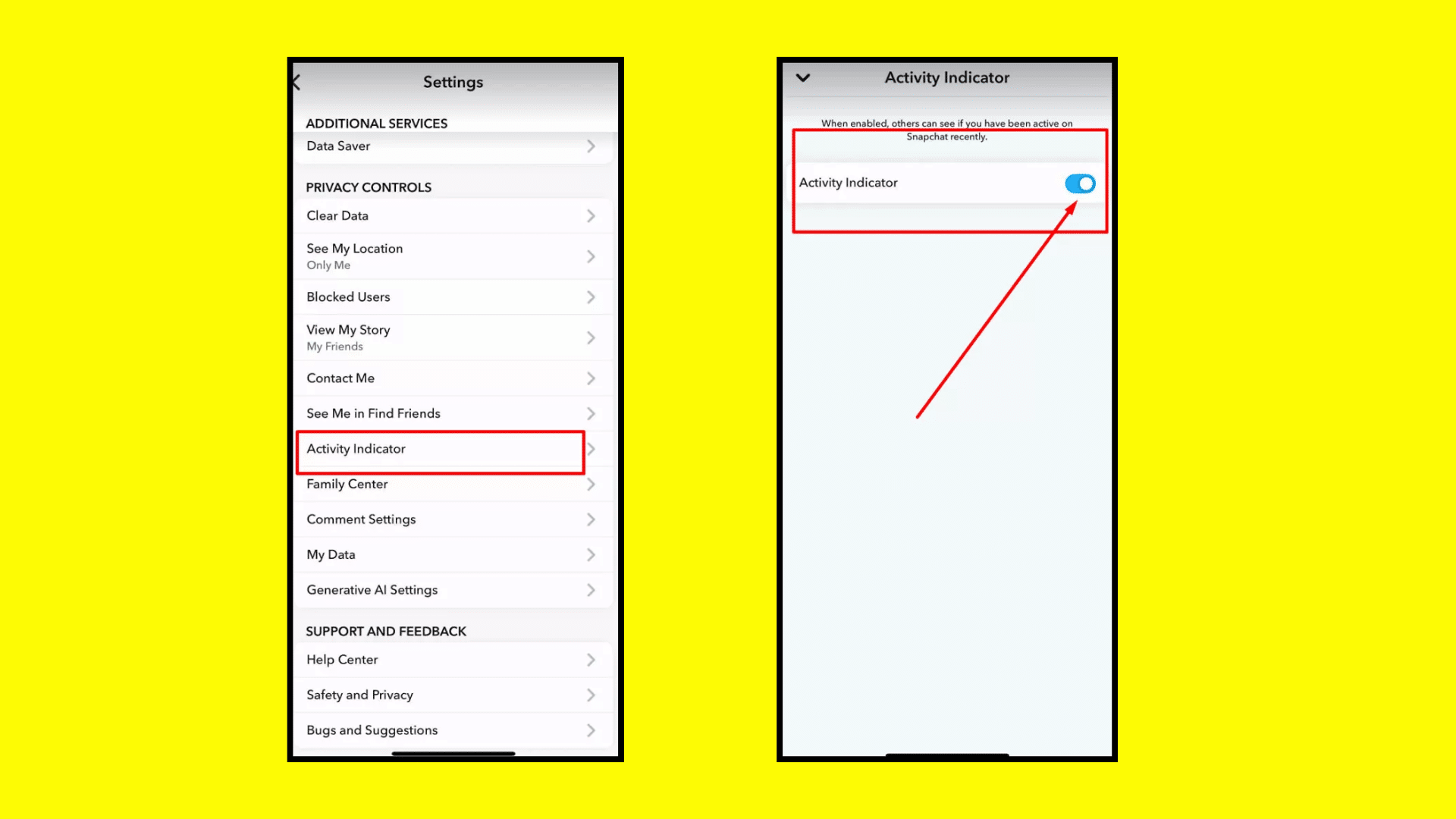
If you prefer not to show recent activity beside your avatar, Snapchat provides a separate privacy control for the Activity Indicator in the app’s settings.
- Open Snapchat and tap your Profile icon.
- Tap the gear icon to open Settings.
- Scroll to App & Privacy and tap My Privacy & Data.
- Under Privacy Choices, tap Activity Indicator.
- Toggle the setting off.
These are the current steps listed on Snapchat’s Activity Indicator support page.
This setting controls the Activity Indicator. If you want to show recent activity again later, return to the same menu and turn the Activity Indicator back on.
What to Do If You’re Unsure Someone Saw Your Snap
Since the green dot cannot confirm whether someone saw your Snap, a few more reliable checks are worth using instead:
- Check the opened or viewed icon next to your sent Snap or Chat. This confirms whether the content was actually opened, unlike the green dot.
- If you have Snapchat+, check Friends in Chat to see whether the person is currently present in that specific conversation.
- Look at your Snap Score change over a day or two. A jump usually means the account has been actively sending and receiving Snaps, though Snapchat does not publish this as a real-time tracker either.
The habit worth building is simple: use the signal built for the question you’re actually asking. The green dot was never built to answer “did they see it,” so leaning on it for that will keep leading to the wrong conclusion.
Final Takeaway
A green dot next to someone’s name will always look more certain than it is, and that gap between how it looks and what it means is exactly where most of the confusion around it starts.
The Activity Indicator confirms recent account activity, nothing more. It cannot tell you the exact time someone was active, what they were doing, or why a reply hasn’t come through yet.
For that, Snap Map, opened or viewed icons, and Friend Emojis each carry a different piece of the picture, and reading them separately is what keeps you from overreading a single symbol.
If you still aren’t sure what the green dot on Snapchat means in a specific situation, drop it in the comments; we read them.
Frequently Asked Questions
Does Snapscore Show Live Activity?
No. Snapchat says Snapscore is calculated from factors such as Snaps sent and received, Stories posted, and other activity. A score change can reflect account activity, but Snapchat does not present Snapscore as a live online status tool.
Is the iPhone Green Dot the Same as Snapchat’s?
No. Apple’s device status indicators show a green dot in the status bar when an app is actively using the camera, or the camera and microphone together. That is an iOS system indicator, unrelated to Snapchat’s Activity Indicator, and it does not reveal anything about another person’s Snapchat activity.
Does Screenshotting a Snap Affect the Green Dot?
No. Snapchat tracks screenshots separately through its screenshot notification system, which alerts the sender when their Snap or Chat is captured. It isn’t connected to the Activity Indicator, and screenshotting doesn’t turn the dot on or off.
Does the Green Dot Still Show for Someone You’ve Unfriended or Blocked?
No. The Activity Indicator only appears on the avatars of current Friends. Once you unfriend or block someone, their avatar and any status indicators, including the green dot, are no longer visible to you.