Have you ever considered changing your YouTube name but worried about losing your audience?
Many creators update their channel identity to match a new brand, switch content niches, create a more professional image, or remove an outdated username.
If you are searching for how to change your YouTube channel name, the process is simple through YouTube Studio. However, it is important to understand the difference between your channel name, handle, and username.
You can update your handle separately, and changing these details will not remove your videos, subscribers, or channel content.
Before You Change Your YouTube Channel Name
Changing your YouTube channel name updates the name viewers see and can affect your overall branding across YouTube, including your channel identity and recognition.
However, important channel elements remain unchanged. Your subscribers, uploaded videos, watch history, comments, and monetization status stay connected to your account after the name change.
A sudden name change may confuse existing viewers, especially if they are familiar with your old branding.
It is better to inform your audience when making a major change. Rebranding makes sense when you are changing your content niche, targeting a new audience, or creating a stronger brand identity for your channel.
YouTube Channel Name vs Handle vs Username
Channel name, handle, and username are often confused but serve different roles on YouTube. The channel name shows your brand, while the handle provides a unique identifier for mentions and links.
| Feature | Purpose | Example |
|---|---|---|
| Channel name | Public name displayed on your channel | Tech World |
| Handle | Unique @identifier used for mentions | @techworld |
| Username | Older term often used for account identity | Google account-related name |
Your channel name appears on videos, channel pages, and search results, while your handle helps users find and share your channel.
Before settling on either one, it is worth taking a moment to avoid trademark conflicts with existing brands. Changing one does not automatically update the other.
How to Change YouTube Channel Name: Step by Step
Changing your YouTube channel name is simple when you follow the right steps. Learn how to update your channel name quickly while avoiding common mistakes and completing the process smoothly.
1. Change Your Channel Name on Desktop
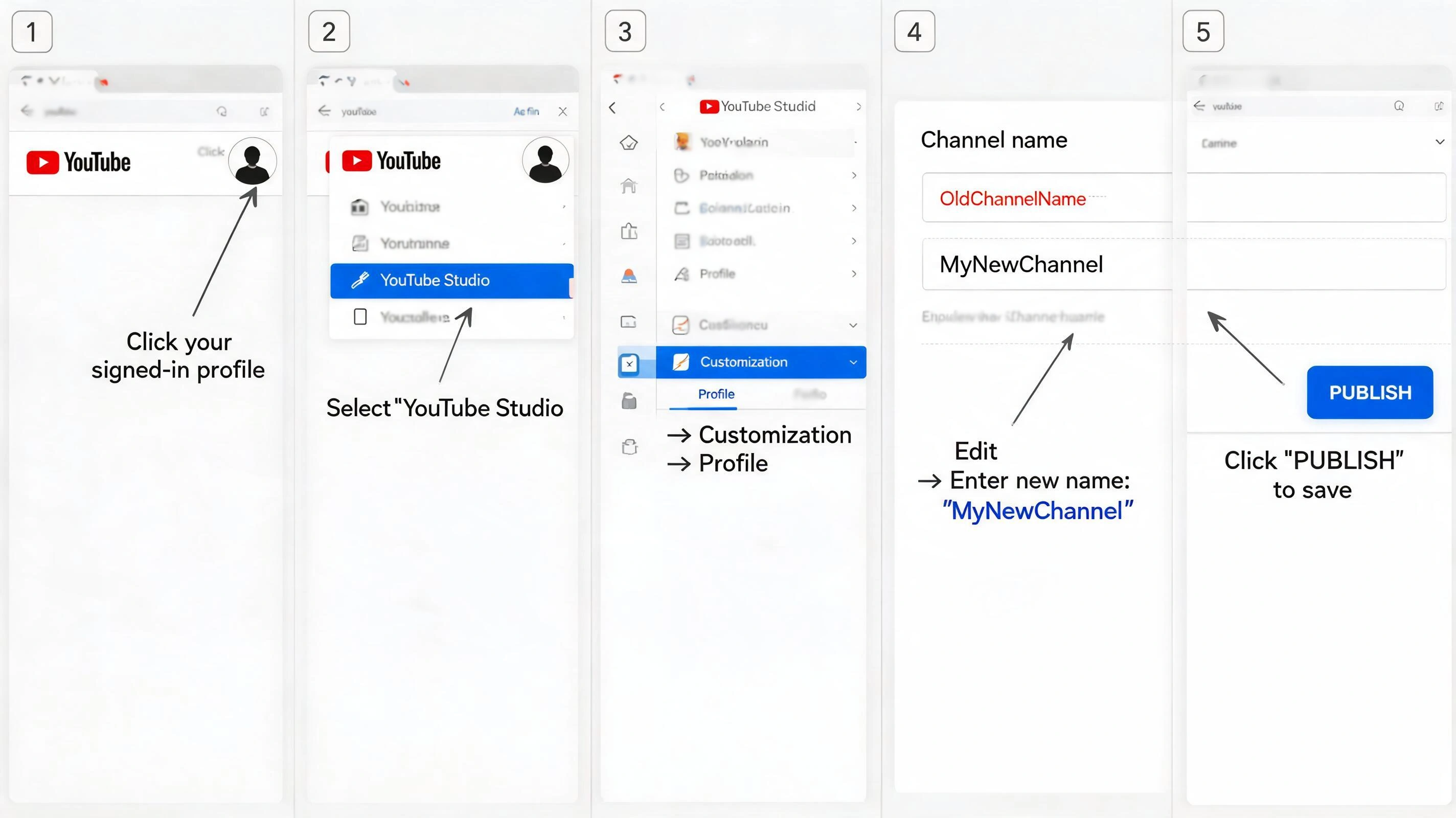
Changing your YouTube channel name from a desktop browser is a straightforward process through YouTube Studio. Follow these steps to update your channel identity and save the changes.
Step 1: Open YouTube and Sign In: Open YouTube, sign in with the Google account linked to your channel, and click your profile picture.
Step 2: Open YouTube Studio: Select YouTube Studio and make sure you have the correct channel selected if you manage multiple channels.
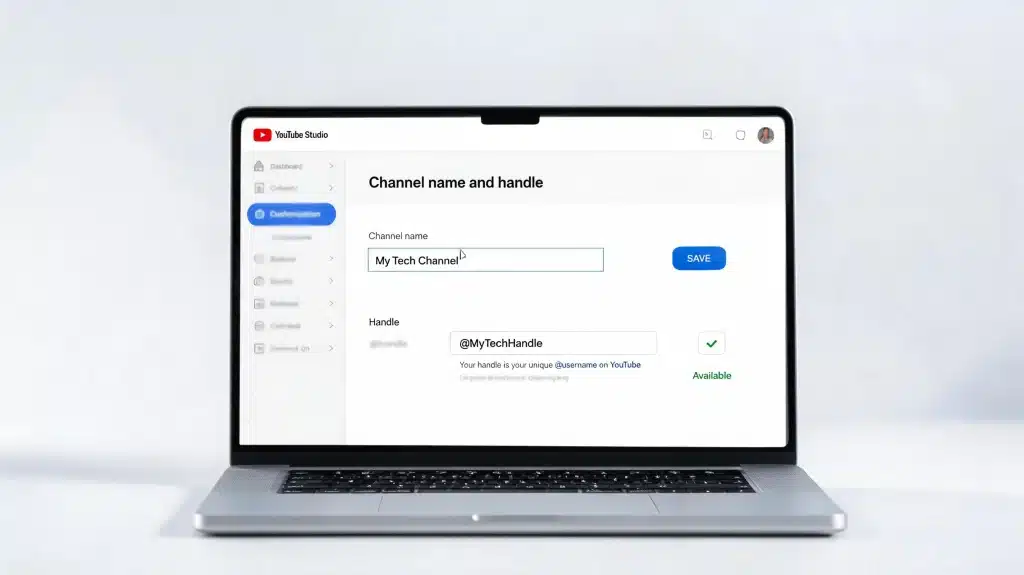
Step 3: Access Channel Customization: From the left-side menu, select Customization, then open the Profile section.
Step 4: Edit Your Channel Name: Find the Name field, enter your new channel name, and check the spelling before saving.
Step 5: Save and Publish Changes: ClickPublish to apply the change. It may take some time for the new name to appear across YouTube.
Once saved, your new channel name will replace the previous one while your videos, subscribers, and channel data remain unchanged.
2. Change Your Channel Name on Mobile
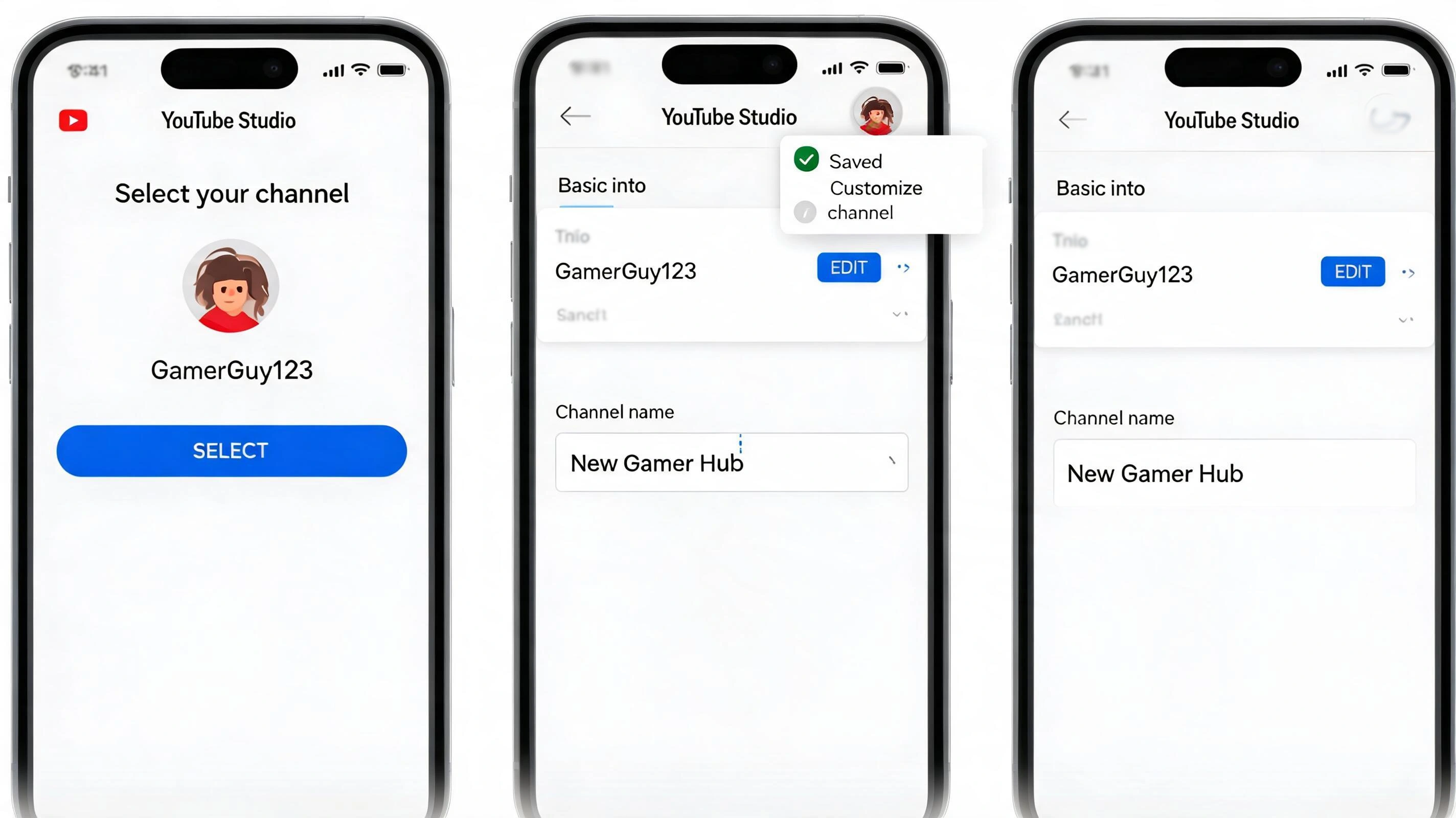
You can update your YouTube channel name directly from your phone using the YouTube Studio app.
The mobile process is useful for creators who manage their channels on the go and want to make quick branding changes. Follow these steps:
Step 1: Open YouTube Studio App: Open the app, sign in with your connected Google account, and select the correct channel if needed.
Step 2: Open Channel Settings: Tap your profile picture, open your channel or profile settings, and select the edit option.
Step 3: Edit Your Channel Name: TapEdit channel, enter your new name, and review it before saving.
Step 4: Save Changes: Tap Save to apply the new name. The update may take some time to appear across YouTube.
Note: The YouTube app is for watching and basic channel actions, while YouTube Studio offers creator tools like editing, analytics, and content management. Changing your channel name will not affect videos, subscribers, or activity.
Reddit Creators Share Their Experience Changing YouTube Names
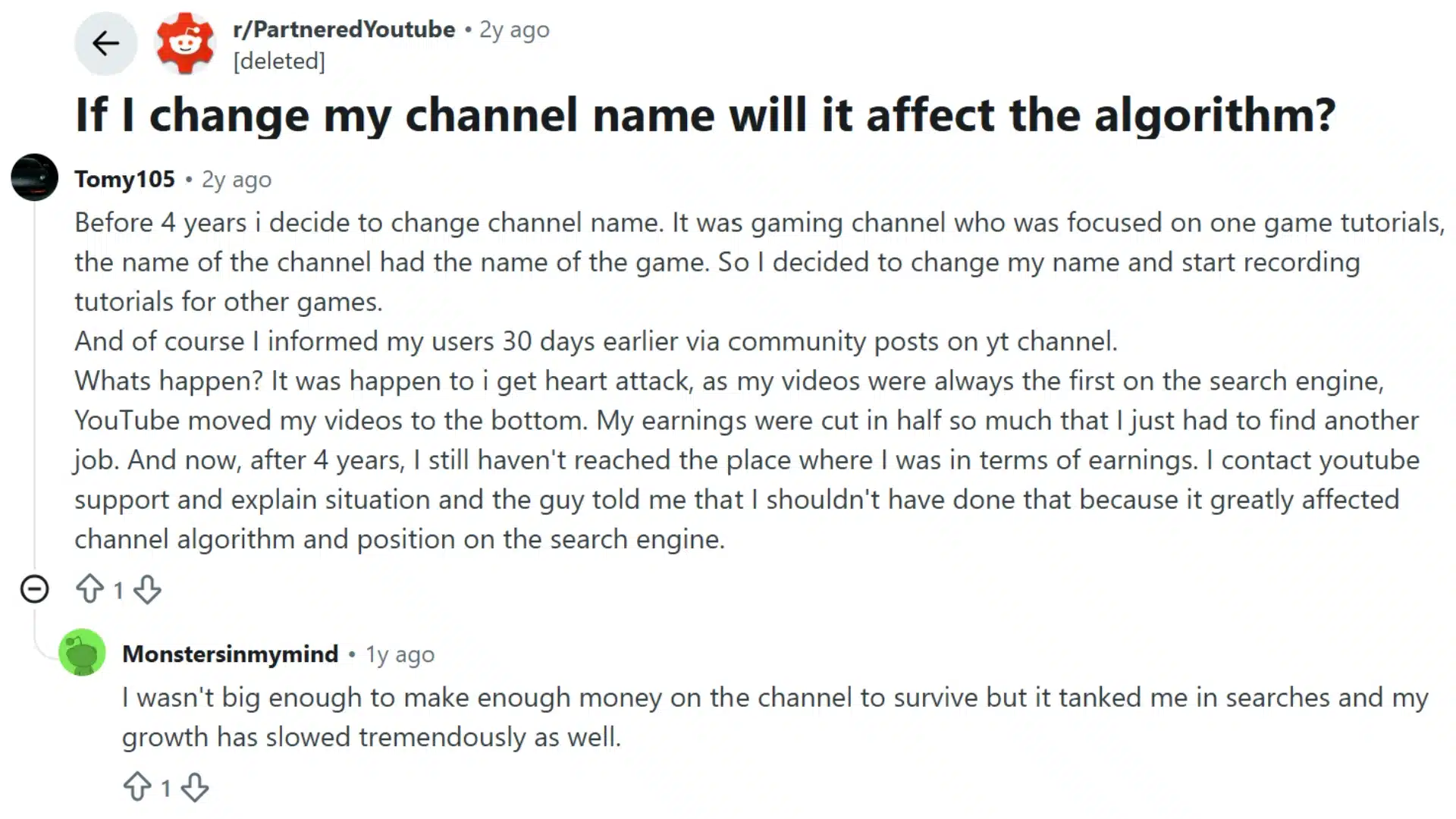
Reddit creators often discuss YouTube name changes from a practical perspective, sharing what happened after rebranding their channels.
Many users report that changing a channel name is generally safe when the content, audience, and overall brand direction remain consistent.
In creator discussions on Reddit, common advice includes avoiding frequent name changes, keeping familiar visuals such as profile images during the transition, and informing subscribers about major updates so they can easily recognize the new identity.
Creators also suggest keeping the existing channel instead of starting a new one unless the content category is changing completely.
Since videos, subscribers, and channel history stay connected, a planned rebrand is often considered a better option than rebuilding from scratch.
How to Change Your YouTube Handle (@Username)
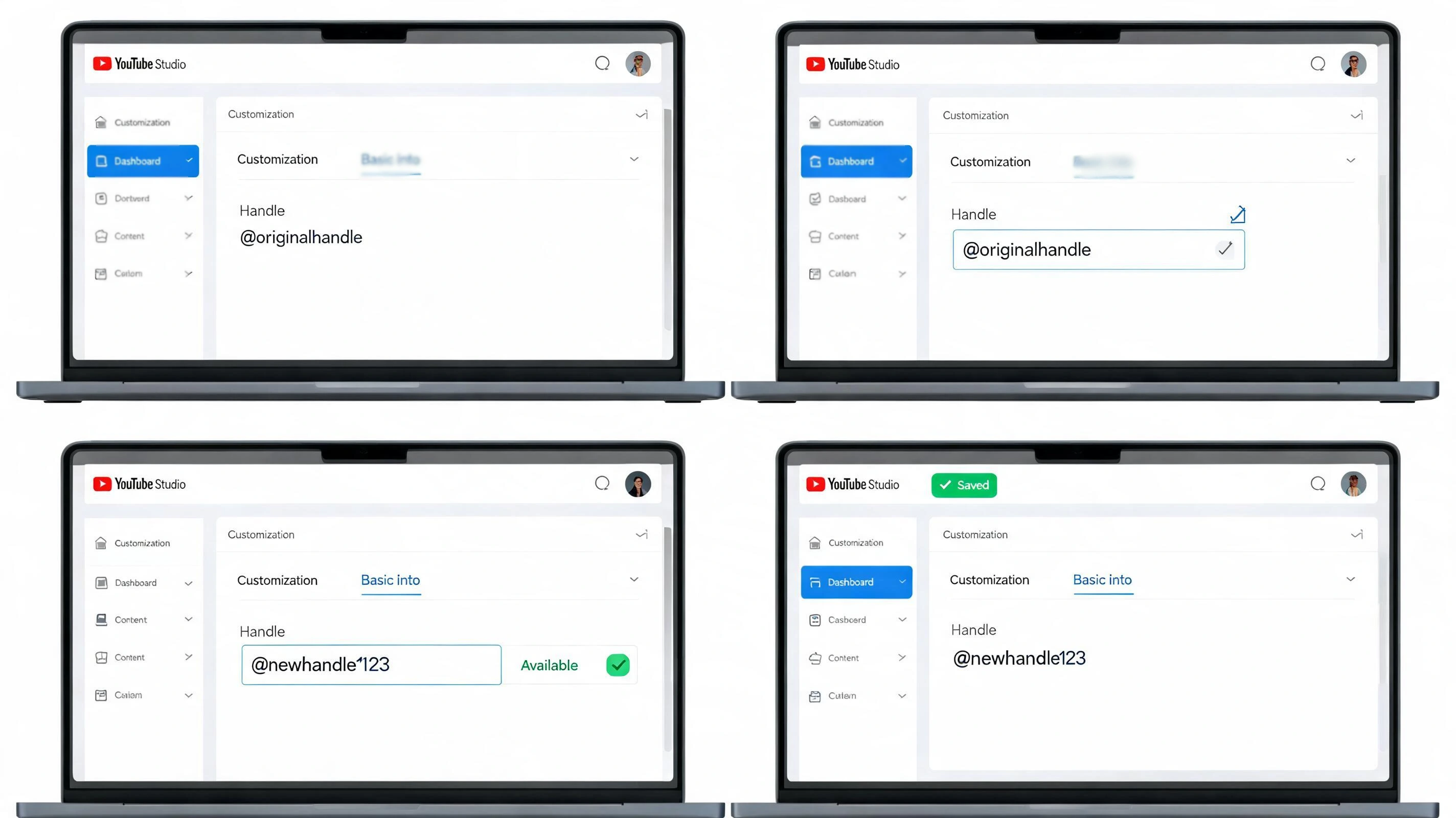
A YouTube handle is a unique @identifier that helps viewers find, mention, and share your channel easily. Unlike your channel name, which can be similar to other creators’, your handle must be unique and is used as part of your channel identity.
Steps to Update Your YouTube Handle
- Open YouTube Studio and sign in to your account.
- Select Customization from the left menu.
- Go to the Profile section.
- Find the Handle option and edit your current handle.
- Enter your new handle and check its availability.
- Save the changes to update your channel handle.
Things to Consider Before Changing Your Handle
- Check availability: Your preferred handle must be unique and not already used by another channel.
- Follow restrictions: Choose a handle that meets YouTube’s character and formatting requirements.
- Think about branding: Select a handle that matches your channel name, content niche, and other social media profiles, much like business owners secure their brand name across registries and platforms.
Changing your handle does not remove your videos, subscribers, or channel data, but updating it carefully helps maintain a consistent brand identity.
Can You Change Handle Without Channel Name?
Yes, you can change your YouTube handle without changing your channel name. Many users refer to handles as usernames, but modern YouTube uses handles as unique identifiers for channels.
Your handle starts with an @ symbol and helps people find, mention, and share your channel.
Your channel name and handle are separate settings, which means you can update one without automatically changing the other.
Similarly, your Google account name does not always need to be changed when updating your YouTube channel identity. This allows creators to adjust their branding while keeping their existing channel setup intact.
What Happens After Changing Your YouTube Channel Name?
Changing your YouTube channel name updates your public identity, but it does not remove your existing content or affect your channel’s foundation.
Many creators hesitate because they worry about losing progress, subscribers, or visibility. Here is what happens after making the change:
- Firstly, your channel stays active. Changing the name does not delete your channel or remove access for viewers. Your videos, playlists, comments, and other content remain available.
- Secondly, your subscribers and monetization remain unchanged. Your audience stays connected to your channel, and changing the name does not affect your monetization status or your existing disclosure requirements.
- Thirdly, your search presence may take some time to update. YouTube needs time to display the new name across different areas. Updating your banner, profile picture, description, and social media profiles can help maintain consistent branding after the change.
Updating your YouTube channel name refreshes your brand without affecting content or audience. Maintain consistency by updating branding elements.
Fixes for YouTube Channel Name Change Issues
If your YouTube channel name will not update, the cause may be account access, permissions, naming restrictions, or a delayed update. Check these common fixes.
| Issue | Fix |
|---|---|
| Wrong account | Confirm you are using the correct Google account and YouTube channel. |
| Brand Account access | Check that you have the required ownership or management permissions. |
| Name restrictions | Make sure the new name follows YouTube’s naming policies. |
| Update not showing | Refresh YouTube Studio, sign in again, or wait for the change to appear. |
| Handle unavailable | Try another spelling or a different handle that fits your branding. |
These quick fixes can help resolve common name change problems while keeping your existing videos, subscribers, and channel content intact.
Tips for Choosing a Better YouTube Channel Name
Choosing the right YouTube channel name helps viewers understand your brand and remember your content. Before renaming your channel, consider these factors to create a name that supports long-term growth.
- Choose a simple YouTube channel name that viewers can easily remember, spell, and recognize.
- Make sure the name reflects your content category or niche.
- Avoid complicated spellings, unnecessary symbols, or confusing words.
- Pick a name that can still fit if your content changes or expands later.
- Check if the same name or branding is available on other social platforms for consistency.
A thoughtful channel name creates a stronger identity and helps build recognition with your audience over time.
How to Update Your Branding After Changing Your Name
Changing your YouTube channel name is only the first step in a successful rebrand. Updating your visual identity and channel information helps viewers recognize your new brand and prevents confusion.
- Update your channel banner: Replace your banner with the new channel name, updated design, or messaging that matches your current content direction.
- Change your profile picture if needed: Update your profile image to maintain consistency with your new brand identity and make your channel easier to recognize.
- Update social media profiles: Change your name, username, or branding details on platforms linked to your YouTube channel to keep your online presence consistent.
- Inform subscribers about the change: Let your audience know about the rename through community posts, videos, or announcements to avoid confusion.
- Update descriptions and links: Review your channel description, video descriptions, website links, and other references to ensure they reflect your new identity.
A complete branding update helps your audience adjust to the change and creates a consistent experience across all platforms.
Conclusion
Changing your YouTube channel name is a simple way to refresh your brand while keeping your videos, subscribers, and channel data safe.
You learned how to update your channel name, handle, fix common issues, and maintain consistent branding after the change.
Whether you are rebranding, changing your content direction, or improving your channel identity, knowing how to change your YouTube channel name helps you make the transition smoothly.
Keep your audience informed and update your branding elements for better recognition. Share your thoughts or questions in the comments below.
Frequently Asked Questions
Does Changing a YouTube Channel Name Affect My Verification Badge?
No, changing your channel name may not affect verification status. Verified creators should review YouTube’s policies before updating their channel identity.
Can I Change My YouTube Channel Name Without Changing My Email?
Yes, you can update your channel name without changing your Google account email or creating a new account.
How Long Does a YouTube Channel Name Change Take to Appear?
A channel name update may appear quickly, but some areas of YouTube can take additional time to reflect the change.