Shopping for a new TV can feel confusing. With so many options available, it’s not always easy to know which features matter and which ones you actually need.
I often see people asking whether a smart TV is worth buying and how it differs from a regular television.
A smart TV connects to the internet, streams content, and supports apps.
In this article, I’ll explain how smart TVs work, the technology behind them, their main features, and the benefits they offer.
By the end, you’ll have a clear understanding of whether a smart TV is the right choice for you.
What Is a Smart TV?
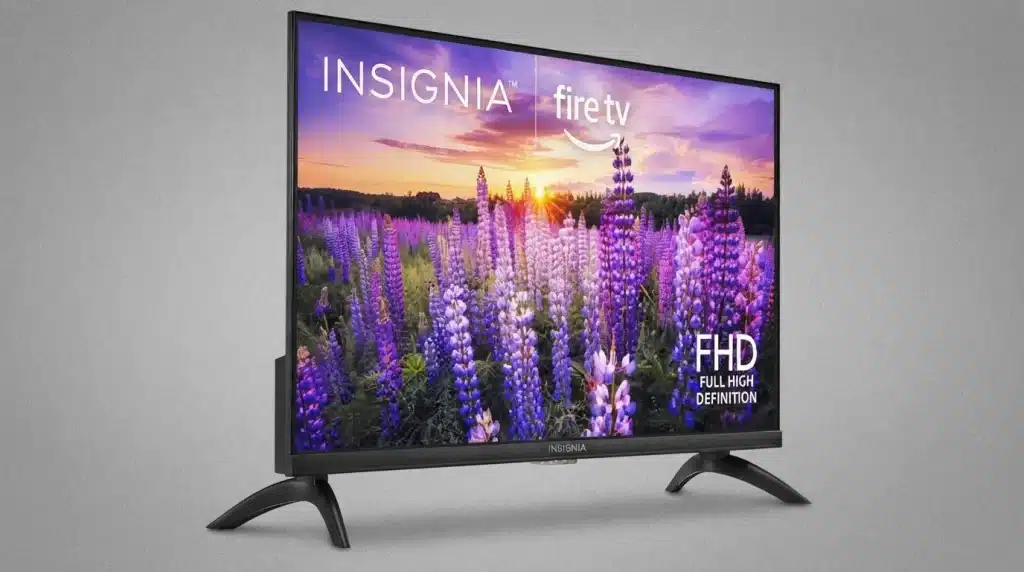
A smart TV is a television that connects to the internet and offers built-in access to apps, streaming services, and online content.
Unlike a regular TV, it can perform many functions without requiring extra devices. A smart TV combines traditional television features with internet-based technology.
It allows you to watch content from streaming platforms like Amazon, Netflix, and YouTube, browse apps, and sometimes even use voice commands.
Most smart TVs come with an operating system that manages apps and settings, similar to a smartphone.
They connect to your home Wi-Fi network and provide access to a wide range of entertainment options in one place.
Many models also support screen mirroring, smart home integration, and personalized recommendations, making viewing more convenient and interactive.
Key Features of a Smart TV
Smart TVs offer more than just traditional TV viewing. They include internet-based features and built-in tools that make entertainment, connectivity, and content access more convenient.
1. Built-In Internet Connectivity
One of the main features of a smart TV is internet connectivity. Most smart TVs connect to the internet through Wi-Fi or an Ethernet cable.
Once connected, users can access online services without extra devices. Internet access allows the TV to stream movies, play music, browse websites, and download apps.
This built-in connection removes the need for separate streaming boxes in many cases.
It also helps users receive software updates that improve performance and add new features over time.
2. Access to Streaming Apps
Smart TVs come with popular streaming apps already installed or available for download. Services like Netflix, YouTube, Disney+, Hulu, and Amazon Prime Video can be accessed directly from the TV.
Users do not need a separate streaming stick to watch their favorite shows and movies.
The app store on the TV allows additional apps to be downloaded based on personal preferences.
This feature gives users quick access to entertainment and makes content viewing simple and convenient from one central location.
3. Voice Control Support
Many smart TVs include voice control features that allow users to operate the TV using spoken commands.
Voice assistants such as Google Assistant, Amazon Alexa, or proprietary systems are often built into the device. Users can search for movies, adjust volume levels, open apps, or check weather updates without using a remote control.
This feature improves convenience and accessibility, especially for users who prefer hands-free operation.
Voice control also helps speed up navigation through menus and entertainment options.
4. Screen Mirroring and Casting
Screen mirroring allows users to display content from smartphones, tablets, or laptops directly on the TV screen. This feature is useful for sharing photos, videos, presentations, or mobile apps with a larger audience.
Technologies like Apple AirPlay, Chromecast, and Miracast make wireless sharing simple.
Instead of passing around a small device, users can show content on a larger screen for better viewing.
Screen mirroring is especially helpful for family gatherings, work presentations, and watching personal media collections.
5. App Store and Downloads
A smart TV includes an app store where users can install different applications based on their needs.
Besides entertainment apps, users can download fitness programs, educational apps, news services, weather updates, and games.
The app store expands the TV’s functionality beyond traditional television viewing. New apps can be added whenever needed, helping users customize their entertainment experience.
This flexibility allows the TV to serve multiple purposes and keeps it useful as new services become available.
6. Smart Home Integration
Many smart TVs can connect with other smart devices in the home. Users can control lights, security cameras, thermostats, and other connected products through the television interface.
Integration with smart home ecosystems creates a more connected living environment.
Some TVs can display security camera feeds or provide updates from connected devices.
This feature allows users to manage different aspects of their smart home without switching between multiple apps or devices throughout the day.
7. Automatic Software Updates
Smart TVs regularly receive software updates from manufacturers. These updates improve security, fix bugs, enhance performance, and sometimes introduce new features.
Unlike traditional televisions, smart TVs continue to improve after purchase through these updates.
Automatic updates help keep apps running smoothly and ensure compatibility with changing streaming services.
Users often receive improvements without needing to perform manual installations. This ongoing support helps extend the useful life of the television and improves the overall viewing experience.
8. Personalized Content Recommendations
Many smart TVs use viewing history and app activity to suggest content that matches user interests. Recommendation systems help users find movies, TV shows, videos, and other programs they may enjoy.
Instead of searching through large libraries, users receive suggestions based on previous viewing habits.
This feature saves time and helps people find new entertainment options.
Personalized recommendations are commonly available across major streaming platforms and integrated directly into the smart TV interface for easier access.
How Do Smart TVs Work?

Smart TVs combine traditional television technology with internet connectivity and built-in software. Once connected to Wi-Fi or Ethernet, they can stream content, run apps, and access online services without extra devices.
1. Internet Connectivity
Internet connectivity is the foundation of a smart TV. The TV connects to your home network through Wi-Fi or an Ethernet cable, allowing it to communicate with online services.
Once connected, it can stream movies, TV shows, music, and other content directly from the internet. I’ve noticed that a strong internet connection makes a significant difference in streaming quality and app performance.
A stable internet connection helps ensure smooth playback, faster app loading, and better overall performance.
Without internet access, most smart features become limited, though the TV can still function for regular viewing.
2. Built-In Operating System
Every smart TV runs on an operating system that manages its apps, settings, and features. Popular platforms include Android TV, Google TV, Roku TV, webOS, and Tizen.
This software provides an easy-to-use interface that lets you navigate menus, launch apps, and customize settings.
The operating system also receives updates that improve performance, add new features, and enhance security. Think of it as the software brain that controls how the smart TV functions.
3. Streaming Apps and Online Services
Smart TVs come with built-in apps that allow users to access popular streaming platforms. Instead of connecting external devices, you can open apps like Netflix, YouTube, or Prime Video directly from the TV.
In my experience, having these apps built in makes it much easier to switch between services without juggling multiple devices or remotes.
These apps retrieve content from the internet and display it on your screen in real time.
Many smart TVs also offer app stores where users can download additional applications for entertainment, sports, education, news, and other purposes.
4. Content Processing and Recommendations
Modern smart TVs use software algorithms to analyze viewing habits and suggest content that matches your interests.
Based on the shows, movies, or channels you watch, the TV may recommend similar options across different platforms.
Some models also use artificial intelligence to improve picture quality, adjust sound settings, and optimize performance.
These smart features help create a more personalized viewing experience, making it easier to discover content and enjoy entertainment tailored to your preferences.
Smart TV vs Regular TV: What’s the Difference?
While both types of TVs are designed for watching content, smart TVs offer internet-based features that regular TVs do not. Understanding these differences can help you choose the right option for your needs and budget.
| Feature | Smart TV | Regular TV |
|---|---|---|
| Internet Connection | Connects to Wi-Fi or Ethernet | Does not connect to the internet |
| Streaming Apps | Built-in apps like Netflix, YouTube, and Prime Video | Requires external streaming devices |
| Operating System | Includes a software platform for apps and settings | No operating system for smart features |
| Voice Control | Often supports voice assistants | Typically not available |
| App Downloads | Can download and install compatible apps | Not supported |
| Content Recommendations | Provides personalized viewing suggestions | No recommendation features |
| Smart Home Integration | May connect with smart home devices | Not supported |
| Initial Cost | Usually more expensive | Generally more affordable |
| Ease of Use | All-in-one entertainment solution | Requires additional devices for online content |
| Software Updates | Receives periodic feature and security updates | Rarely receives functional updates |
Benefits of Using a Smart TV
Smart TVs make entertainment more convenient by bringing internet-based features directly to your television. They help reduce the need for extra devices while providing access to a wider range of content and services.
- Access to Endless Entertainment: Smart TVs give you instant access to streaming platforms, live TV apps, movies, shows, music, and online videos from a single screen.
- No Need for Extra Streaming Devices: Since most streaming apps come built in, you can watch your favorite content without purchasing separate media players or streaming sticks.
- Convenient User Experience: Everything is organized in one interface, making it easy to switch between apps, channels, and settings with a remote or voice commands.
- Personalized Content Recommendations: Many smart TVs suggest shows and movies based on your viewing habits, helping you discover new content that matches your interests.
- Voice Control Support: Compatible voice assistants let you search for content, adjust settings, and control playback with simple spoken commands.
- Smart Home Connectivity: Some smart TVs can connect with smart home devices, making it easier to manage compatible lights, cameras, speakers, and other connected products.
- Regular Software Updates: Manufacturers provide updates that improve performance, add features, and enhance security over time.
Do You Need Internet for a Smart TV?
No, a smart TV does not require an internet connection to work.However, internet access is needed for most smart features, such as streaming apps, web browsing, and online services.
Even without internet, a smart TV can show content from cable boxes, gaming consoles, DVD players, and other connected devices.
You can watch regular TV channels and use external media sources just like you would on a standard television.
However, features such as Netflix, YouTube, app downloads, voice assistants, and software updates will not work unless the TV is connected to the internet.
If your main goal is to stream content or access online entertainment, a stable internet connection is important.
Otherwise, the TV can still perform basic viewing functions without any issues.
How to Set Up a Smart TV?
Setting up a smart TV is usually a simple process that takes only a few minutes. Once connected to power and the internet, you can access apps, streaming services, and other smart features.
- Place and Connect the TV: Position the TV in your preferred location and connect it to a power source. Attach any external devices, such as a cable box, gaming console, or soundbar, if needed.
- Turn on the TV: Use the remote control to power on the TV and follow the on-screen setup instructions provided by the manufacturer.
- Connect to the Internet: Choose your Wi-Fi network or connect an Ethernet cable. Enter the password to establish an internet connection.
- Sign In or Create Accounts: Log in to your TV account, such as Google, Samsung, Roku, or LG, to access apps and personalized features.
- Update the Software: Check for available system updates and install them to improve performance, security, and functionality.
- Install and Arrange Apps: Download your preferred streaming apps and organize them on the home screen for easier access.
- Adjust Picture and Sound Settings: Customize brightness, display modes, volume levels, and audio settings based on your viewing preferences.
Common Drawbacks of Smart TVs
While smart TVs offer many useful features, they also come with a few limitations that buyers should consider. Understanding these drawbacks can help you make a more informed purchasing decision.
| Drawback | Description |
|---|---|
| Dependence on the Internet | Many smart features, apps, and streaming services require a stable internet connection to function properly. |
| Privacy Concerns | Some smart TVs collect viewing data and usage information, which may raise privacy concerns for certain users. |
| Higher Cost | Smart TVs are generally more expensive than regular TVs with similar screen sizes and display quality. |
| Software Issues | Apps may crash, freeze, or experience performance problems over time, especially on older models. |
| Limited App Support | Not all apps are available on every smart TV platform, which can restrict content options. |
| Regular Updates Required | Software updates are necessary for security and performance, but can sometimes change features or settings. |
| Security Risks | Internet-connected devices can be vulnerable to cybersecurity threats if not properly updated. |
| Advertisements and Promotions | Some manufacturers display recommendations, sponsored content, or ads within the TV interface. |
| Platform Restrictions | Certain features and services may only work within a specific brand’s ecosystem or operating system. |
Are Smart TVs Worth Buying?
Yes, smart TVs are worth buying for most people because they combine traditional TV viewing with internet-based features in one device.
They offer convenient access to streaming apps, online content, and smart tools without requiring extra hardware.
A smart TV can be a practical choice if you regularly watch content from platforms like Netflix, YouTube, or Prime Video.
It simplifies your entertainment setup by eliminating the need for separate streaming devices and provides easy access to a wide range of content.
Many models also offer voice control, screen mirroring, and smart home support. The value depends on your needs and budget.
If you mainly watch cable channels and do not use online services, a regular TV may be sufficient. For most households, though, a smart TV offers greater flexibility and convenience.
Conclusion
Smart TVs have changed how people watch content at home. The right choice depends on your viewing habits, budget, and need for convenience.
With built-in apps and internet access, smart TVs provide all-in-one entertainment.
I believe the best choice is the one that matches how you actually use your TV every day.
By understanding how smart TVs work, their benefits, and their limitations, you can make a more confident buying decision and avoid paying for features you may not need.
Do you own a smart TV, or are you thinking about buying one? Share your experience, questions, or recommendations in the comments below.
Frequently Asked Questions
Is Netflix free on a Smart TV?
No, Netflix is not free on a smart TV and requires a separate subscription to access its content.
Why Are People Getting Rid of Cable TV?
Many people are switching to streaming services because they offer more flexibility, on-demand content, and often lower monthly costs.
How Many Years Does a Smart TV Usually Last?
A quality smart TV typically lasts between 7 and 10 years, depending on usage, maintenance, and brand.