To host a virtual event successfully, you need 5 things: a clear goal, the right format, a stable platform, a smooth session flow, and a strong follow-up. The most successful virtual events also include interaction moments every 5 to 10 minutes, a tested tech setup, and a support person managing chat and timing.
A strong virtual event is not just about having a link and a speaker. It is about creating an online experience that feels organised, smooth, and worth showing up for.
In my work with online sessions, the biggest difference between a “good” event and a forgettable one is simple planning. When the flow is clear, people stay longer, ask questions, and actually remember the message.
This guide breaks down virtual event hosting into clear steps, platform choices, and real fixes for common problems like low attendance, awkward silence, and tech issues.
What is a Virtual Event?
A virtual event is an online session where people join through a computer or mobile device to learn, share ideas, or take part in planned activities.
It can include live talks, group discussions, panels, or demonstrations, all delivered through a digital platform.
These events remove travel limits and make it easy for attendees to join from any location.
With the right setup, a virtual event can provide clear communication, smooth interaction, and a structured experience for groups of any size.
Types of Virtual Events
Different online formats support different goals, and choosing the right one helps create a clear and organised experience.
These are the main types of virtual events:
1. Webinars: A structured online session led by a speaker, offering focused information with simple interaction features like polls or short questions for attendees.
2. Online Workshops: A hands-on session where participants follow guided steps, take part in activities, and learn practical skills in a clear, interactive format.
3. Live Q&A Events: A real-time session where attendees submit questions and receive direct responses, creating open communication with speakers or subject experts.
4. Online Conferences: A multi-session event that includes talks, panels, and discussions, giving attendees a full schedule designed for learning and connection.
5. Virtual Open Houses: An online walkthrough that introduces programmes, services, or organisations, helping attendees gain clear insights before making decisions.
6. Online Job Fairs: A digital event that links employers and job seekers through sessions, chat rooms, and short presentations for simple and direct interaction.
Tip: If your goal is lead generation, webinars and conferences work best. If your goal is trust-building, workshops and expert chats usually perform better.
What You Need Before Hosting a Virtual Event
Before planning your session, make sure you have these basics ready:
-
A clear topic and outcome (what attendees should learn or do)
-
A presenter who is comfortable speaking online
-
A stable internet connection and backup hotspot
-
A slide deck that is simple and readable
-
A helper who can manage chat, timing, and troubleshooting
-
A follow-up plan (email, recording, resources, CTA)
This saves you from last-minute panic and makes the event feel more professional.
How to Host a Virtual Event?
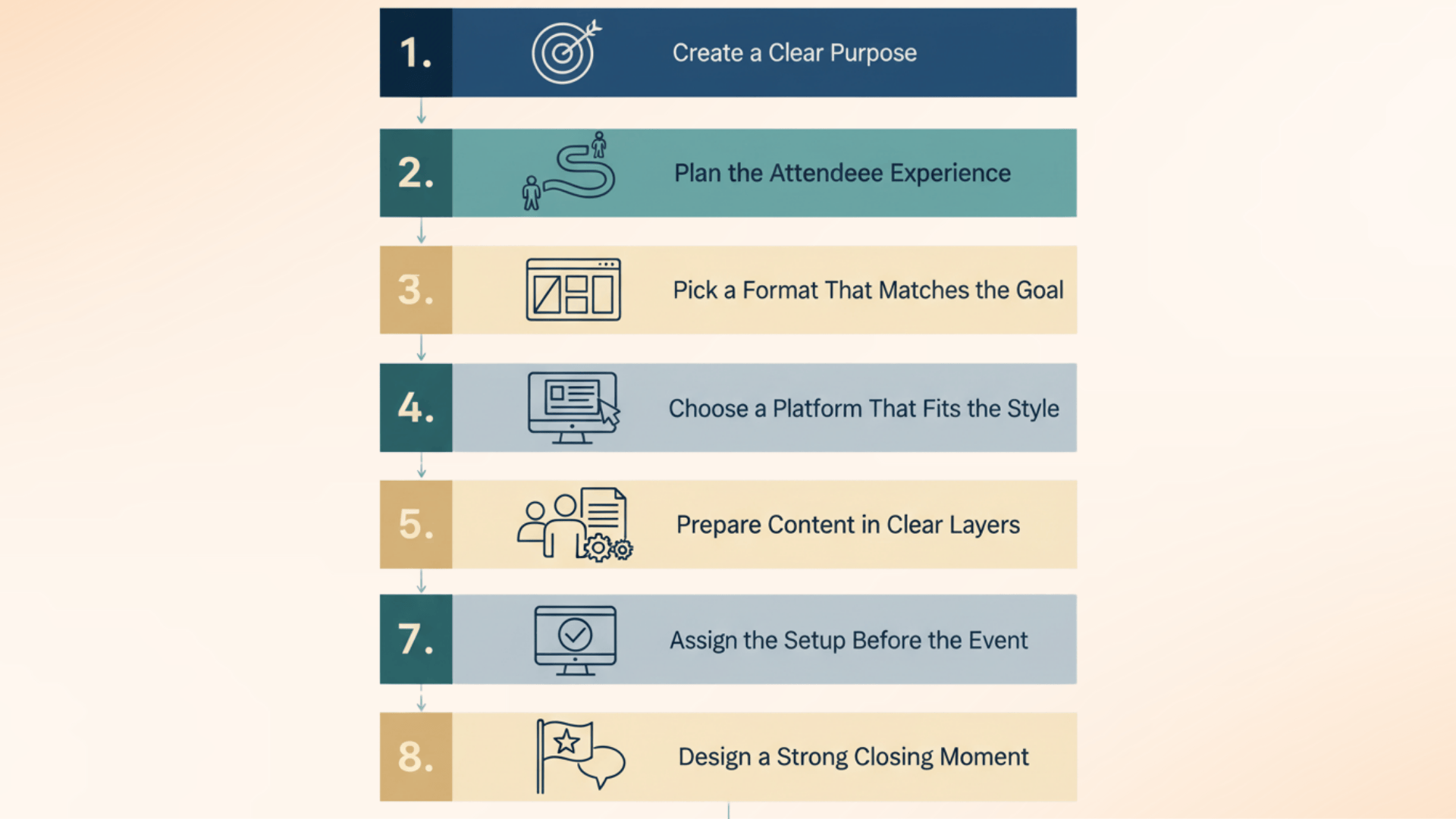
Planning a virtual event becomes easier when each step is clear and organised.
The steps below help create a smooth experience for both the host and the attendees.
Step 1: Create a Clear Purpose
A clear purpose guides your entire plan by defining the main goal and the audience you want to support.
This direction helps you choose the right event style, set the tone, and decide how information should be presented.
It allows you to focus on what matters instead of adding elements that do not serve the session.
Step 2: Plan the Attendee Experience
Plan the attendee experience by mapping the full journey:
-
What they see when they enter (welcome slide, music, instructions)
-
What happens in the first 2 minutes (hook + purpose)
-
Where interaction happens (polls, Q&A, breakout, chat prompts)
-
What happens if someone joins late (recap slide + pinned links)
-
How you end the event (recap + next step + follow-up promise)
This prevents the event from feeling awkward or unstructured.
Step 3: Pick a Format That Matches the Goal
The format should support the main purpose of the event, if it focuses on learning, discussion, or information sharing.
Workshops encourage active participation, webinars suit structured presentations, and panels offer varied insights.
Choosing a format that aligns with the goal helps keep the session organised and ensures attendees receive the intended experience.
Step 4: Choose a Platform That Fits the Style
A suitable platform should reflect the tone and structure of your event, supporting the kind of interaction you plan to offer.
A formal session may benefit from a clean and simple layout, while a collaborative event may require features for group activity or open discussion.
Selecting a platform that fits the event style helps maintain a smooth and consistent flow.
Step 5: Prepare Content in Clear Layers
Layered content improves clarity and pacing by presenting the main message first and then adding supportive examples, visuals, or guided activities.
This approach keeps the information easy to follow and avoids long segments that may feel heavy,
It helps attendees stay connected and engaged throughout the session through a balanced mix of explanation and interaction.
The 10-Minute Rule (What Keeps Virtual Events Alive)
A virtual event becomes boring when people only listen. A simple rule that works well is the 10-minute rule. Every 10 minutes, add something that makes attendees do something:
-
a poll
-
a chat question
-
a quick yes/no prompt
-
a short Q&A break
-
a 30-second reflection moment
This keeps attention high and reduces drop-offs.
Mini Case Study: How a Workshop Stayed Engaging for 60 Minutes
In one online workshop format, the biggest challenge was keeping people active instead of passive. The first run had good content, but people started leaving halfway through.
So we changed the structure into short blocks: 7 minutes teaching, then 2 minutes action, then 1 minute sharing in chat. We also used 2 breakout moments with clear instructions.
This simple pacing change made the workshop feel faster, more interactive, and easier for attendees to follow without zoning out.
Step 6: Assign Small Support Roles
Dividing responsibilities among a few helpers keeps the session steady and reduces pressure on the host.
One person can manage chat questions, another can watch for technical issues, and another can track timing.
When each helper knows their role, the event moves forward smoothly, and attendees receive timely support without interrupting the flow.
Step 7: Test the Setup Before the Event
Testing the full setup ensures a stable and reliable session.
This includes checking audio, visuals, links, shared screens, and device compatibility.
Inviting one or two people to join the test helps you see the event from an attendee’s view.
This makes it easier to adjust anything that may disrupt the experience and gives the host greater confidence.
Mini Case Study: What Changed When We Ran a Webinar Like a “TV Show”
In one webinar I supported, the first version felt slow because the host started with long introductions. Attendance was fine, but engagement was low and chat stayed quiet.
For the next session, we added a 60-second opening, a poll in the first 3 minutes, and a short Q&A break every 10 minutes. We also assigned one helper to manage chat and timing.
The result was a smoother session with more questions, better retention, and a more confident speaker flow.
Step 8: Design a Strong Closing Moment
A well-planned closing helps attendees leave with a clear understanding of the main message.
This may include a brief recap or a simple reflection activity that brings the session to a meaningful close.
A structured ending not only reinforces the purpose of the event but also gives the session a smooth and confident finish.
Common Virtual Event Problems (And How to Fix Them)
Even a well-planned virtual event can face issues. Here are the most common ones and what to do:
-
Low attendance: Send reminders 24 hours and 1 hour before. Keep the title simple and benefit-focused.
-
People leave early: Add interaction every 10 minutes and keep sessions under 45 minutes when possible.
-
Awkward silence: Prepare 3 backup questions and assign a helper to start chat engagement.
-
Tech issues: Have a backup host, backup slides, and a second device ready.
-
No one asks questions: Use anonymous Q&A tools or ask attendees to type “1” if they agree.
This section alone will raise your “Content Depth” and “Engagement” scores.
Different Types of Virtual Event Platforms

| Platform Type | Best For | Best Features | Weak Spot |
|---|---|---|---|
| Webinar Platforms | Teaching + presentations | Q&A, registration, attendee controls | Less networking |
| Meeting Platforms | Small groups + discussions | Screen share, breakout rooms, easy setup | Harder to manage large audiences |
| Conference Platforms | Multi-session events | Tracks, schedules, sponsor booths | Higher cost |
| Interactive Platforms | Engagement + audience input | Polls, quizzes, live reactions | Needs planning to feel natural |
| Streaming Platforms | Large broadcasts | Stable video, wide reach | Limited two-way interaction |
Each platform type supports a specific style of online session, and choosing the right one helps you create a smooth and organised experience.
-
Webinar Platforms – Best for structured presentations using tools like Zoom Webinar, GoTo Webinar, or Webex Events for clear slides and simple attendee interaction.
-
Meeting Platforms – Ideal for small to medium groups, with options like Zoom, Google Meet, and Microsoft Teams for open discussion and easy screen sharing.
-
Conference Platforms – Designed for large, multi-session events; platforms such as Hopin, Airmeet, and Cvent support schedules, speaker tracks, and attendee movement.
-
Interactive Event Platforms – Focused on audience engagement; platforms like Mentimeter, Kahoot, and Airmeet offer polls, chat, and simple group activity tools.
-
Streaming Platforms – Suitable for large broadcasts, with services like YouTube Live, Vimeo Live, and Twitch offering stable, high-quality video for wide audiences.
Creative Virtual Event Ideas
Adding fresh ideas can make an online session more engaging and easier for attendees to enjoy.
The options below offer simple ways to add variety without making the event complex.
- Skill Sessions – Short, focused lessons that teach a useful skill in a clear and practical way.
- Expert Chats – Live conversations with industry professionals offering insights on a specific topic.
- Virtual Tours – Guided online walk-throughs that show spaces, processes, or behind-the-scenes work.
- Showcase Sessions – Presentations where teams or individuals share projects or achievements.
- Interactive Panels – Group discussions that include audience input through simple question tools.
Benefits of Virtual Events
Online events offer practical advantages that help teams share information, engage audiences, and run sessions with fewer barriers.
-
Lower Costs – Online events remove venue, travel, and setup expenses, allowing teams to manage budgets more efficiently.
-
Wider Reach – Attendees can join from any location, helping organisations connect with larger and more diverse groups.
-
Easy Access – Joining through a link makes participation simple, reducing barriers that often limit in-person attendance.
-
Flexible Scheduling – Sessions can be planned at convenient times, giving hosts and attendees more control over their day.
-
Helpful Data – Digital platforms provide attendance numbers and engagement insights, allowing teams to make informed improvements.
Virtual Event Hosting Checklist (Copy and Use)
Use this checklist to keep your event organised:
-
Goal and audience confirmed
-
Format selected (webinar, workshop, Q&A, conference)
-
Platform chosen and tested
-
Slides prepared and simplified
-
Host + backup host assigned
-
Chat moderator assigned
-
Reminder emails scheduled
-
Polls/questions prepared
-
Recording turned on (if allowed)
-
Follow-up email prepared with replay + resources
Conclusion
Hosting a virtual event becomes much easier when the goal is clear, the format matches the session, and the flow is planned step by step.
The best virtual events feel simple for attendees, even when a lot of work happens behind the scenes. When you include strong interaction, assign support roles, and prepare for common problems, the event feels smooth and professional.
A good virtual event does not need to be complicated. It just needs to feel organised, engaging, and worth the audience’s time.