Watching your phone battery drain faster than expected can be frustrating and even worrying.
Between fast charging, battery warnings, and endless advice online, it’s hard to know what really helps or hurts your battery.
Wireless charging adds even more questions. It feels easy and modern, but people often wonder if that convenience comes at a cost.
With so many mixed opinions, the truth can feel unclear.
The blog breaks everything down in a simple way so you can feel confident about how you charge your phone.
Keep reading to understand what really affects battery health, and is wireless charging is bad for battery health or is wireless charging better for battery health.
How Does Wireless Charging Work?
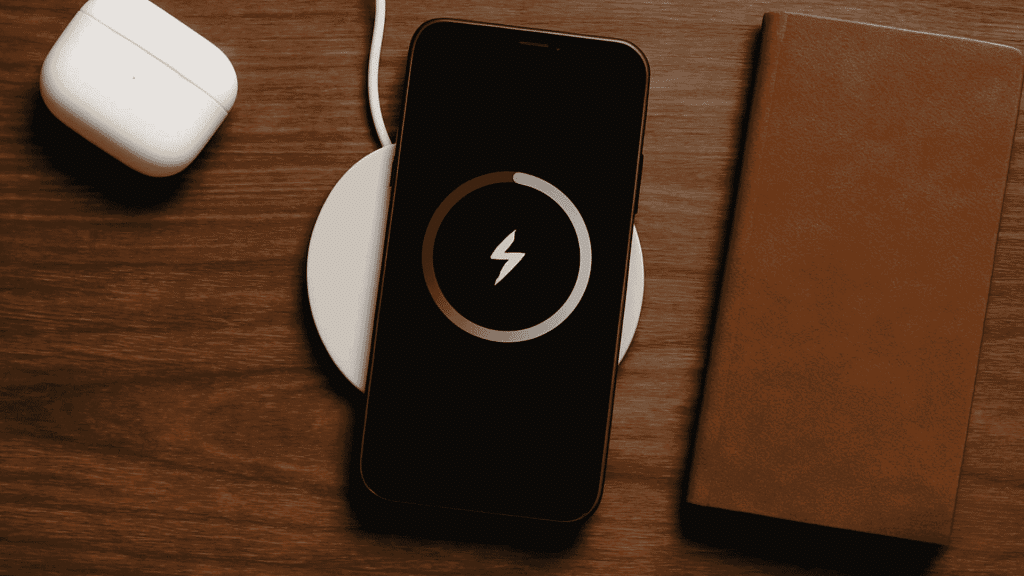
Wireless charging works by sending power from a charging pad to your phone without using a cable.
Inside the charging pad, there is a coil that creates a magnetic field when it is plugged into power. Your phone also has a coil inside it.
When you place your phone on the pad, the magnetic field transfers energy from the pad’s coil to the phone’s coil.
This energy then turns into electricity that charges the battery.
Wireless charging uses a standard called Qi, which helps control how much power is sent.
Is Wireless Charging Bad for Battery Health?

No, wireless charging is not automatically bad for battery health, but it can create slightly more heat than wired charging. This happens because power moves through charging coils instead of a direct cable connection.
Heat is the main factor that affects battery wear. All phone batteries lose capacity faster when they are exposed to high temperatures, no matter how they are charged. With wireless charging, extra heat can build up if the phone is not aligned properly on the pad, if it has a thick case, or if it is placed on a soft surface that traps warmth.
In most situations, battery capacity drops because of normal aging, not because wireless charging is used. Modern phones are designed to manage heat and slow charging when temperatures rise too much.
It is also important to note that fast wired charging often produces more heat than wireless charging. Fast charging pushes higher power into the battery quickly, which can stress it more than slower charging methods.
Overall, managing heat is more important than choosing between wireless and wired charging. Keeping your phone cool, removing thick cases, and avoiding high temperatures will help protect battery health over time.
Is Wireless Charging Better for Battery Health in Any Case?
Yes, Wireless charging can be better for battery health when used correctly because it creates less heat and reduces physical wear.
Wireless charging usually runs at a slower speed than fast wired charging, which helps keep the phone cooler.
Lower heat is important because heat is one of the main reasons batteries wear out over time. A cooler battery can hold power better and last longer.
Wireless charging also reduces wear on the charging port since there is no need to plug and unplug cables often.
This helps prevent loose ports, dust buildup, and connection problems. It is especially useful for people who charge their phones many times a day or leave them charging overnight.
Short, steady charging sessions place less stress on the battery than repeated fast charging.
When paired with a quality charger, wireless charging supports consistent performance and long-term battery health.
Factors Affecting the Lifespan of the Battery

Battery lifespan depends on how a phone is exposed to heat over time. Daily habits often impact battery health more than the charging method itself.
1. Charging to 100% All the Time
Charging your phone to 100% every time can slowly reduce battery lifespan.
Lithium-ion batteries feel the most stress when they stay fully charged for long periods. This stress builds up over months and causes the battery to hold less charge.
It is better to unplug the phone once it reaches around 80–90%.
2. Using Phone While Charging
Using your phone while it is charging adds extra heat, especially during gaming, video streaming, or video calls.
The phone works harder while also taking in power, which raises its internal temperature.
Letting your phone rest while charging helps it stay cooler and reduces unnecessary stress on the battery.
3. Cheap Chargers and Pads
Cheap wireless chargers and pads often lack proper safety controls.
They may send unstable power or fail to manage heat correctly. This can cause overheating, slow charging, or uneven power flow, which harms the battery over time.
Certified chargers are tested to meet safety standards and protect your phone.
4. High Temperature Everyday Uses
High temperatures from daily activities can damage battery health faster than charging methods.
Leaving your phone in a hot car, using it under direct sunlight, or heavy use in warm environments raises battery temperature.
Even normal tasks can add heat if done for long periods. Keeping your phone cool during daily use helps protect battery lifespan.
5. Frequent Fast Charging
Fast charging is convenient, but using it constantly can increase battery stress.
It pushes higher power into the battery in a short time, which creates more heat. Over time, this heat can reduce battery capacity faster than normal charging.
Mixing fast charging with slower charging methods helps balance convenience and battery care.
What Real Users Say About Wireless Charging?

Reddit users say wireless charging works fine for daily use, but heat is the main concern.
Several S22 Ultra owners mention that wireless charging creates more heat than wired charging, especially during long sessions like overnight charging.
This extra heat can speed up battery wear over time, even though modern phones slow charging when temperatures rise.
Some users feel slow wired charging keeps the phone cooler and helps the battery last longer.
Others point out that charging cycles stay the same with wired or wireless charging, so habits matter more than the method.
Keeping the battery between 20% and 80% comes up as a smart move.
Overall, Reddit users agree that wireless charging is safe, but managing heat and avoiding constant full charges helps protect long-term battery health.
Wireless Charging vs Wired Charging
Wireless charging and wired charging both power your phone, but they work in different ways and affect daily use differently.
Wireless charging sends power through a charging pad, making it easy to place your phone down without plugging in a cable.
Wired charging uses a cable that sends power directly into the phone, which makes it faster and often cooler.
However, frequent plugging and unplugging can wear out the charging port over time.
Wireless charging reduces port wear and is great for desks or bedside use, while wired charging works better when you need a quick battery boost.
Neither method is harmful on its own. Battery health depends more on heat, charging habits, and charger quality than the charging method itself.
Common Myths About Wireless Charging
Many people hear confusing claims about wireless charging that sound serious but are often misunderstood. Knowing the facts helps you avoid unnecessary worry.
- Battery damage myth: Modern phones manage heat and power, keeping batteries safe during wireless charging.
- Overheating concern: Certified wireless chargers control temperature to prevent overheating.
- Slow charging issue: Slower charging creates less heat and supports better battery health.
- Overnight charging fear: Phones stop drawing full power once the battery is full.
- Safety comparison: Wireless and wired charging both meet strict safety standards.
- Charger quality: Not all wireless chargers are equal; low-quality ones can cause problems.
Real Tips to Use Wireless Charging Safely
Simple daily habits can make wireless charging safer and easier on your phone battery. Small changes can help reduce heat and support battery health.
- Remove Thick Cases: Take off thick or metal cases before charging to prevent extra heat and allow better heat release.
- Use a Flat Surface: Always charge on a hard, flat surface so air can flow properly around the phone.
- Choose Certified Chargers: Use trusted, certified wireless chargers to control power flow and reduce overheating risks.
- Limit Overnight Charging: Avoid charging overnight every day; unplug the phone once it reaches full charge.
- Enable Smart Charging: Turn on optimized or smart charging in settings to slow charging and protect battery health.
- Avoid Phone Use While Charging: Do not play games or watch videos while charging to prevent extra heat buildup.
Conclusion
Wireless charging often gets a bad reputation, but it is much safer than many people think.
What matters most is heat control, charging habits, and the quality of the charger you use, not whether the power comes from a cable or a charging pad.
Wireless charging may produce a bit more warmth, but modern phones are designed to handle this without trouble.
Most battery issues come from using cheap chargers, running heavy apps while charging, or letting heat build up day after day.
Your phone is part of your daily life, and caring for its battery helps it last longer and work better.
If you still worry about battery health, then share this blog post and comment on which charging method you trust most.