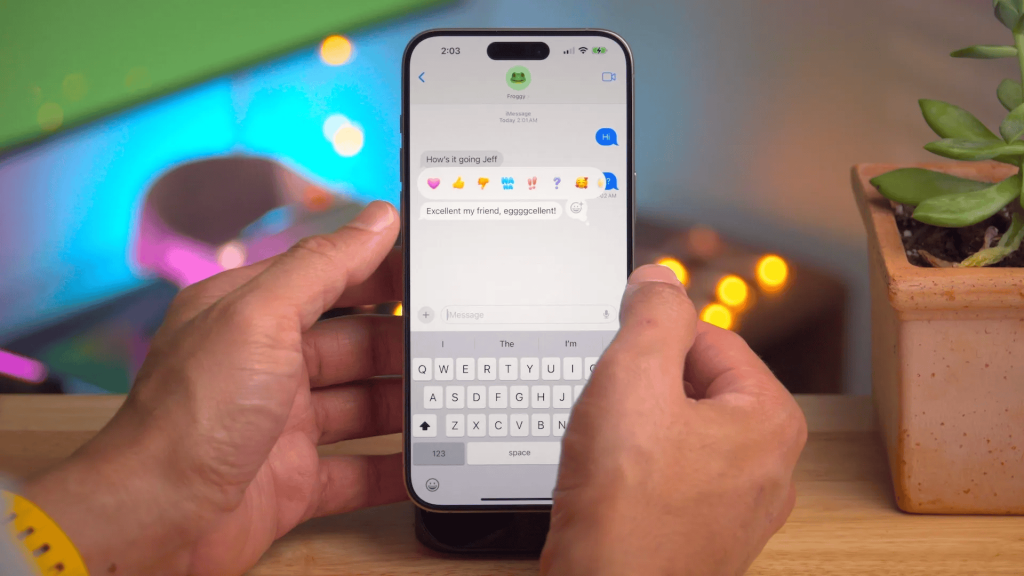
Have you ever thought about what text message RCS is on iPhone and why people keep talking about it? I want to break it down in a clear and simple way
RCS stands for Rich Communication Services, and it changes how texting works on iPhone when messaging Android users.
I see it as a bridge between old SMS texts and modern chat apps. With RCS, messages can include better images, read receipts, typing indicators, and more stable group chats.
It also helps conversations feel smoother across devices instead of being limited and plain.
In this post, I explain how RCS works on iPhone, what features it brings, and what still works differently from iMessage.
By the end, you should know if RCS matters for your everyday texting needs today.
What is Text Message RCS on iPhone?
Text Message RCS on iPhone refers to Apple’s support for Rich Communication Services, a modern messaging standard designed to improve basic SMS and MMS texting.
For users asking what text message RCS on iPhone is, it allows iPhone and Android devices to share better photos, videos, read receipts, typing indicators, and more reliable group chats.
Messages are sent over data instead of carrier-only SMS, which helps improve delivery and media quality.
RCS works alongside iMessage, not as a replacement, and is mainly used when texting Android users.
While it adds helpful features, some options like end-to-end encryption and full reactions may still differ from iMessage.
Overall, RCS makes cross-platform texting more precise, more stable, and closer to app-based messaging without requiring extra downloads.
Traditional SMS vs. RCS: A Complete Comparison
This quick comparison explains how traditional SMS and RCS differ in features, message quality, and overall texting experience, helping readers understand which option offers better modern messaging support.
| Feature | Traditional SMS | RCS |
|---|---|---|
| Message delivery | Carrier-based only | Uses mobile data |
| Media quality | Low-quality images | High-quality media |
| Read receipts | Not available | Available |
| Typing indicators | Not supported | Supported |
| Group chats | Limited, unstable | More reliable |
| Message length | Very limited | Longer messages supported |
RCS vs. iMessage: Apple’s Messaging Ecosystem
RCS vs. iMessage highlights the differences within Apple’s messaging ecosystem when communicating across devices.
iMessage is Apple’s proprietary service, offering features like end-to-end encryption, rich reactions, and smooth syncing between Apple devices.
RCS, or Rich Communication Services, is a universal messaging standard aimed at improving texting between iPhone and Android users.
For those asking what RCS is on iPhone, it refers to Apple’s support for RCS to enhance non-iMessage conversations with better media sharing, read receipts, and typing indicators.
While iMessage delivers a smooth experience within Apple’s ecosystem, RCS focuses on improving cross-platform communication.
Both systems can work side by side on iPhones, but feature availability depends on carriers and device settings.
How RCS Works on iPhone: Implementations
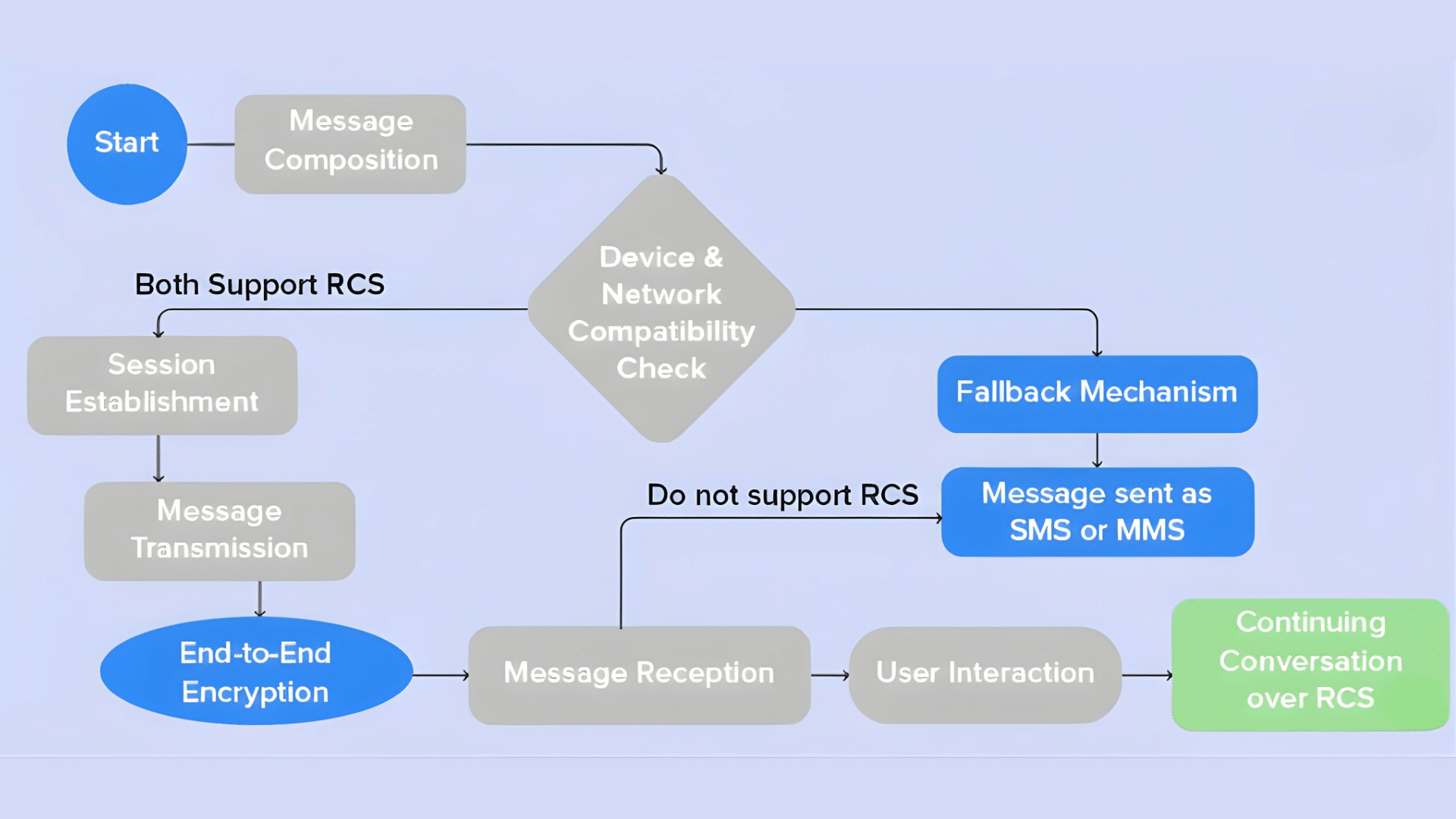
This section explains how RCS functions on iPhone, focusing on its integration, activation process, and smooth messaging experience across devices.
1. Carrier Integration and Provisioning
RCS on iPhone depends on carrier provisioning rather than a separate app. Apple enables RCS inside the Messages app when a supported carrier allows it.
Activation happens automatically in the background. Messages switch from SMS to RCS only when the recipient device also supports it.
Carriers manage servers, routing, and feature availability. Regional rollout varies, so some users may see delays. Apple keeps iMessage untouched for Apple-only chats.
2. Data-Based Message Routing
RCS uses internet-based routing instead of traditional carrier SMS channels. Messages travel through data connections, including Wi-Fi and mobile data.
This allows faster delivery and better reliability. Larger images and videos keep higher quality. Long messages are no longer split awkwardly.
Group chats remain synced instead of fragmenting. Delivery and read indicators rely on this data flow. If data drops, fallback to SMS may occur. iPhone handles switching automatically.
3. Feature Negotiation and Activation
RCS features on iPhone are activated through feature negotiation between devices. Both phones must support RCS and compatible options.
The system checks capabilities before enabling read receipts, typing indicators, and media upgrades. This happens per conversation.
If one side lacks support, messages revert to SMS or MMS. Users do not manually toggle features. Apple limits some functions to maintain consistency.
4. Fallback Logic and Compatibility
Fallback logic ensures messages are still sent when RCS fails. iPhone automatically drops to SMS or MMS if data is unavailable.
This protects message delivery in poor network conditions. Users rarely notice the switch. Older phones remain reachable. Apple prioritizes reliability over forcing RCS use.
Fallback also applies when recipients disable RCS. Media quality lowers during fallback. Despite limits, communication continues.
Key Features that Set RCS Apart
RCS improves basic texting by adding modern features that make messages clearer, faster, and more interactive across different devices and platforms.
- Read receipts: Let users see when messages are delivered and read, reducing confusion and helping conversations move forward with clearer response expectations.
- Typing indicators: Shows when the other person is typing, making chats feel more natural and reducing awkward pauses during real-time conversations.
- High-quality media sharing: Supports clearer photos and videos without heavy compression, improving how shared content looks compared to traditional SMS.
- Improved group chats: Keeps group conversations stable, synced, and easier to manage, avoiding broken threads common with MMS-based group messaging.
- Longer messages: Allows extended texts without splitting, making it easier to send detailed messages in one smooth conversation flow.
Apple’s Historical Stance on RCS Technology
For many years, Apple focused on strengthening iMessage as its primary messaging service, keeping it separate from cross-platform standards like RCS.
SMS and MMS remained the fallback for messages sent to non-Apple devices. Apple often cited privacy, security, and user experience control as reasons for not adopting RCS early.
Meanwhile, Android and carriers pushed RCS as a replacement for outdated SMS.
Over time, pressure from regulators, carriers, and users increased as cross-platform messaging gaps became more noticeable.
Apple eventually began supporting RCS to improve communication between iPhone and Android users, without replacing iMessage.
This move reflects a balance between maintaining ecosystem control and addressing modern messaging expectations.
The Future of RCS and iPhone Messaging
The future of RCS and iPhone messaging points toward gradual improvements in cross-platform communication.
As more carriers expand support, RCS features on iPhone are expected to become more consistent and reliable.
Apple is likely to continue refining how RCS works within the Messages app while keeping iMessage as its primary service.
This approach allows Apple to enhance texting with Android users without changing the Apple-only experience.
Future updates may bring better feature alignment, improved security options, and more stable group messaging.
Regulatory pressure and user demand will also influence how quickly RCS evolves on iPhone. While RCS may not fully match iMessage, it is positioned to reduce long-standing messaging gaps.
Overall, RCS represents a step toward smoother, more modern texting across different platforms and devices over time.
Conclusion
I hope this post helped clear up how RCS fits into iPhone messaging today.
In this post, I wanted to explain the topic in simple terms, without hype, so it’s easier to see where RCS helps and where it still falls short.
Knowing what text message RCS on iPhone is makes it clearer why cross-platform texts now feel less limited than before.
This is why I see RCS as a practical step forward, not a replacement for iMessage, but a way to reduce friction when chatting with Android users.
Features like better media, read receipts, and stronger group chats can make daily conversations smoother. As carriers expand support, the experience should keep improving.
If this guide helped you, share your thoughts below, ask questions, or add your experience in the comments to keep the conversation going.
Frequently Asked Questions
Does RCS Replace iMessage on iPhone?
No, RCS does not replace iMessage. iMessage remains the default for Apple users, while RCS only activates when texting supported non-iPhone devices.
Will RCS Messages be Encrypted on iPhone?
RCS encryption on iPhone depends on carrier support. End-to-end encryption may not always apply, unlike iMessage’s built-in encrypted messaging.
Do Both Users Need RCS for it to Work?
Yes, both users must have RCS supported and enabled by their carriers for RCS features to work instead of SMS or MMS.