When people start building a smart home, they often reach a point where the built-in apps feel limiting. That is when comparisons begin.
Many users want more control, better device support, and deeper automation without locking themselves into one ecosystem.
This is where the debate around homebridge vs home assistant usually starts. Both platforms promise flexibility, but they approach it in very different ways.
One focuses on extending HomeKit with minimal effort, while the other aims to become the central brain of the entire home.
In this blog, you will see real-world differences in setup, automation depth, cost, stability, and long-term maintenance.
The goal is not to pick a winner blindly, but to help you understand which system fits your comfort level, devices, and expectations.
What is Homebridge?
Homebridge is an open-source tool that connects non-HomeKit devices to Apple Home. Its main purpose is simple: make devices that are not officially HomeKit-compatible appear in the Apple Home app.
It works through plugins, which act as bridges between different brands and HomeKit. Most users are Apple-focused and want everything controlled through Siri and the Home app.
Instead of switching platforms, they use Homebridge to extend what they already have. In terms of security and privacy, Homebridge runs locally on your hardware, so data usually stays within your network.
Device compatibility depends on available plugins, and there are hundreds covering cameras, lights, thermostats, and more.
It is popular among users who want better integration without leaving the Apple ecosystem.
What is Home Assistant?
Home Assistant is an open-source home automation platform that lets you control and manage smart devices from a single central system.
Unlike tools that only act as bridges, its main purpose is to handle comprehensive home automation, including dashboards, automations, integrations, and device management all in one place.
It is commonly used by enthusiasts, power users, and people who want more control over how their smart home behaves.
Many choose it when built-in apps feel limited. From a security and privacy standpoint, Home Assistant runs locally on your hardware, which means most data stays within your network unless you enable cloud features.
Device compatibility is broad, supporting thousands of integrations across Apple, Google, Alexa, Zigbee, Z-Wave, and many other platforms.
Homebridge vs Home Assistant: Core Differences
When comparing Homebridge vs. Home Assistant, the real differences show up in daily use, long-term growth, and how much control you actually want.
1. Simplicity vs Depth
Homebridge focuses on doing one job well: bringing unsupported devices into HomeKit. The interface is lighter, the setup feels more direct, and most changes happen through plugins.
It is easier to understand at a glance. Home Assistant, on the other hand, offers deeper control across nearly every part of a smart home.
It allows detailed automations, custom dashboards, and broader device handling, but that depth comes with a steeper learning curve.
2. Bridge vs Full Platform
Again, Homebridge acts mainly as a bridge. It connects devices to Apple Home and relies on HomeKit for automation and control.
It does not try to replace your main smart home app. Home Assistant works as a complete platform.
It can manage devices, dashboards, automations, and integrations without depending on another ecosystem. It becomes the central brain of the home rather than just a connector between systems.
3. Ecosystem Dependence
Homebridge works best inside the Apple ecosystem. It depends heavily on HomeKit for scenes, automations, and remote access.
If your home is built around Apple devices, it fits naturally. Outside that setup, its usefulness drops. Home Assistant is more flexible across ecosystems.
It can connect to Apple, Google, Amazon, and many other platforms. This wider compatibility makes it suitable for households with mixed devices.
4. Long-Term Flexibility
Homebridge handles growth well if the setup remains centered around HomeKit. Adding devices is usually as simple as installing another plugin.
However, its structure limits how far customization can go. Home Assistant offers more room to expand.
As the smart home grows, users can build advanced automations, create new dashboards, and integrate additional protocols. It adapts better to complex or updated setups.
Homebridge vs Home Assistant: Automation Comparison
When looking at Homebridge vs Home Assistant in daily use, automation depth is where the real separation lies.
Homebridge relies on HomeKit for routines, so most setups revolve around simple triggers such as time, motion, or device state changes.
This works well for everyday needs, such as turning on lights at sunset, adjusting a thermostat at night, or activating a scene when someone arrives home.
Home Assistant goes much further with layered logic. Automations can include multiple conditions that must be met at the same time, such as presence, time of day, weather, and device status.
Presence detection can combine phone tracking, network connectivity, and sensor data for greater accuracy.
Multi-condition triggers allow multiple events to influence a single action, creating a more responsive and personalized smart home experience.
Stability and Updates: Homebridge vs Home Assistant
In the long run, stability often depends on the level of complexity. Homebridge is generally stable because it focuses on bridging devices to HomeKit.
Most issues come from plugins rather than the core system, especially if a plugin is no longer maintained or breaks after a platform change.
When plugins are stable, the system usually runs quietly for months without much attention. Home Assistant updates more frequently and introduces new features regularly.
While this keeps the platform moving forward, updates can sometimes affect existing automations or integrations. Backups are built into the system and make recovery easier if something goes wrong.
Over time, reliability remains strong, but it requires more active management compared to Homebridge.
Homebridge vs Home Assistant: Setup Guide
Setting up Homebridge usually feels lighter and more direct. It can be installed on a Raspberry Pi, a small server, or even an old computer.
After installation, plugins are added through its web interface to connect devices to HomeKit. Most of the configuration happens inside the Apple Home app once devices appear.
The process is manageable for beginners, especially those already familiar with Apple products. Home Assistant setup takes more time but offers a guided installation path.
It can also run on a Raspberry Pi, a mini PC, or in a virtual machine. After installation, users configure integrations, dashboards, and automations within its own interface.
The initial learning curve is higher, but the platform provides detailed documentation and community support to help complete the setup properly.
Homebridge vs Home Assistant: User Feedback
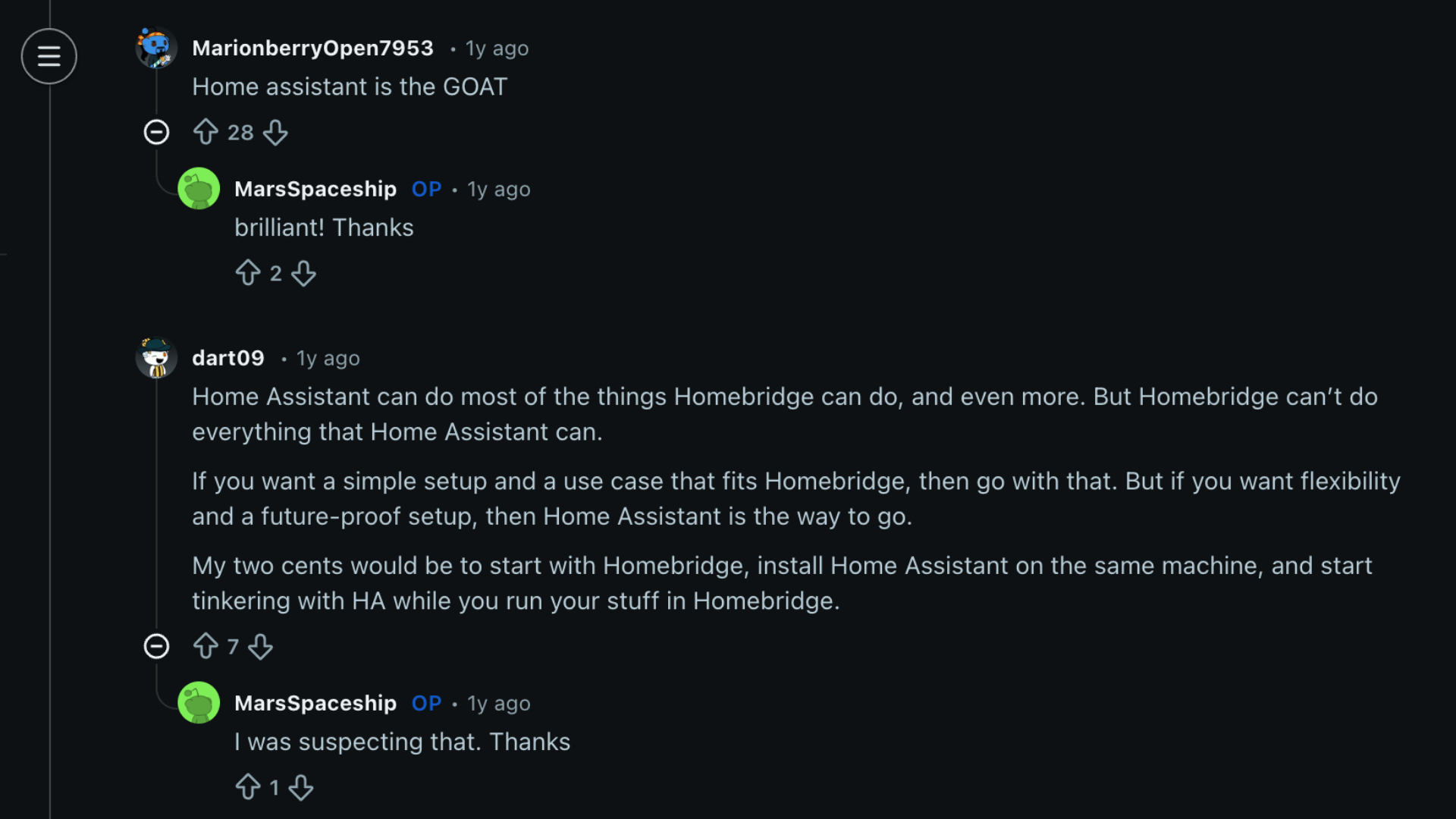
When Reddit users talk about Homebridge vs. Home Assistant, real-world experience says a lot of things.
Many describe starting with Homebridge because it felt lighter and easier to manage. One person shared, “I ran Homebridge for 5 years or so.” It worked well for their needs and stayed stable over time.
After switching, the tone often changes.
That same user added, “But 2 years ago I started using Home Assistant and wow! My smarthome has reached a new level!”
Others echoed similar views, saying Home Assistant offers deeper automation and broader integrations. One comment simply stated, “Home assistant is the GOAT.”
Still, not everyone frames it as a winner-takes-all.
Another user explained, “They’re two different things,” while someone else summed it up clearly, “Both. Tools for different jobs.”
The overall message from Reddit is simple: your choice depends on how much flexibility, control, and complexity you are comfortable handling.
Homebridge vs Home Assistant: Cost Comparison
Homebridge is completely free to install, and the main cost comes from the hardware used to run it. A Raspberry Pi 4 usually costs around $50 to $75, plus a microSD card and power supply.
Some users install it on an old computer they already own, which reduces the cost to almost nothing. Home Assistant is also free software, and the basic hardware requirements are similar.
However, many users choose more powerful mini PCs to handle heavier automations and larger device networks.
Hidden costs show up in different ways. Homebridge users often need an Apple TV or HomePod as a home hub, which can add $100 to $300.
Home Assistant users may buy Zigbee or Z-Wave dongles costing $30 to $60. Cloud services and paid add-ons can increase expenses for both.
Which One Should You Pick?
The right choice depends on your devices, comfort with setup, and how advanced you want your smart home to become.
- For Apple users: Homebridge works smoothly with HomeKit and keeps everything simple within the Apple ecosystem experience.
- For tinkerers: Home Assistant offers deeper control, detailed automations, and more freedom to experiment and customize workflows.
- For simple setups: Homebridge handles basic routines efficiently and requires less technical maintenance over long periods.
- For complex automation: Home Assistant supports layered logic, advanced triggers, and wider compatibility across multiple smart devices.
- For long-term growth: Home Assistant adapts better as your smart home expands with new devices and advanced automation needs.
Conclusion
Homebridge vs Home Assistant comes down to simplicity versus control after spending real time with both platforms.
Homebridge works best for users who want an easy way to bring unsupported devices into HomeKit without rebuilding their entire smart home setup.
It stays lighter, requires less maintenance, and fits naturally into an Apple-focused environment.
Home Assistant suits users who want deeper automation, broader device compatibility, and more detailed control over logic and dashboards.
It takes more time to learn, but it offers flexibility that smaller systems cannot match. Both platforms serve different needs, and neither is the wrong choice.
The better option depends on your comfort with complexity and how far you want your smart home to grow.
Which setup aligns more closely with your smart home? Share your thoughts in the comments below.