When I look at how small businesses operate today, it’s clear that workflow automation has become more than just a convenience; it’s a necessity.
I’ve seen how easy it is for teams to get overwhelmed with repetitive tasks, manual data entry, and constant follow-ups.
That’s why finding the right automation software can make such a big difference.
It helps save time, reduce mistakes, and keep everything running smoothly without a huge team. In this guide, I want to share the best workflow automation tools that I believe truly support small businesses.
Each one offers something unique, whether it’s easy integrations, simple setup, or features that help automate everyday tasks.
What is Workflow Automation Software?
Workflow automation software replaces manual steps with automated actions to streamline repetitive tasks.
It connects apps, systems, and data sources so information can move seamlessly from one step to another without human intervention.
This type of software uses triggers, rules, and predefined workflows to execute tasks such as sending notifications, updating records, assigning tasks, and generating reports.
By reducing manual work, workflow automation improves accuracy, increases productivity, and ensures processes run consistently.
Automation helps small businesses save time, cut errors, and stay organized.
Whether used for sales, customer support, marketing, or internal operations, workflow automation software helps businesses work more efficiently and focus on higher-value activities.
Top Small Businesses Workflow Automation Management Tools
These platforms help reduce repetitive tasks, improve consistency, and keep teams aligned without constant manual effort.
1. Zapier
When I use Zapier, I appreciate how simple it makes automation, even when connecting dozens of different apps.
I can build workflows in minutes by choosing a trigger and an action, and Zapier handles everything behind the scenes.
I rely on it to automate tasks between Gmail, Slack, Google Sheets, Trello, Airtable, and more.
What I love most is how scalable it is, whether I’m creating a basic two-step workflow or a more advanced multi-step process, Zapier adapts to what I need.
2. ClickUp
It helps me keep my team organized without manually tracking every update. I enjoy how customizable ClickUp is; views, fields, and workflows can all be adjusted to my actual work.
For small businesses trying to bring everything under one roof, ClickUp saves time and eliminates the need for multiple apps.
Its automation tools help reduce repetitive work and keep projects moving smoothly.
Whenever I want strong organization combined with automation, ClickUp delivers exactly what I need.
3. Airtable

It is a tool I love using when I need automation combined with database-level structure. It lets me organize information in grids, calendars, Kanban boards, and forms.
The automation builder helps me set up triggers that send emails, update records, create tasks, or push information into other apps.
For small businesses that rely on spreadsheets, Airtable is a big upgrade because it blends spreadsheet familiarity with the app-like power of a modern app.
I use it for project tracking, content planning, customer records, and lightweight CRM systems.
4. Monday.com

It helps me automate workflows in a visual and incredibly intuitive way.
I appreciate how each board works like a customizable system where I can add automation rules that update statuses, assign tasks, send reminders, and integrate with other tools.
The interface makes collaboration easy, and I like how the platform adapts to any team, marketing, operations, sales, or support.
For small businesses that want organization and automation in a single space, Monday.com works beautifully.
5. Asana

It is a tool I rely on for clear, structured workflows with automation built right into tasks and projects.
I love how rules let me automatically assign tasks, adjust due dates, move items between sections, or notify teammates when something changes.
It keeps everything organized without me needing to micromanage tasks.
Asana is great for small teams who want visibility into what’s happening and what comes next. The automations make routine project management much easier by reducing the need for manual updates.
6. Trello + Butler Automation

This has always been one of my favorite simple tools, and Butler automation makes it even more powerful.
I love how I can create rules, buttons, and scheduled commands to automatically move cards, assign tasks, or update labels.
It helps me keep boards organized without manually dragging every card around. Trello feels lightweight, but its automation tools make it strong enough for daily workflows.
I use it for editorial calendars, small projects, operations, and task tracking. For small businesses looking for a visual, simple solution, Trello plus Butler is a great match.
7. Make (Integromat)
Make is the platform I turn to when I want highly visual, flexible automation. I love how each workflow looks like a diagram, with modules connected like a flowchart.
It helps me think through processes clearly. I use Make to automate tasks between apps, transform data, and create multi-step workflows that go far beyond basic triggers.
Even though the company originated in Europe, its strong U.S. presence makes it a common choice for American small businesses.
It’s ideal when I need creative freedom and advanced logic without writing code.
8. HubSpot CRM
It is a tool I appreciate when I need automation that supports marketing, sales, and customer communication simultaneously.
The free CRM is powerful, and the workflows help me automate follow-ups, create tasks, send emails, and organize contacts.
It’s perfect for small businesses building customer pipelines without complicated software.
HubSpot’s automation helps me save time, stay organized, and maintain consistent communication with leads and clients.
9. Salesforce Essentials
This tool gives me the power of Salesforce but sized correctly for a small business.
I appreciate how automation helps me route leads, send reminders, update stages, and track customer interactions. It keeps my sales process clean and predictable.
While it’s simpler than enterprise Salesforce, it still gives me strong automation tools and reporting features.
For small teams that need a dependable CRM with workflow automation, Salesforce Essentials feels like a solid fit.
10. Smartsheet
Smartsheet is a tool I enjoy when I need spreadsheet-style organization with advanced automation.
I can build workflows that send alerts, request approvals, update fields, and automatically move tasks.
It feels familiar, like Excel, but much more powerful. Smartsheet works well for operations, project management, and resource planning.
The automation features help me avoid repetitive work and stay on top of deadlines.
11. Nintex
When I use Nintex, I appreciate how powerful it is for building process-driven automation without needing complex coding skills.
I can design workflows visually, drag steps into place, and connect forms, documents, and approvals into a smooth system.
What I like most is how well Nintex handles structured processes, things like onboarding, purchase requests, compliance tracking, and routine operations.
It helps me reduce manual steps by routing tasks automatically, sending alerts, updating records, and keeping everything consistent.
12. Pipefy

With this tool, I can set rules that move cards, assign tasks, request approvals, or notify teammates automatically.
Pipefy works well for onboarding, customer requests, budgeting workflows, and service operations.
I like how customizable each process is because I can adjust fields, forms, and phases to match the way my business runs.
Its automation features save me time by cutting down on mistakes and keeping tasks from getting stuck, which helps my team stay organized and focused on the work that matters.
13. Kissflow
It works well for approvals, procurement, onboarding, service requests, and other routine operations that need a clear structure.
I like how Kissflow centralizes all activity, so I always know the status of each task and who is responsible for the next step.
Its automation tools remove repetitive follow-ups, cut human error, and keep every process consistent.
When I need a no-code platform that delivers dependable workflow automation, Kissflow gives me exactly what I’m looking for and helps my team stay organized and efficient.
14. Quickbase
This tool allows me to build custom business applications and automated workflows that fit exactly what my operations need.
I love how I can create databases, forms, dashboards, and processes without coding, and then automate steps that update records, send alerts, or move tasks through different stages.
It’s especially useful when I need to manage complex operations, track resources, or coordinate work across several teams.
Quickbase helps me eliminate manual spreadsheets and replace them with automated systems that scale.
15. Workato

It gives me the power to build advanced automations without needing a development team, and I love how its “recipes” let me combine multiple steps into one smooth workflow.
I can connect apps, transform data, and trigger actions across systems like Slack, Salesforce, Gmail, and databases.
What I appreciate most is how Workato handles complex logic while still feeling approachable.
It helps me automate approvals, onboarding flows, lead handoffs, and operational processes that would otherwise take hours of manual work.
The platform also scales well as my business grows, so I don’t outgrow the automation I’ve built.
16. Unito

It helps me keep my tools synchronized so workflows run smoothly across teams and platforms.
I like how it creates two-way connections between apps like Trello, Asana, ClickUp, Jira, and Airtable, keeping information up to date automatically.
Instead of copying tasks or updating records manually, Unito mirrors changes across systems in real time.
I appreciate how customizable each sync is. I can filter by fields, rules, and conditions to ensure the right information flows to the right place.
17. Process Street
This tool helps me create repeatable workflows that keep my operations consistent and organized.
I can set conditional logic, assign tasks, trigger notifications, or update fields without managing each step manually.
The interface feels clean and easy to understand, which makes it simple for my team to follow processes without confusion.
I also enjoy how Process Street integrates with tools like Slack, Zapier, and Google Workspace, enabling information to flow smoothly between systems.
18. Ninox

Ninox helps me build custom databases and automated workflows without needing any coding skills.
Once everything is set up, I can add automation that triggers emails, updates records, assigns tasks, or connects information between tables.
This makes my operations faster and more organized. I appreciate how Ninox works across devices and teams, so everyone stays aligned.
It integrates with popular tools via APIs or services like Make and Zapier, keeping my data connected.
19. Microsoft Power Automate

It integrates seamlessly with Microsoft 365 tools like Outlook, Teams, SharePoint, and Excel, making it easy to automate the tasks I handle every day.
I can create flows that send notifications, update files, assign tasks, move data, or run approvals automatically.
Power Automate also connects to hundreds of external apps, helping me centralize multiple systems into a single workflow.
For small businesses that already use Microsoft products, Power Automate offers an efficient, powerful solution that enhances productivity and keeps daily operations running smoothly.
20. Notion

This tool helps me bring documents, tasks, databases, and workflows together into a single flexible workspace.
With Notion’s automation integrations, I can trigger actions that update records, assign tasks, send notifications, or move information between systems automatically.
It helps me stay organized without needing several different apps. I love how customizable everything is, from templates to relational databases.
Notion supports my small business by allowing me to build lightweight CRM systems, content calendars, project hubs, and documentation centers.
21. Formstack
Its workflow builder lets me create clear, repeatable processes for tasks such as onboarding, registration, service requests, and internal operations.
I appreciate how Formstack integrates with tools like Salesforce, Slack, Google Workspace, and more, which keeps information moving smoothly across my systems.
I can automate notifications, update records, and ensure every form submission reaches the right person immediately.
Formstack saves me time by reducing administrative work and helping my team avoid errors.
22. Jotform

It is to design forms, add logic, and create workflows that automatically send emails, update records, assign tasks, or push data into other tools.
It helps me manage registrations, orders, client intake, feedback, and internal requests without needing extra manual follow-up.
The platform integrates with apps like Google Sheets, Slack, Asana, and Airtable, which keep everything organized.
When I need a form-based automation system that saves time and keeps my operations consistent, Jotform is one of the tools I trust most.
23. Zoho Flow

With Zoho, I can create flows that automatically trigger actions in other apps, update data, send notifications, or move information between systems.
Zoho Flow works especially well when I’m using multiple Zoho products, but it also integrates smoothly with tools like Slack, Trello, Gmail, and Airtable.
I appreciate how it lets me map fields, apply conditions, and design multi-step workflows that reduce repetitive manual work.
It helps me maintain consistency, avoid mistakes, and keep my business running efficiently.
How Do These Tools Help Small Businesses?
With clear workflows and automated steps, even small teams can operate efficiently and stay consistent every day.
- Start with one simple workflow
- Choose tools that integrate with existing apps
- Standardize processes before automating them
- Track performance and adjust workflows regularly
- Use templates to save setup time
Automation becomes far more effective when it supports real business needs.
Online Community Reviews and Real User Feedback
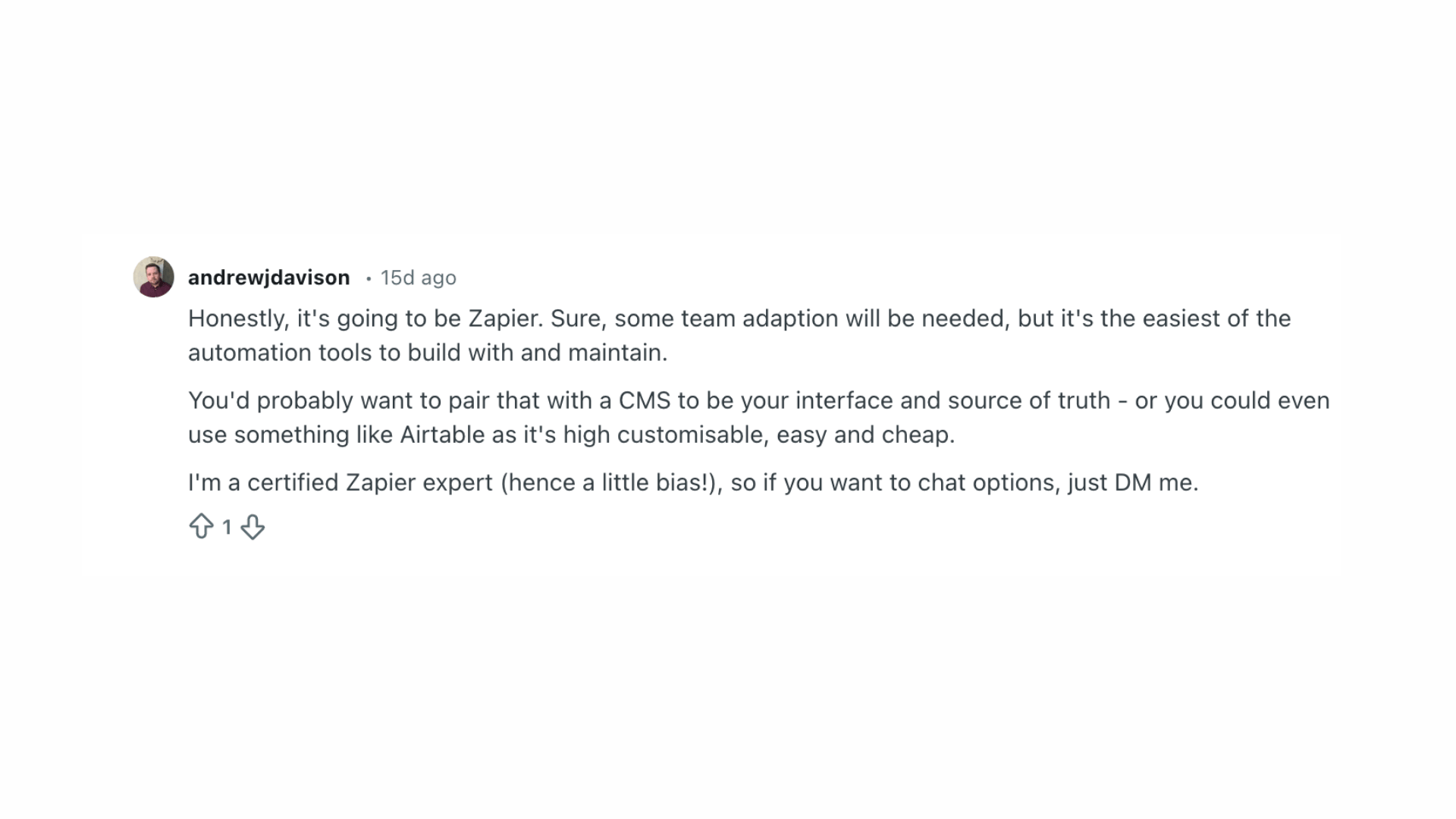
A Reddit user shared that Zapier is often the most practical workflow automation tool for small businesses because it’s easy to build with and doesn’t require advanced technical skills.
While they acknowledged that teams may need some time to adapt, Zapier’s straightforward design makes automation far more accessible than other platforms.
They also suggested using Zapier with a CMS or using Airtable to manage data and processes more easily.
The commenter mentioned being a certified Zapier expert and added personal insight into why the tool works well for small teams.
Their overall view emphasized simplicity, adaptability, and long-term maintainability for real-world business needs.
Conclusion
Finding the right workflow automation tool can make everyday work feel easier, especially when you’re running a small business with limited time and resources.
The tools here help you reduce repetitive tasks, stay organized, and keep your team moving without constant manual work.
As you find your options, focus on what fits your current processes and supports the way you already work. Even one simple automated workflow can create noticeable improvements.
The more you refine your systems, the more freedom you gain to handle the parts of your business that matter most.
I’d love to hear from you. What tools have helped you simplify your daily tasks? Share your experience in the comments below.