Choosing the right cloud integration platform can feel overwhelming, especially when every tool claims to be the most powerful or flexible option.
When I started comparing these platforms for my own projects, I realized how important it is to match the tool to the actual needs of my business, not just the marketing claims.
Some platforms focus on no-code automation, while others specialize in API connections or enterprise workflows.
In this guide, you’ll learn the differences between the most popular cloud integration platforms and share what stood out to me during my research.
If you’re trying to decide which solution fits your team, data, and long-term goals, this blog will help you make a confident choice.
What Cloud Integration Platforms Do?
Cloud integration platforms connect disparate cloud applications, on-premises systems, and data sources to enable seamless data flow, automation, and workflow orchestration.
These iPaaS tools offer no-code/low-code integration, support hybrid setups, manage APIs, and enable real-time syncing.
Key functions include visual drag-and-drop builders for custom workflows, prebuilt connectors (often 300-7,000+), AI-driven automation, event-driven triggers, and enterprise scalability.
They cut manual work, improve agility, strengthen security, and support legacy-to-cloud migrations.
Popular in e-commerce, IT, and revenue ops, Boomi fits hybrid setups, while Zapier works well for simple automations.
Overall, they drive efficiency by unifying ecosystems without custom coding.
Top Cloud Integration Platforms Compared
The list below reflects my personal experience and research, giving a clear picture of how these platforms differ and why one might suit a specific type of project better than another.
1. MuleSoft
Whenever I evaluate MuleSoft, I’m always impressed by how enterprise-focused the platform is.
With its Anypoint Platform, MuleSoft gives me deep control over APIs, integrations, and system orchestration, making it ideal for large or complex environments.
I like that it offers strong analytics, supports multiple protocols, and includes solid security for safe system communication.
MuleSoft also offers prebuilt connectors for major enterprise applications, which saves time when integrating complex systems like ERPs or CRMs.
2. Boomi
It is one of the platforms I turn to when I want cloud-first integration without the complexity of enterprise-heavy tools.
I like how visual and approachable the interface feels, especially when building workflows and mapping data between systems.
The library of prebuilt connectors helps me integrate applications faster, and the platform’s real-time monitoring tools keep everything running smoothly.
Boomi supports API management and traditional integrations, making it flexible for hybrid environments.
3. Zapier

This one is usually the first platform I think of when I need quick, no-code automation for daily workflows.
What I like most is how easy it is to set up automations between the thousands of apps Zapier supports.
It’s perfect for situations where I want to connect tools like Gmail, Slack, Airtable, or Google Sheets without writing a single line of code.
Although it’s not built for deep API management or enterprise-level integrations, it’s great for boosting productivity and handling repetitive tasks.
4. Workato
When I use Workato, I appreciate how it allows both citizen developers and technical teams to build integrations on the same platform.
The recipes feel intuitive, and the automation options are more advanced than those in basic no-code tools.
Workato’s support for complex data transformations and multi-step workflows makes it great for larger businesses that need more sophistication.
It’s ideal when I need a tool that can grow with a business and handle more advanced automation scenarios.
5. Tray.io
It is a platform I explore when I want a high-flexibility, low-code solution that still feels approachable.
Its drag-and-drop builder gives me a lot of freedom to design workflows that suit specific use cases without needing heavy programming skills.
Tray.io also offers strong scalability, making it a good fit for teams that expect their integration needs to grow over time.
Compared to purely no-code tools, it gives me more control while still keeping the interface visually accessible and intuitive.
6. Celigo
This is one of the platforms I use for structured, e-commerce-friendly integrations.
It’s especially strong for connecting tools like Shopify, NetSuite, Amazon, and other systems that rely on consistent data syncing.
The interface feels clean, and the platform provides solid monitoring tools to keep workflows reliable.
Celigo is a great fit for businesses that rely heavily on operations, fulfillment, and marketplace integrations.
7. Microsoft Power Automate

Power Automate is one of the tools I use most when working with companies already invested in Microsoft 365.
I love how naturally it integrates with apps like SharePoint, Outlook, Teams, and Dynamics 365. The flow designer is easy to use, and I can create powerful automations without writing any code.
I like that Power Automate supports hundreds of third-party connectors, making it very versatile.
For internal workflows and small integrations, Power Automate is usually all I need. It’s affordable, simple, and fits well with Microsoft tools.
8. SnapLogic
Its AI-powered assistance helps me build workflows faster, and the “snaps” system makes connecting apps incredibly smooth.
I appreciate how well it handles large-scale data movement while still offering a user-friendly interface.
SnapLogic works great in hybrid environments, letting me connect on-prem systems with cloud services.
Whenever I work on projects that require high-volume integrations but still need fast development, SnapLogic is one of my preferred choices.
9. IBM App Connect
IBM App Connect is the tool I reach for when I’m dealing with organizations that have a mix of old and modern systems.
I love how it bridges legacy applications with cloud platforms without needing huge changes to infrastructure.
The interface is clean, the mapping tools are strong, and the reliability is excellent.
App Connect also offers great monitoring tools that help me track long-running integrations. Whenever security, stability, and hybrid connectivity are priorities, this platform gives me exactly what I need.
10. Jitterbit

It is one of the easiest platforms for me to use when I want power without unnecessary complexity.
I love how quickly I can design workflows visually, map data, and deploy integrations. The Harmony platform gives me API creation, management, and automation all in one place.
It integrates extremely well with CRMs, ERPs, and e-commerce systems.
Whenever I need fast development paired with strong transformation tools, Jitterbit is a platform I trust.
11. Apigee (Google Cloud)

Apigee is one of the platforms I rely on for complete API management and strong performance visibility.
Its monitoring tools make it easy to spot issues early and understand traffic patterns across different services.
I also like how simple it is to apply authentication, caching, and rate limiting policies without writing custom code. These built-in features save time and keep APIs consistent.
Apigee is especially useful for teams building API-first products or handling large volumes of requests that require reliable, well-managed endpoints.
12. Kong
Kong’s plugin-based architecture is a huge advantage; whether I need security, transformation, logging, or rate-limiting features, I can add them without rewriting anything.
It performs extremely well under heavy traffic, especially in Kubernetes and microservices environments.
I also appreciate how easily Kong scales, making it ideal for both small teams and enterprises.
Whenever I need a cloud-native gateway that’s fast, developer-friendly, and versatile, Kong is one of the first platforms I think of.
13. TIBCO
It is a platform I rely on when I’m working with enterprise environments that require high reliability and strong support for legacy systems.
I like its stability and maturity, making it ideal for large-scale integrations in major industries.
TIBCO’s transformation tools help me manage even the most complex data structures, and I appreciate the seamless integration of mainframes, databases, cloud systems, and analytics tools.
For organizations needing reliable, long-term integrations with minimal downtime, TIBCO always delivers.
Online Community Reviews
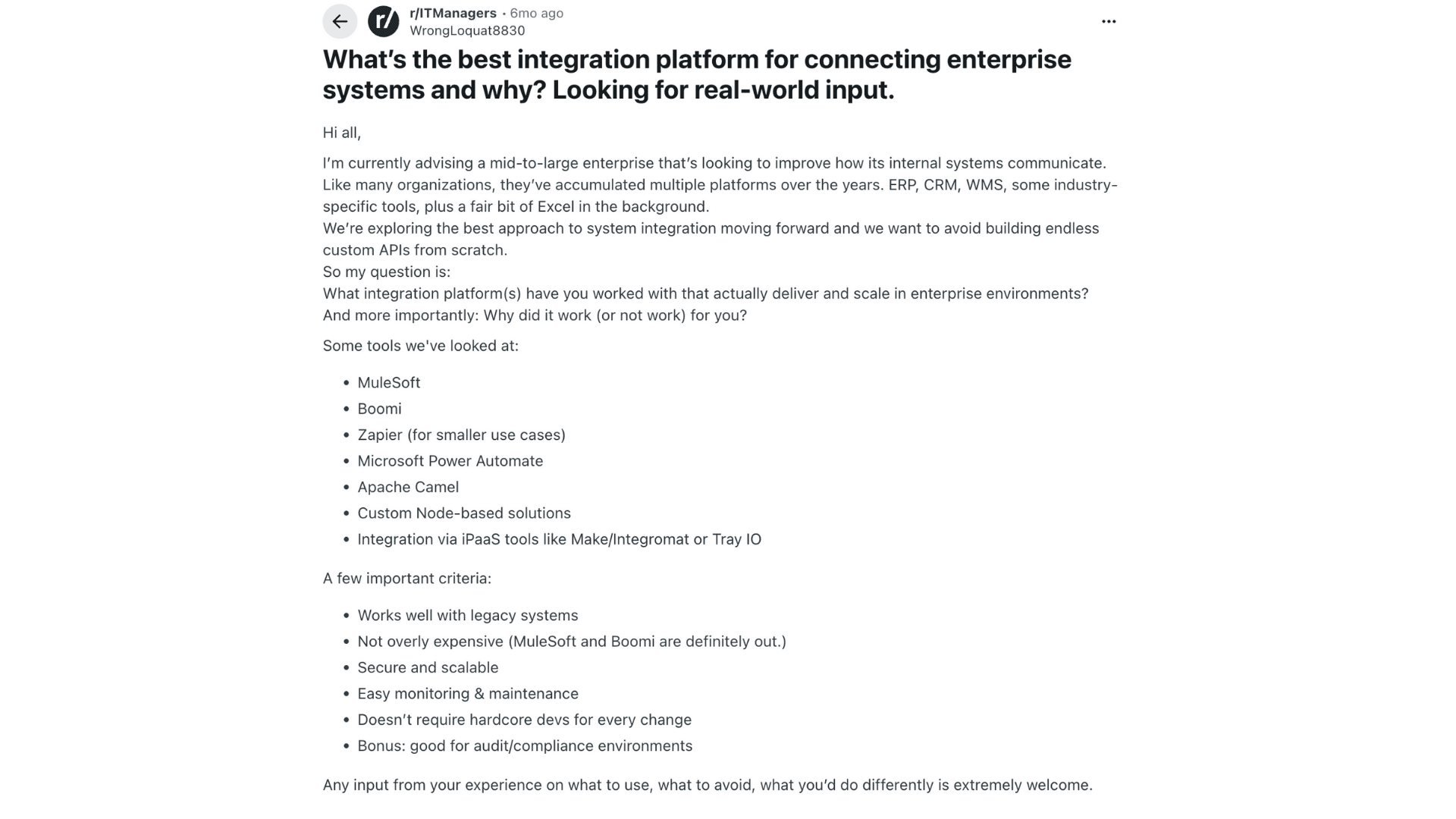
A discussion on Reddit highlights the challenges mid-to-large enterprises face when trying to streamline communication between multiple internal systems.
Many IT managers say MuleSoft is reliable and connects many systems, but they also note that it’s expensive.
Others mention that tools alone don’t fix poor planning, and that teams still need clear documentation and good governance.
Some users prefer lighter, low-cost tools like Power Automate, Workato, or Apache NiFi because they handle common workflows without needing heavy coding.
A few also warn that depending only on custom API work can lead to problems later if the system becomes hard to maintain.
Many recommend a mix of low-code tools and small custom services to cover edge cases.
Overall, users look for platforms that scale, support legacy systems, and are easy to manage over time.
Best Platform by Use Case of Cloud Integration Apps
The list below reflects what stood out to me when evaluating scalability, ease of use, automation depth, and long-term sustainability.
1. Enterprise
When I look at enterprise-level needs, MuleSoft consistently stands out as the most capable platform.
What makes it ideal for large organizations is its ability to handle massive data flows, complex API ecosystems, and hybrid environments that include both cloud and legacy systems.
I appreciate how MuleSoft provides strong governance, versioning, monitoring, and enterprise-grade security, all essential for companies working across multiple departments and systems.
Its API-led architecture helps prevent integration sprawl and gives teams a structured way to scale over time.
2. Mid-Sized Businesses
For mid-sized businesses, Boomi often feels like the perfect balance of power and accessibility.
What I like most is how Boomi supports both simple cloud connections and more advanced workflows without overwhelming me with complexity.
The visual interface makes mapping data and building integrations much faster than code-heavy tools.
Boomi also offers a range of prebuilt connectors, which help reduce development time when connecting to CRMs, ERPs, or industry platforms.
3. Startups
When I’m working with startups, Zapier almost always becomes the first tool I recommend.
Startups usually need fast, simple automations rather than huge enterprise workflows, and Zapier makes that incredibly easy.
I never have to write code, and the setup process takes minutes instead of days. It’s perfect for connecting tools like Slack, Gmail, Stripe, Airtable, or Notion, apps most startups already use.
While Zapier isn’t built for deep system integrations, it handles day-to-day automation beautifully and saves small teams a ton of time.
4. No-Code
For no-code users looking for something more flexible than Zapier, Workato has become one of my favorite platforms.
Even though it’s more powerful, I still find its “recipe” style builder very intuitive.
It gives me the ability to create advanced workflows with conditions, loops, and multi-step logic, all without writing code.
This makes Workato perfect for operations teams, analysts, or anyone who wants deeper automation without relying on engineering support.
Conclusion
After learning about these different cloud integration platforms, I’ve learned that the “best” option really depends on the size of the business and how much complexity the team can handle.
Some tools are built for deep, enterprise-level workflows, while others shine in simpler, faster use cases.
For me, the key is choosing a platform that balances power with usability so the organization isn’t constantly fighting the tool or relying on developers for every change.
When the right platform is in place, integrations run smoother, data stays consistent, and teams spend far less time fixing issues.
With a thoughtful choice, it becomes much easier to build a connected, scalable system that supports long-term growth.