Comparing two screens side by side and feeling that one simply looked clearer, sharper, and more immersive, yet you could not fully explain why.
That quiet difference often leads to a common question: What is 2K resolution, and does 2K monitor resolution truly change the viewing experience?
The terms sound technical, and the numbers can seem overwhelming at first glance, which makes choosing the right display feel more complicated than it should be.
Still, resolution plays a powerful role in how text appears, how games feel, and how detailed images look during everyday use.
Many people only realize this after upgrading and noticing that everything appears more refined and comfortable on the eyes.
This blog will help you understand 2K resolution, its differences with other resolutions, and which one suits you the best.
Understanding Screen Resolution
Screen resolution refers to the number of pixels displayed on a screen, arranged in a grid pattern.
It is written as horizontal × vertical, such as 1920 × 1080, which means 1,920 pixels across and 1,080 pixels down. Pixels are tiny dots that form images, text, and graphics.
A higher pixel count usually results in sharper and more detailed visuals because more information fits into the same space.
This improves text clarity, image sharpness, and overall screen quality.
Common terms include HD (1280 × 720), Full HD (1920 × 1080), QHD (2560 × 1440), and 4K (3840 × 2160). These names often reflect pixel height or total pixel range.
In consumer markets, 2560 × 1440 is sometimes called 2K, even though it is technically closer to QHD than true cinema 2K monitor resolution.
What is 2K Resolution in Monitors?
2K monitor resolution refers to a display format with around 2,000 pixels across the horizontal axis.
In technical terms, true 2K is defined as 2048 × 1080 and is based on the Digital Cinema Initiatives standard used in movie production.
This version typically uses a 17:9 aspect ratio, slightly wider than the common 16:9 format on most monitors.
Pixel density depends on screen size; on smaller displays, 2K appears sharper because the pixels are packed closer together.
It also supports high refresh rates in many modern panels, depending on the monitor design.
How 2K Resolution Compares With Other Resolutions?
Resolution affects image sharpness, workspace, gaming performance, and hardware demand. The differences are not just about pixel counts but also about aspect ratios and screen-size suitability.
1. True 2K vs QHD
2K monitor resolution is 2048 × 1080 with a 17:9 aspect ratio, mainly used in digital cinema.
QHD, on the other hand, is 2560 × 1440 with a 16:9 aspect ratio and about 3.6 million pixels. In consumer monitors, many brands label 1440p as 2K, even though it has more pixels than true 2K.
QHD provides more screen space and sharper detail, making it better for gaming and productivity.
It is commonly available in IPS, VA, and TN panels. IPS offers better color accuracy, VA delivers deeper contrast, and TN prioritizes faster response times.
2. True 2K vs Full HD
Full HD usually refers to 1920 × 1080 resolution with a 16:9 aspect ratio. True 2K at 2048 × 1080 offers slightly more horizontal pixels and uses a 17:9 aspect ratio, making it wider.
The difference in sharpness is noticeable but not dramatic on smaller screens.
Full HD works well for everyday tasks and budget gaming setups because it requires less GPU power. It is widely available in IPS, VA, and TN panels.
2K monitor resolution delivers a bit more detail and slightly wider visuals, making it better suited for larger displays and media production environments.
3. 2K vs 4K Resolution
4K resolution is 3840 × 2160 with a 16:9 aspect ratio and over 8 million pixels! That is nearly four times the pixel count of true 2K at 2048 × 1080.
The sharpness difference is clear, especially on screens 27 inches or larger. 4K is excellent for video editing, detailed design work, and immersive media viewing.
However, it requires stronger GPU performance and higher bandwidth. 2K demands less hardware power and is easier to run smoothly.
Both resolutions are available in IPS, VA, and OLED panels, with IPS being popular for color accuracy and OLED offering deep blacks.
Real User Experience of 2K Monitor Resolution
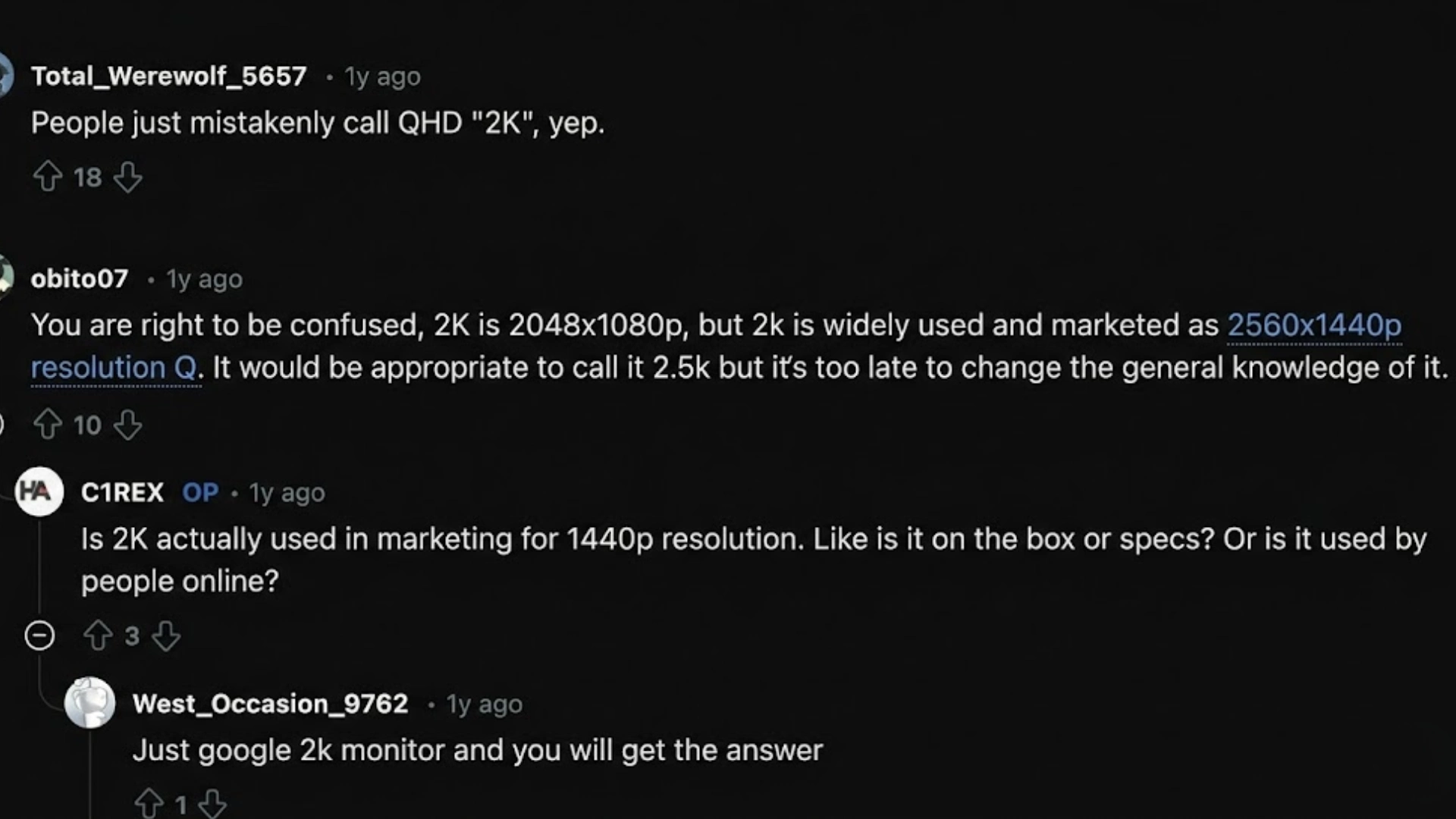
Reddit discussions reveal ongoing confusion around 2K monitor resolution, especially when comparing 2048×1080 and 2560×1440.
Many users point out that true 2K, based on DCI standards, equals 2048×1080. However, in the consumer monitor market, 1440p is widely labeled and sold as 2K.
Several commenters admit this shift comes largely from marketing convenience rather than technical accuracy.
Calling 2560×1440 “2.5K” would be more precise, but brands favor cleaner numbers on boxes.
Some users also explain how 4K earned its name by delivering four times the pixel count of 1080p, which adds to the naming confusion.
Others argue that consistency in aspect ratio and practical display standards influenced why 1440p became associated with 2K.
Overall, Reddit users agree that while 1440p is not true 2K by cinema standards, the term 2K has evolved into common shorthand for QHD in everyday tech conversations.
Advantages and Limitations of 2K Monitor Resolution
It delivers sharper visuals than standard HD, but it is not perfect for every setup. Below is a simple breakdown of its key advantages and limitations.
| Advantages | Limitations |
|---|---|
| Sharper image quality than 1080p | More demanding on GPU than 1080p |
| Better balance between visuals and performance | Not as detailed as 4K |
| Ideal for 27-inch monitors with clear text | Can reduce frame rates in high-end games |
| Widely available in gaming monitors | Marketing confusion around the 2K definition |
| Suitable for both work and gaming | May require display scaling adjustments |
Is 2K Monitor Resolution Good for Gaming?
2K resolution in gaming monitors is widely considered a strong balance between visual clarity and performance.
With about 3.6 million pixels, it delivers noticeably sharper images than 1920 × 1080 while remaining easier to run than 3840 × 2160.
This makes it ideal for 27-inch displays, where pixel density stays crisp without overloading the GPU.
Many 1440p gaming monitors support refresh rates of 144Hz, 165Hz, or even 240Hz, which improves motion smoothness in fast-paced games.
To run modern titles at high settings, a mid- to upper-tier graphics card is usually recommended, along with an appropriate panel choice.
How to Choose the Right Monitor Resolution for You?
Choosing the right resolution depends on budget, performance needs, screen size, and daily use.
Higher resolutions like 4K cost more and often require a stronger graphics card, while 1080p and 1440p are more affordable and easier to run.
Screen size also matters; on smaller monitors under 24 inches, 1080p looks sharp.
For 27-inch displays or larger, 1440p or higher provides better clarity, especially at close viewing distances. Primary use of the resolution also matters.
Competitive gaming favors 1080p or 1440p for higher refresh rates, and office work benefits from extra workspace at 1440p. Creative tasks may justify 4K for finer detail.
Check support for refresh rates, GPU compatibility, and total setup cost.
4K is better for detailed work, but unnecessary for basic tasks or mid-range hardware. A 2K monitor resolution delivers the best balance of clarity, cost, and performance.
Conclusion
2K monitor resolution sits in a practical middle ground in today’s display landscape.
It represents a step above basic Full HD in sharpness and usable screen space, while avoiding the heavy hardware demands and higher cost that often come with 4K.
For many users, it delivers a clear and balanced experience that feels modern without being excessive.
Gamers who want smoother performance, professionals who need extra workspace, and everyday users upgrading from 1080p can all benefit from this resolution.
The key is to match it to the right screen size and hardware.
If you are considering a monitor upgrade, compare models carefully and, if possible, view a display in person before buying.
Have you used a 2K monitor? Share your thoughts and experience in the comments below.