Finding the best application integration platforms can feel confusing, especially when every tool claims to solve the same problems.
When I first dug into these platforms, I realized how important it is to understand what each one actually does and how it fits into real workflows.
You might feel the same if you need to connect apps, automate tasks, or keep systems running smoothly.
In this guide, I’ll walk you through some of the most trusted integration platforms and explain what they offer in simple terms.
You’ll see tools that handle automation well, which support complex systems, and which are easier for everyday use.
My goal is to give you clear, honest information so you can choose a platform that fits your needs without guessing. By the end, you’ll know exactly where to start.
What is an Application Integration Platform?
An application integration platform is a tool that helps different apps work together without manual effort. It connects software that normally doesn’t communicate, allowing data to move smoothly between systems.
You can use it to automate tasks, reduce errors, and cut down on repeated work.
Many platforms offer prebuilt connectors for common apps, making setup easier. Others let you build custom workflows for more complex needs.
These platforms are helpful for teams that rely on multiple tools every day and want a simpler way to manage information.
They also support real-time updates, so changes in one app show up in another right away. With a good integration platform, you save time and avoid switching between apps to copy or update data.
It gives you one place to manage connections and keep your systems working together.
Most Popular Integration Platforms Today
Each platform offers its own strengths; some are better for simple no-code automations, while others handle complex enterprise-level integrations.
1. Zapier
It’s often the first integration platform I choose when I need to connect apps quickly without writing code. Building automations feels simple because I just select a trigger in one app and an action in another.
Zapier supports thousands of tools. That means I rarely deal with compatibility issues.
It also helps me handle repetitive work like sending notifications, updating spreadsheets, and moving customer information between platforms.
Tasks that once took several steps now happen automatically, saving time and keeping my workflow steady.
2. Make (Integromat)
Make gives me visual, flowchart-style automations that help me understand exactly how data moves between apps.
Make is ideal when I need deeper control over data, modifying fields, formatting text, filtering events, or merging information from multiple sources.
I can connect dozens of apps in one automation and watch everything execute in real time. Although it takes a little more learning, the flexibility is worth it.
Make feels like a powerful engine behind my workflows, allowing me to automate processes that Zapier can’t always handle.
3. Workato
Its “recipes” make workflows easy to build while still handling complex tasks across sales, finance, HR, and operations.
Workato combines no-code design with advanced features like data transformation, conditional logic, and custom APIs.
It integrates with thousands of business applications, helping unify systems that normally don’t communicate.
The platform also scales smoothly, supporting everything from small workflows to full business operations while keeping processes organized and efficient.
4. MuleSoft

It is the platform I rely on when an organization needs deep API-driven integrations. It’s more technical than typical no-code tools, but the power it provides is unmatched.
I appreciate how MuleSoft lets me build reusable APIs that stitch together systems like CRMs, ERPs, databases, and custom applications.
The Anypoint Platform gives me full control over data mapping, orchestration, security, and monitoring.
It’s ideal when I’m dealing with legacy systems or enterprise architecture where precision and governance matter.
5. Boomi
Boomi stands out to me because of its speed and ease of building integrations using its visual drag-and-drop interface.
I enjoy how quickly I can connect systems using prebuilt connectors, whether I’m linking CRM data, syncing ERP systems, or automating HR workflows.
Boomi’s cloud-native architecture makes scaling effortless, and I love how the AtomSphere platform centralizes monitoring, logging, and management.
It also includes data quality tools and API management, giving me a full integration suite in one place.
6. Tray.io

Tray integrates with a huge range of SaaS platforms, making it easy for me to connect marketing, sales, finance, and operations tools.
I appreciate how scalable the platform feels, whether I’m building a lightweight automation or a full integration process; Tray handles the load.
It’s especially useful when a business needs advanced capabilities without committing to highly complex enterprise platforms.
Tray’s performance, flexibility, and strong API support let me build workflows exactly the way I want.
7. Celigo
It is the platform I use when I need strong, prebuilt integrations, especially for e-commerce, finance, and ERP systems.
The platform offers Integration Apps that provide ready-made flows between tools like NetSuite, Shopify, Salesforce, and Amazon.
These templates save me a huge amount of configuration time. Celigo’s interface is clean and structured, making it easy to manage data mappings, error handling, and automation logic.
The platform supports simple workflows and complex enterprise integrations, giving me flexibility as needs grow.
8. SnapLogic
Its visual “Snaps” make it easy to connect systems quickly without dealing with low-level technical details.
The platform handles large data volumes well, making it ideal for analytics, enterprise data flows, and syncing apps across teams.
The built-in AI suggests pipeline components and identifies fixes when something isn’t working. SnapLogic supports cloud, on-premise, and hybrid environments, offering strong flexibility.
This setup helps integrate older systems with modern SaaS tools while keeping everything running smoothly.
9. TIBCO Cloud Integration
TIBCO helps me build reliable, scalable integrations without losing visibility or control.
I appreciate how it supports event-driven architectures, API management, and data orchestration in a single platform.
Whether I’m connecting cloud services, legacy databases, or enterprise systems, TIBCO gives me tools to manage everything cleanly.
The interface allows me to map data visually, deploy integrations rapidly, and monitor performance in real time.
10. Microsoft Power Automate
It’s easy to connect Outlook, Teams, SharePoint, Excel, and hundreds of third-party apps with Power Automate.
The platform supports simple no-code flows as well as advanced workflows for more complex needs. Triggers, conditions, loops, and approvals make it possible to automate everyday business operations without writing code.
The AI Builder also adds helpful intelligence to forms, documents, and emails, improving accuracy and reducing manual work.
This mix of tools makes Power Automate a strong choice for streamlining tasks.
11. IBM App Connect
It works well across both cloud and on-premise environments, making it easy to connect legacy systems with modern SaaS platforms.
The interface blends low-code tools with advanced options, allowing integrations to match any workflow’s complexity.
IBM App Connect supports event-driven processes, API creation, and real-time data flows, offering strong flexibility for different use cases.
Its security and compliance features protect sensitive business data, which is vital for teams handling critical information.
How to Evaluate Pricing and Value in Integration Platforms?
Assessing pricing and value is critical when choosing an application integration platform. Many tools offer free tiers or trial periods, making it possible to explore functionality before committing financially.
For smaller businesses, selecting a platform with a generous free or low-cost entry level ensures automation benefits without overwhelming the budget.
As needs grow, pricing can shift quickly. User count, workflow volume, API calls, and data transfers all impact total cost.
The best value comes when features like automation builders, connector libraries, monitoring tools, and support services are included at a predictable price point.
Hidden fees, such as extra connector charges, overage fees, or premium support, should be carefully reviewed.
The most worthwhile platforms balance affordability with flexibility and robust functionality that grows with the business.
Pricing Breakdown: Which Platforms Offer the Best Value?
Understanding pricing helps you choose a platform that fits your budget and needs. This table gives a simple look at how each tool approaches cost and where the best value appears.
| Platform | Pricing Type | Free Tier | Best Value For |
| Zapier | Subscription, usage-based | Yes | Small teams needing fast no-code automation |
| Make (Integromat) | Tiered, scenario-based | Yes | Users needing detailed, visual data workflows |
| Workato | Enterprise subscription | No | Large businesses with complex automation needs |
| MuleSoft | Enterprise licensing | No | API-led architecture and deep system integration |
| Boomi | Tiered enterprise plans | No | Mid-size to enterprise data sync and workflows |
| Tray.io | Usage-based SaaS | No | Scaling teams needing flexible SaaS integrations |
| Celigo | Tiered with Integration Apps | No | E-commerce, finance, and ERP-focused operations |
| SnapLogic | Enterprise subscription | No | High-volume data pipelines and hybrid systems |
| TIBCO | Enterprise pricing | No | Real-time workflows and event-driven architecture |
| Power Automate | Per-user or per-flow plans | Yes | Microsoft 365 users automating daily processes |
| IBM App Connect | Usage-based & enterprise | No | Highly regulated industries needing strong security |
Key Features to Look for in Integration Tools
Choosing the right integration platform starts with understanding the features that matter most. These points help you compare tools clearly and decide which one fits your workflow and long-term needs.
1. Prebuilt Connectors
Prebuilt connectors let you link apps without building integrations from scratch.
They save time, reduce setup work, and make it easier to start automating right away. A strong platform should offer connectors for CRM, ERP, HR, marketing, and productivity tools.
When these connectors are well maintained, you avoid errors and reduce the need for custom development.
This feature is especially helpful for smaller teams that want quick results without technical overhead.
2. Workflow Automation
A good integration tool should support simple and advanced automations that manage tasks across different apps. Workflow builders help you set triggers, conditions, and actions with little effort.
These automations reduce manual work and keep information consistent across systems.
A visual editor makes the process easier to understand, even for new users.
The best platforms allow automations to grow over time, supporting both small daily tasks and larger business processes.
3. Real-Time Data Sync
Real-time sync ensures that data stays updated across all systems without delay. This feature is important for teams that rely on accurate information to make decisions.
When changes in one app instantly appear in another, workflows become smoother and more reliable.
Real-time sync also reduces duplicate data and prevents errors caused by outdated information.
Platforms that support continuous syncing help keep operations steady, especially in fast-moving business environments.
4. API Support
API support allows deeper and more flexible integrations, especially for systems that don’t have prebuilt connectors.
With strong API tools, you can pull, update, or push data across apps with precision. This is essential for organizations managing custom software or legacy systems.
API features also improve scalability because they allow workflows to expand as needs grow.
Good API support ensures the integration platform can adapt to complex or specialized requirements over time.
5. Error Handling and Monitoring
Error handling keeps workflows stable by detecting problems early and offering clear ways to fix them.
A solid platform provides detailed logs, alerts, and troubleshooting tools that help prevent small issues from becoming bigger ones.
Monitoring dashboards show which workflows are running correctly and where delays might occur.
This transparency is valuable for maintaining smooth operations and avoiding disruptions. It also helps teams stay confident that their automations will perform as expected.
User Experience and Reviews
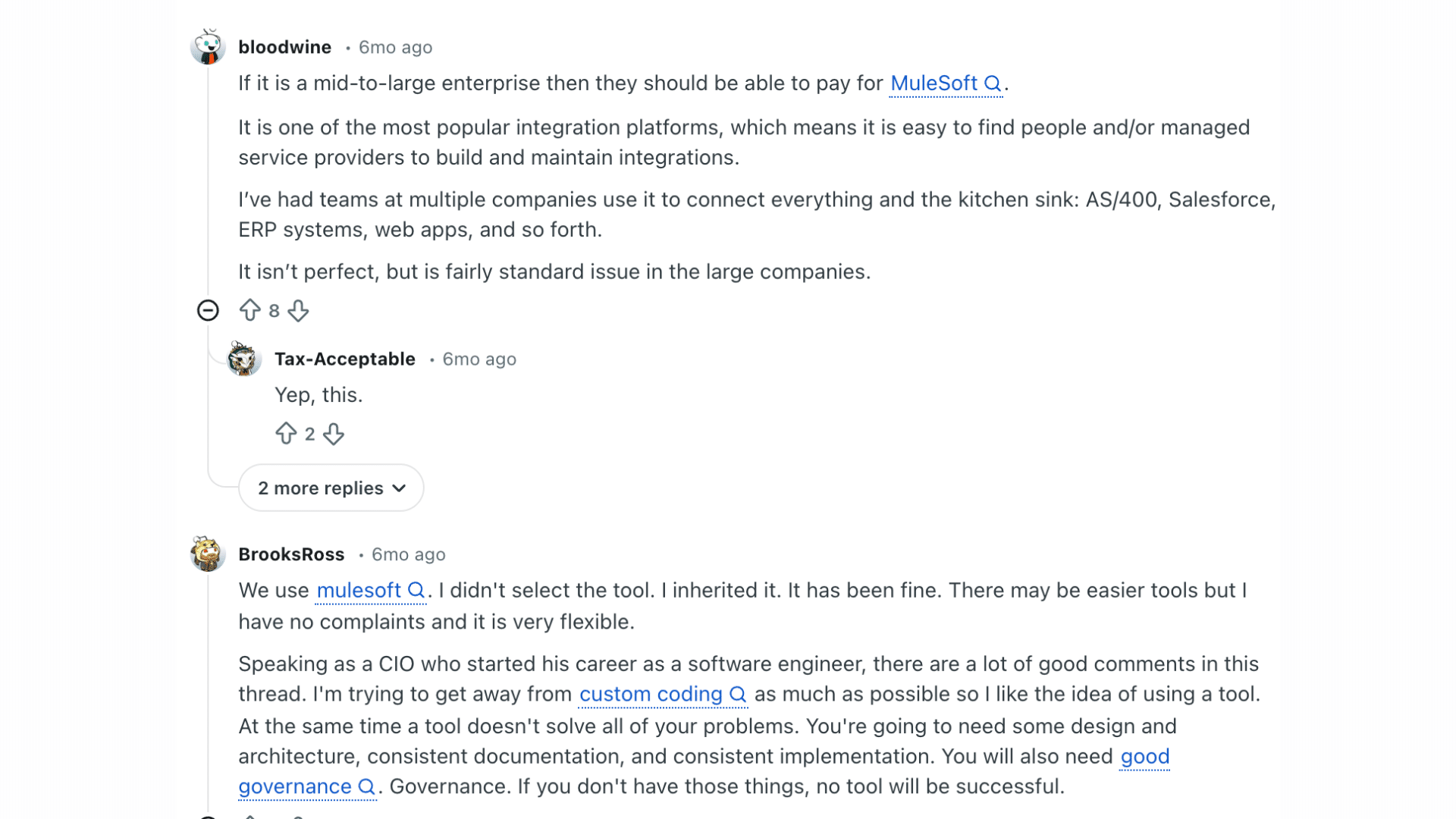
According to discussions on Reddit, MuleSoft is frequently recommended as a strong integration platform for mid-to-large enterprises.
Users highlight that its popularity makes it easier to find skilled professionals and managed service providers capable of building and maintaining integrations across a range of systems.
While not considered perfect, MuleSoft is described as a standard, reliable choice within large organizations.
Another Reddit commenter notes that MuleSoft offers flexibility and ease of maintenance, even when inherited rather than intentionally selected.
Several users say integration works only when supported by good design, documentation, and governance.
The overall sentiment suggests that MuleSoft is powerful and widely adopted, but its effectiveness depends heavily on disciplined implementation.
Limitations to Consider Before Choosing a Platform
Every integration tool has strengths, but each also comes with trade-offs. Knowing these limits helps you choose a platform that truly fits your needs.
- Some platforms require technical knowledge, making setup harder for non-technical teams.
- Pricing can increase quickly as workflows, users, or API calls grow.
- Not all tools support complex enterprise systems or legacy software.
- Vendor lock-in can occur if workflows become too dependent on a single platform.
- Limited connectors may require custom development for certain apps.
- Performance may drop during high-volume data transfers or peak usage.
- Security and compliance features vary across platforms and may not meet industry requirements.
Conclusion
Choosing the right application integration platform depends on how your systems work today and what you want them to handle in the future.
You’ve now seen what each platform offers, the strengths they bring, and the types of businesses they support.
Some tools are built for simple no-code automations, while others are designed for complex, enterprise-level workflows.
The goal is to find a platform that removes manual work, keeps data moving correctly, and grows with your needs.
If you’ve used any of these platforms or faced challenges while trying to connect your systems, I’d love to hear your experience.
Your insights can help other readers make smarter decisions. Share your thoughts in the comments below.